
IK Multimedia’s latest music accessory, iRig PRO ($150), builds on the success of its prior microphone, guitar, and MIDI interfaces for the iPad, iPhone, and iPod touch with a single accessory. iRig PRO actually incorporates most of the features from iRig PRE (iLounge Rating: A-), iRig HD (iLounge Rating: A-), and iRig MIDI (iLounge Rating: A-) into a single adapter, while using the same 24-bit analog-to-digital converter introduced with the iRig HD. It’s the rare accessory that’s even better than the sum of its parts.
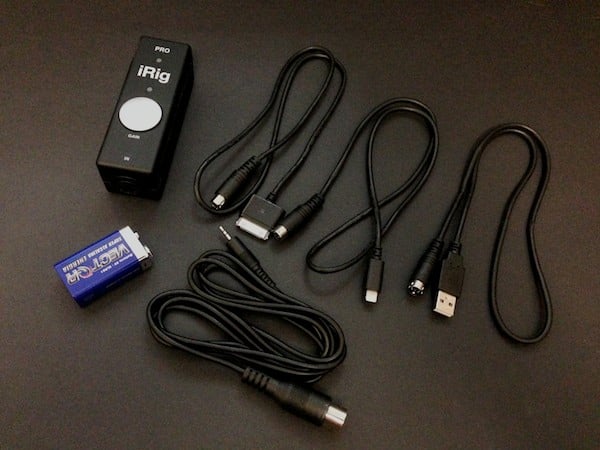
Designed with a similar form factor to the company’s iRig PRE XLR microphone interface, iRig PRO revises the XLR microphone jack found on the prior device to double as a 1/4” high-impedance guitar input, and uses the same high-quality 24-bit analog-to-digital conversion hardware found in the iRig HD. A 2.5mm MIDI IN jack on the left side allows for the simultaneous connection of external MIDI sources such as keyboards. For normal guitar or MIDI use, iRig PRO is powered by a connected iOS device or Mac, while an included 9V battery provides 48V phantom power for condenser microphones requiring it. The package also includes a six-foot 2.5mm to MIDI connector cable as well as Lightning, Dock Connector, and USB cables for connecting to an iOS device or Mac.

Contrasting with prior iRig interfaces, iRig PRO moves the gain control from a dial on the side to a prominent silver dial right on the face of the device.
A master power switch is not necessary for normal use as the device draws power from a connected iOS device whenever a compatible app is running, although a switch on the side is used to activate the 48V condenser microphone phantom power. Two multicolored LEDs above the gain dial provide status feedback, with the upper LED indicating phantom power status or MIDI signal, and the lower LED indicating power and input level status. IK Multimedia’s standard 7-pin DIN connector is located on the far for connecting to an iOS device or Mac with one of the included cables.

Unlike the pure analog output from the iRig PRE, iRig PRO provides analog to digital conversion for both instrument and microphone sources, allowing it to deliver even cleaner sound. We ran through comparison testing with a set of different microphones—a Shure Beta 87 condenser mic, a Shure SM58 dynamic mic, and a Shure Beta 57A condenser instrument mic—and found that iRig PRO virtually eliminated the already low noise floor found on the iRig PRE, improving further on the previously great interface. Whether this difference will matter depends largely on your intended use case, however: the ultra-low noise floor is great for recording directly into an iOS application, but may be irrelevant when using effects apps to output processed audio via an iOS device’s headphone port.

Like iRig HD, the 1/4” high-impedance jack on iRig PRO is primarily intended for use with guitars and basses, but can be used with other instrument-level sources.
Not surprisingly, iRig PRO performed with the same level of audio quality as iRig HD, with clean sound, an almost non-existent noise floor, and distortion-free audio across a wide range of frequencies, volume, and gain levels from screaming guitar solos to quiet classical guitar riffs. Users looking for a separate guitar interface may still prefer the iRig HD for its lower price and slightly more solid and unobtrusive design, but in terms of sound quality there’s really no reason to prefer one over the other.

MIDI support on the iRig PRO is the most straightforward of all, simply using the MIDI IN port to pass commands through to any compatible Core MIDI iOS app, which worked exactly as we expected. Unlike the iRig HD and iRig PRE, the MIDI features here are a bit less versatile than the company’s iRig MIDI accessory, since iRig PRO doesn’t include MIDI OUT or MIDI THRU connectors; it’s solely for MIDI input. These additional ports are generally only required for more sophisticated MIDI configurations, however, and a musician looking to simply use an iOS device for recording or live performances likely won’t care about these omissions. It’s worth noting that the applications for a MIDI input with an iOS device go well beyond traditional keyboards, allowing users to connect pedalboard controllers and other accessories that can control an effects panel during a guitar or vocal performance.

With iRig PRO, IK Multimedia has done a extremely impressive job of combining three of its most useful iOS accessories into a single device at a pretty reasonable price point, without losing much in the process.











