
The iPhone, iPod touch and particularly the iPad have continued to dramatically expand their abilities as music creation devices since the App Store debuted in 2008. Initially limited mostly to virtual instrument apps, Apple’s introduction of Core MIDI support followed by an iOS version of Apple’s own GarageBand music software solidified the iPad’s status as a versatile and powerful tool for amateur and professional musicians alike.
For those who might not know the background details, here’s a brief primer. The Musical Instrument Digital Interface standard, more commonly known as MIDI, enables accessories such as electronic piano keyboards, synthesizers, and drum machines to interface with each other and computer software for recording and editing of compositions. Rather than sending out actual audio streams, MIDI devices operate by sharing digital information—notes, tempos, sound references, and volume levels—with one another. This information can be recorded and played back on MIDI hardware, or edited using a number of desktop computer applications. MIDI has also been expanded beyond traditional music and audio to include a wide array of other studio and performance equipment, such as stage lighting systems. Prior to the introduction of Core MIDI in November 2010, accessory manufacturers—and software developers—had to build proprietary MIDI solutions for iOS devices. Apple recognized the need for a standard method to address this increasingly common requirement, debuting Core MIDI in iOS 4.2 so MIDI hardware and iOS apps could easily communicate with each other.

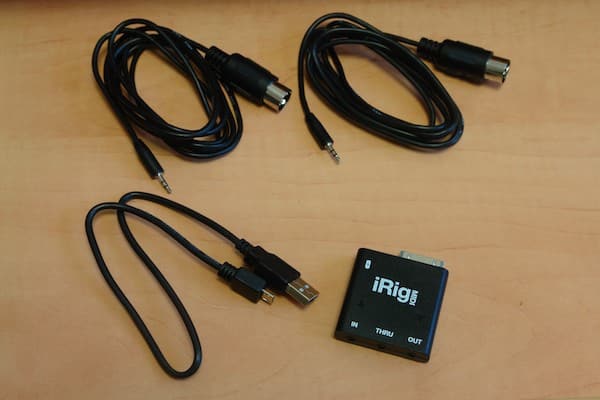
iRig MIDI ($70) is IK Multimedia’s pocket-sized Core MIDI interface for connecting MIDI devices to an iPhone, iPod touch or iPad. Three MIDI ports are included: in addition to the standard MIDI IN and MIDI OUT connections, iRig MIDI also includes a MIDI THRU port for use with more sophisticated MIDI system configurations such as external sound modules and sequencers—a useful addition for professional musicians that isn’t commonly found on other similar accessories.
The package also includes two 5-foot 2.5mm to 5-pin DIN MIDI cables, as well as a micro-USB charging port and cable to provide power to the iOS device for longer sessions. Two LEDs display activity on the MIDI IN and OUT channels.

To get users started, IK Multimedia provides two free companion iOS apps called SampleTank and iRig MIDI Recorder, though the iRig MIDI can also be used with any of the more than 100 Core MIDI-compliant apps on the App Store, including Apple’s GarageBand. Connecting the iRig MIDI to an iOS device the first time will provide the user with a prompt to go to the App Store and download the free iRig MIDI Recorder app.

iRig MIDI Recorder is a universal app that provides basic recording and playback of MIDI sequences from any external MIDI source when used with the accessory. The basic use is relatively straightforward: connect your external MIDI devices via the iRig MIDI, start the app and hit the “Record” button; by default, all received MIDI data will be recorded, and the resulting MIDI file can be exported via e-mail or iTunes File Sharing. It can also be downloaded with a browser via a direct Wi-Fi connection to the app.

iRig MIDI Recorder also provides several more advanced recording features, including the ability to monitor and/or filter out specific MIDI data types while recording, as well as limiting recording to only MIDI channel 1 instead of all 16 channels. An optional “Soft THRU” mode is also available that can be used to send all received MIDI data back out the MIDI OUT port at the same time as it is being recorded, effectively creating a second MIDI THRU port on the iRig MIDI. iRig MIDI Recorder is also used to manage and download firmware updates for the iRig MIDI device; the current firmware version of a connected accessory will be displayed at the bottom of the Setup screen.

In addition to the iRig MIDI Recorder, IK Multimedia also offers SampleTank in two versions, SampleTank Free and SampleTank ($20).
They currently differ only in the number of included instruments and sounds; both SampleTank apps provide iRig MIDI users with a full-featured MIDI workstation tool for iOS devices. Four-channel MIDI sequencing is provided alongside hundreds of realistic instruments and sound patterns, allowing musicians to use the app as either a sound/synth module for live performances, or for creating and saving multi-track recordings.

IK’s full version of SampleTank provides access to an expandable set of over 500 instruments organized across 16 different categories, providing a wealth of acoustic, electric and electronic sounds. Each category also includes dozens of instrument riffs and grooves for a total of over 1,000 patterns to choose from for backing purposes. While the free version of SampleTank includes 8 instruments and over 1,000 patterns, the $20 version comes bundled with additional sounds for 136 instruments in total. Users of either version can add more Sound Packs via in-app purchase for $2, $5, or $10 per pack, or a flat rate of $40 for the full set of 22; however, free app users still need to pay $20 more to get 64 instruments that are unique to the full app, and not included in the sound packs. Existing instruments and sounds can also be customized with adjustments for volume, pan, filter cutoff frequency, filter resonance and envelope attack and release, as well as instrument-specific effects settings; customizations can be saved in 96 available user presets.

SampleTank can handle up to four MIDI channels simultaneously with different instruments or sounds assigned to each channel. Input from external MIDI devices is reflected in real-time, with on-screen keyboard and controllers indicating the MIDI notes and commands as they are being received. Users can also record up to four independent tracks via MIDI input, or using the virtual keyboard and drum pads in the app itself; existing tracks can also be overdubbed with additional layers. Recordings can be exported to a universally playable M4A format via e-mail or iTunes File Sharing.











