
Following up on last year’s iRig guitar patch (iLounge Rating: B), IK Multimedia’s iRig Mic ($60) is a professional-grade handheld microphone for iOS devices. Targeted at the vocalist or songwriter, iRig Mic provides a quality condenser microphone that connects to the device’s headphone jack and can be used with IK Multimedia’s VocaLive app for the iPhone and iPod touch, or just about any other iOS recording application.
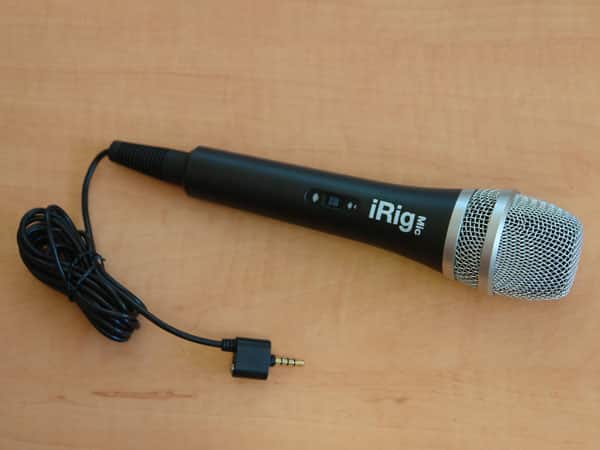
The iRig Mic includes a 6.5’ cable for reasonable freedom of movement when using the mic, also allowing it to easily be mounted on a stand further away from your iOS device. A standard 3.5mm headphone jack plug is used for connecting to your device, with a little bit of extra tolerance that enables the plug to be connected to an encased iOS device. There’s also a headphone passthrough jack built into the plug for connecting external headphones or line input to a mixer or external amp.

A single three-position switch on the microphone allows the user to select between low, medium and high gain settings as appropriate; the mic includes no power switch and is basically always on whenever it’s connected to a device. Since the iRig Mic uses a standard audio-in connection, it can actually be used as an input source for any recording application such as the iPhone’s built-in Voice Recorder app, GarageBand for the iPad or any number of other third-party apps. In our testing, however, the input levels from the iRig Mic at the medium gain settings when used with many third-party apps were noticeably lower than expected compared to other audio recording accessories or the iPhone’s built-in microphone—the iRig Mic provided cleaner sound than the built-in mic, but at a lower volume. The high gain setting on the iRig Mic provided a higher recording level, but not surprisingly increased both noise and distortion. More sophisticated apps like GarageBand will let you adjust input levels appropriately, so limited on-accessory settings may be less of a problem.

IK Multimedia provides a companion VocaLive application on the App Store, and the iRig Mic is clearly designed to work in tandem with this app, which provides line level adjustments and filters. Following the approach IK Multimedia used with its AmpliTube guitar app last year, VocaLive has a modular design that allows users to essentially price out and build their own effects kit through in-app purchases.
The free version of VocaLive gets users started with two effects—reverb and double—plus a single-track recorder and all of the other “standard” features of the app. Up to 10 additional effects can be purchased within the app for $3-$5 each. Alternatively, users can purchase the $20 full VocaLive app, which bundles all 12 effects with 50 presets to get you started. Both versions otherwise include the same features.

Up to three effects processors can be configured in a chain, and VocaLive can be used as an effects board, sending the resulting audio through the included headphone/line-out jack to an external mixer or amp. Each individual effect includes a photorealistic set of controls, with knobs and buttons that can be manipulated directly on the touchscreen. Individual effects can also be bypassed without removing them from the effects chain, and users can easily create their own presets from any set of effects. Buttons at the bottom of the presets and FX screens allow users to store up to four favorite presets for quick retrieval.

Although users can start with the free VocaLive and build their own effects kit, at $3-$5 a pop these can quickly add up: the full range of 10 effects bought through in-app purchase will cost $38—almost twice as much as the paid version of the app. Since no discount is given to upgrade-ready users who have already made in-app purchases, we’d recommend that anybody who expects they may need more than three or four effects go straight for the full $20 version before making any in-app purchases in the free version.

VocaLive also includes a single-track recorder allowing you to save multiple recordings within the app and export recordings as WAV files via e-mail and iTunes File Sharing. An optional four-track recorder upgrade is available for $5 via in-app purchase; it’s surprising that even the $20 “full” VocaLive app does not include the four-track recorder. The multitrack recorder provides mute, solo, level, pan and effects controls for each track; additional controls are accessed by swiping left and right in the control section.
Multiple tracks can also be “bounced” into a single track using a button in the bottom-right corner, allowing you to mix a theoretically unlimited number of tracks by laying down three or four at a time.

Users can also import external songs into VocaLive to use as backing tracks. Songs can be imported over a local Wi-Fi network, via iTunes File Sharing, or even directly from the iPod library on your device. Imported tracks are converted to WAV format and stored within the app where you can preview the track, select a section to loop and adjust the playback speed. Imported songs can be transferred into the multitrack recorder for mixing with your own vocals or applying additional effects.

VocaLive also allows you to remove the vocals from imported tracks, although how well this works is going to depend largely on the type of music you’re working with. In our testing, it rarely removed the vocals entirely, often leaving an echo of the vocals in the background. With some songs it worked well enough to be useful for creating backing tracks, while in others, it barely removed the vocals at all. While this is fun for casual use, we’d expect that serious musicians will simply import their own backing tracks rather than relying on this feature. Additional tools in VocaLive include a metronome and vocal trainer mode as well as audio demos that can be played through the effects processors for experimenting with different settings. Settings within the app allow the user to tweak input and output levels, a noise filter, latency and feedback, and whether to enable background audio playback on iOS 4 multitasking devices.











