
Building on the success of last year’s iRig KEYS (iLounge Rating: A-/B+), IK Multimedia has released iRig Keys Pro ($150), essentially a big brother to the company’s earlier portable MIDI keyboard controller. iRig Keys Pro provides all of the same features as the smaller model, including the relatively compact, bus-powered design, while delivering a three-octave set of full-size, velocity-sensitive keys. It can be used with any Core MIDI compliant iOS app on an iPad, iPhone, or iPod touch, and includes both Dock Connector and Lightning adapter cables as well as a USB cable for connecting to a Mac or PC.
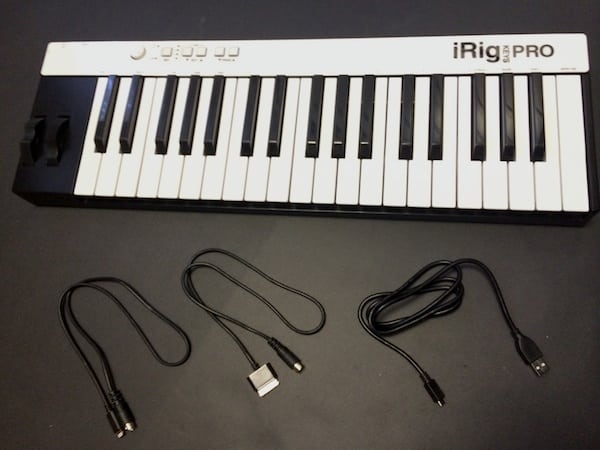
At its most basic level, iRig Keys Pro really is just a larger version of iRig Keys, with all of the same features and a bigger footprint. The major difference is that with iRig Keys Pro, IK Multimedia decided to sacrifice the prior model’s uber-portability in order to provide a set of full-sized keys—a reasonable compromise in our opinion that makes iRig Keys Pro much more usable for traditional keyboard players. This version measures 23.22” wide by 7.44” deep by 2.24” tall, versus the original iRig Keys’ 19.8” wide, 4.72” deep and 1.57” tall. Despite the larger size, however, the keyboard is still designed to be transportable, as it’s constructed from the same solid but light-weight plastic as iRig Keys, and draws its power from the connected device to eliminate the need for extra cables, power adapters, or batteries.
While you’re not going to be able to toss this version into a backpack, it’s still small and light enough for most serious musicians on the go.

iRig Keys Pro provides the same three-octave set of 37 velocity-sensitive keys, now sized for proper two-handed playing—an enhancement that will make the accessory much more relevant to pianists and other serious keyboardists. Also included are the same pitch bend and modulation wheels along with the user-assignable control knob and illuminated buttons for octave and program change. At the top-left corner, you’ll find a 7-pin DIN connector for iOS devices, a micro-USB port for connecting to a Mac or PC, and a pedal port for connecting an optional external sustain/expression pedal. Core MIDI compliance allows iRig Keys to be used with a wide variety of iOS music apps, and IK Multimedia provides users with free versions of its SampleTank and iGrand Piano apps for download on the App Store.

One other distinct difference worth noting from last year’s iRig Keys is that iRig Keys Pro now includes a Lightning cable—a deficiency in last year’s release that, while not surprising considering the tight control exercised by Apple over the Lightning connector, detracted from its overall value for users with newer iOS devices. IK Multimedia has finally been able to remedy this by including the Lightning cable for all of its iOS accessories, providing out-of-the-box connectivity for all iOS device models with no additional adapters required. The two-foot Dock Connector and Lightning cables connect to the proprietary seven-pin DIN port on the back of iRig Keys Pro; this is the same connector now used by all of IK Multimedia’s other iOS accessories, however, making the cables interchangeable for users of other IK Multimedia devices.
It’s worth mentioning that many other keyboard controllers on the market still rely on a generic USB connection, requiring iOS users to purchase a USB to Dock Connector or Lightning adapter at additional expense.

Like its little brother, iRig Keys Pro also offers a number of more advanced MIDI features beyond those that would be expected from a basic keyboard. MIDI program and control change messages can be sent directly from the device, and users can store up to four presets for quick recall using the “Set” button. The control knob defaults to MIDI volume control (CC#07) but can be easily reassigned to any other MIDI control change operation. Users can also set the MIDI transmit channel, choose from six different touch/velocity sensitivities, transpose the keyboard, send specific MIDI program changes, and even send an “All Notes Off” message.

While the keyboard is normally designed to be used in bus-powered mode, drawing power from a connected iOS device whenever a Core MIDI compliant app is running, users can optionally connect it to a standard USB power source via the micro-USB port to conserve iOS device power during longer performances or recording sessions.











