
Announced in January, iRig HD ($100) has arrived as a proper sequel to IK Multimedia’s popular music accessory iRig, replacing the analog line-in connection with an entirely digital interface — a change that fundamentally transforms the prior amateur musician-grade product into a professional-caliber offering. The small, nearly cylindrical adapter has a 1/4″ high-impedance input jack on one end for connecting an electric guitar, bass, or other instrument-level audio source, plus a 7-pin DIN connector on the other end for connecting an iPad, iPhone, iPod touch or Mac using your choice of several included two-foot cables. iRig HD also includes a gain control on the side, along with a status LED on the top. The unit feels solidly constructed, weighing less than a pack of gum with only a modestly larger footprint, a size that lets you easily toss it and your cable of choice into a guitar case or iPad bag.
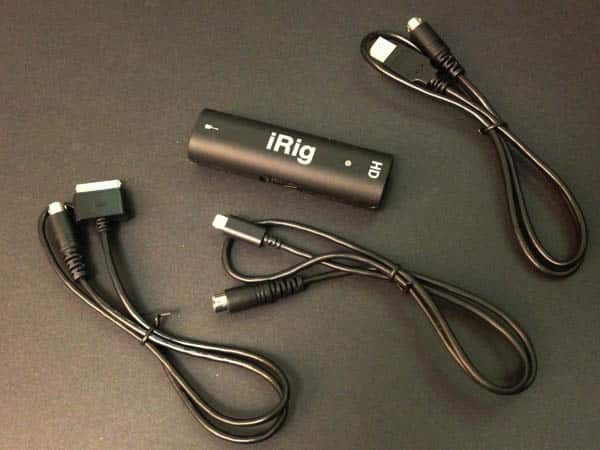
Building on the original iRig, which essentially just provided a pre-amp for normalizing and filtering audio levels for analog input, the iRig HD adds a 24-bit analog-to-digital converter for passing true digital audio into the Dock Connector or Lightning port. iRig HD is designed to be used with IK Multimedia’s own AmpliTube family of guitar and effects processing apps, but also works with Apple’s GarageBand or any other real-time processing app that supports digital audio input. Further, as per IK Multimedia’s usual strategy, a selection of exclusive AmpliTube in-app features—here, two amps and two effects pedals—are unlocked as soon as the app detects the accessory.

For the first time, both Dock Connector and Lightning cables are included in the package for connecting to any iPad or relatively recent iPhone or iPod touch—the iPhone 4, 4S, and 5 and the fourth- and fifth-generation iPod touch are all formally supported.
There’s also a USB cable for use with Mac computers. While the 7-pin DIN used by the iRig HD is proprietary to IK Multimedia, cable length is not a serious issue as the device’s unobtrusive size allows it to simply fit in line with any desired length of guitar patch cable. It’s also worth noting that this connector seems to now be a standard within the company, allowing the same cables to be used with other IK Multimedia accessories such as the iRig KEYS.

Using iRig HD is relatively straightforward, but does require you to connect the parts in a specific sequence—perhaps due to authentication, the Lightning or Dock Connector cable must be connected to the iRig HD before you connect the iOS device. Once it’s properly assembled, the iRig HD draws power from the iOS device whenever a compatible digital audio app is running. A multi-colored status LED on the top lights up blue to indicate that the unit is powered, and also serves as a rudimentary line-level indicator: green for low signal, orange for adequate signal, and red for high signal.
Musicians can use the status LED to adjust the gain control to roughly match the signal level, then fine-tune the audio within the iOS application. Depending on the app being used, the headphone jack on the iPad, iPhone, or iPod touch can be used to pass the processed audio out to a guitar amp, mixer, powered speakers, or a set of headphones.

We were quite impressed with what the iRig HD delivers in actual operation, particularly considering its size and price. Our testing found that iRig HD offers clean and clear audio with no audible noise or crosstalk. Further, by taking advantage of a high-quality A/D converter and digital input through Dock Connector or Lightning connections, the iRig HD avoids the normal audio input limitations of iOS devices’ headphone ports, and is therefore able to provide distortion-free audio across a much wider frequency range—including higher volume and gain levels. In addition to allowing for screaming guitar solos on the high-end, however, sound came through very cleanly at lower volume levels as well, allowing for more subtle nuances to be clearly heard.

IK Multimedia has again raised the bar for affordable, professional-quality instrument interfaces for iOS devices. While iRig HD is an appropriate name for this product given the performance of its predecessor, the digital to analog quality difference will endear this model to professionals who would have skipped the earlier version, despite the non-trivial price jump from model to model.











