
We continue to be impressed by the number of creative and affordable music production accessories that have been ushered in with the evolution of the iPad as a music creation and production tool. In the same way that Apple’s GarageBand brought music production from the professional studio into home and even mobile environments, clever accessory makers are producing accessories at price points accessible to bedroom musicians. Originally debuted at this year’s International CES, IK Multimedia’s iRig BlueBoard ($99) is a wireless MIDI pedalboard that connects to an iPhone, iPad, or iPod touch via Bluetooth, allowing the user to send MIDI control messages from the floor to any Core MIDI iOS app.
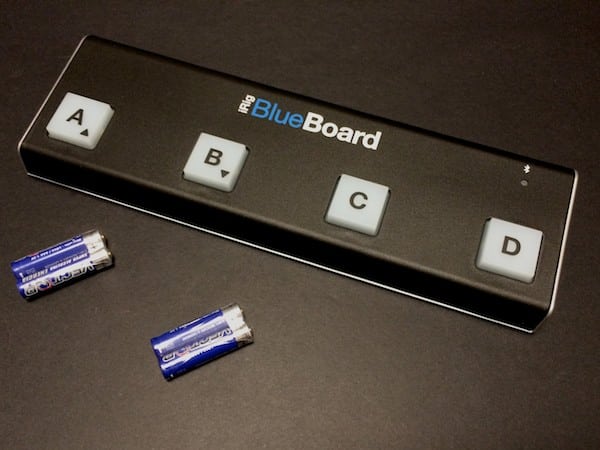
The basic premise of BlueBoard is a relatively simple one. Musicians usually have their hands occupied playing their instruments, making it tricky to send program and control changes that may be required for switching instrument sounds or adjusting volume, modulations, effects, or other parameters on-the-fly. BlueBoard solves this by allowing these MIDI commands to be activated by foot, much like the effects pedals and stomp boxes traditionally used by guitar players. BlueBoard provides four foot-switch buttons along with two ports for connecting standard external pedals, providing the user with up to six active controls at once.
In addition, up to 32 banks can be configured, and the user can switch between banks on the fly, providing access to a total of 192 possible controls.

BlueBoard includes four backlight soft-touch pads, plus two jacks for connecting additional pedal/switch controllers, and draws its power from four AAA batteries. Unlike most stomp boxes, the device is constructed out of fairly durable plastic rather than metal. As the device is designed with the musician on-the-go in mind, however, this keeps it down to a more portable weight; it comes in at just under 9oz, slightly lighter than the Apple Wireless Keyboard, and is about the same width and one third of the depth. This all makes BlueBoard very suitable for tossing into a backpack, laptop bag, or instrument case for gigs on the go.

Rather than using a Lightning or Dock Connector cable, BlueBoard connects to your iOS device via Bluetooth, using a free iRig BlueBoard companion app available from the App Store. The BlueBoard hardware pairs directly with the app, using a sort of “ad hoc” Bluetooth LE pairing technology—you simply select the BlueBoard from within the app and you’re ready to go; a visit to your iOS Bluetooth Settings is unnecessary, and in fact BlueBoard will only show up in your Bluetooth settings while it’s actually connected, disappearing automatically once it’s turned off or the BlueBoard app is shut down.

The BlueBoard app acts as a “bridge” between the BlueBoard hardware and the iOS Core MIDI subsystem, translating and sending MIDI commands from the BlueBoard to whichever MIDI app happens to be running, such as AmpliTube’s SampleTank or Apple’s GarageBand. Essentially, you load up the app, connect the BlueBoard to it, customize which program and control changes you want to assign to each bank or button, and then switch over to your MIDI app of choice; the BlueBoard app runs in the background, receiving signals from the pedalboard accessory and sending the appropriate MIDI commands through.

IK’s app can run in one of two modes: Program Change or Control Change, depending on the musician’s preferences and what needs to be controlled.
In Program Change mode, each of the built-in buttons is statically assigned to a Program Change, in numeric sequence, from 1 to 32, while any connected external pedals can still be customized to send Control Changes. This mode is designed to allow for quick selection of different instrument patches or presets in apps like SampleTank. In Control Change mode, all buttons are used to send fully customizable Control Changes; the four built-in buttons act as simple on/off toggles while the external ports support analog controls such as pedals that can be calibrated to send continuous control changes such as volume adjustments. In Control Change mode, a Program Change can also be sent with each bank change, allowing the user to assign different instrument patches or presets for each bank of controls.

The app allows the user to choose to send MIDI commands on all channels simultaneously or only a single channel, allowing flexible integration with other MIDI external MIDI controllers. A backlight can also be toggled off from the app, or adjusted to one of fourteen intensity levels. Additional settings allow for independent calibration of external pedals, as well as the ability to set whether the user can switch through the 32 banks; in bank change mode, users can hold down the A and B buttons to switch to the next or previous control bank, however in order to facilitate this the buttons only send MIDI commands when released rather than right away on the initial press.

iRig BlueBoard is a clever and useful idea—as well as a very good implementation. The use of Bluetooth allows the controller to be conveniently placed without the need for extra cables, while also leaving the iOS device’s Lightning or Dock Connector port open for connecting actual MIDI instruments or other accessories.











