
We’ve seen a number of environment sensors designed for Apple’s HomeKit home automation platform in the past couple of years, with most typically designed to monitor temperature, humidity, or motion, and while some include obvious combinations such as temperature and humidity, iHome’s new iSS50 is the first we’ve seen that actually ties together five different environment sensors into a single device; it’s capable of measuring temperature, humidity, and motion, as well as light and sound levels.
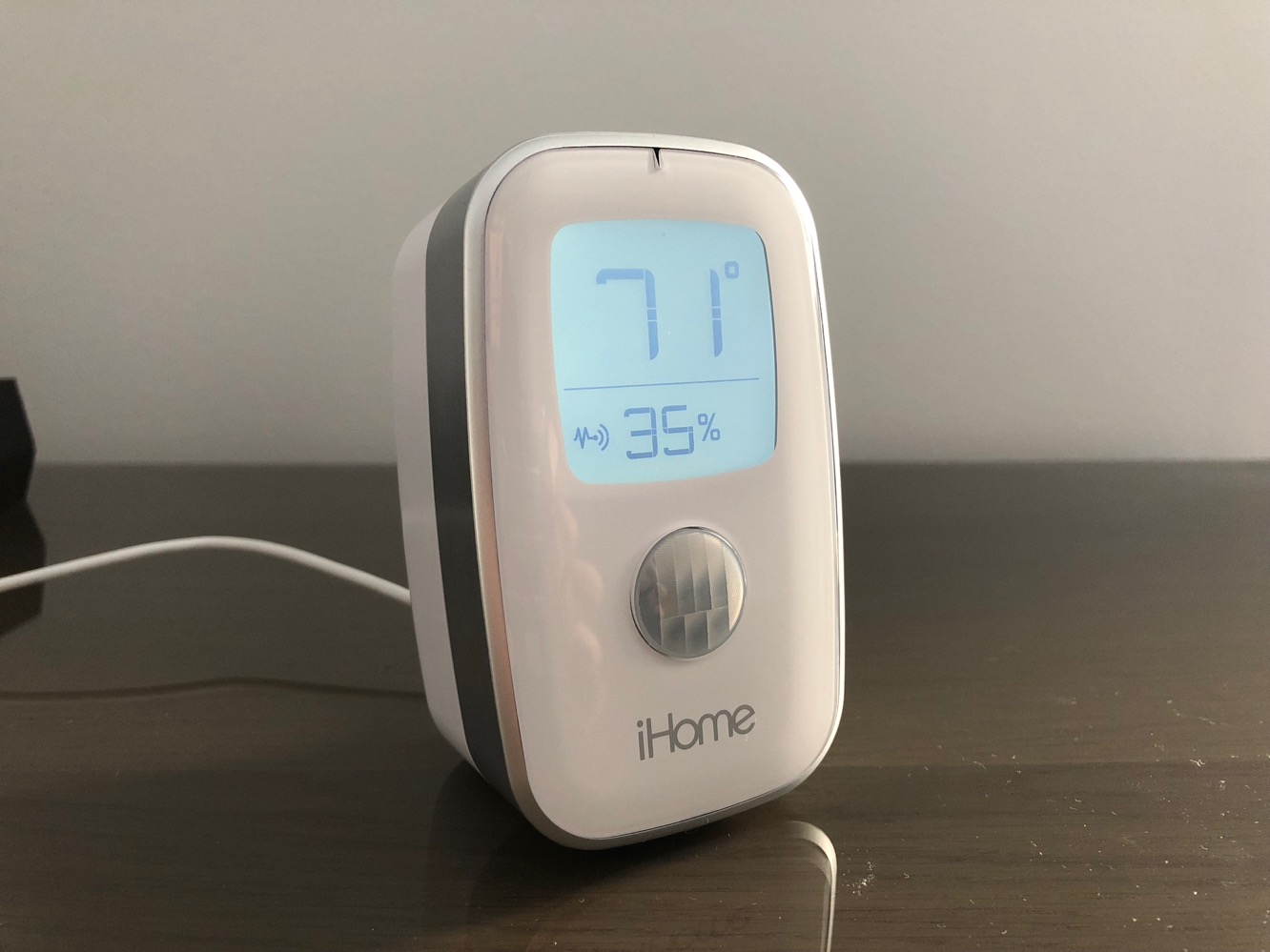
Unlike just about every other sensor we’ve seen, the iSS50 plugs into an AC outlet rather than being battery powered, and connects to HomeKit over Wi-Fi instead of Bluetooth. A USB power adapter and USB-A to micro USB cable is included in the package, along with a quick start guide. Although the need to plug in the iSS50 may limit the places where it can be used, it’s definitely more of a tabletop unit than something that you’d tuck into the corner of a room or hang up on a wall anyway, with a more appliance-style industrial design as opposed to the sleeker minimalist look of something like Elgato’s Eve Degree. The iSS50 has a distinct look that isn’t going to appeal to everyone.

A large backlit LCD dominates the front of the iSS50, displaying temperature and humidity front and center along with status indicators for Wi-Fi, sound, and motion detection. A dimmer button on the rear of the unit allows you to adjust the LCD brightness between five settings: off, automatic, low, medium, or high.
As a standalone temperature and humidity monitor, the iSS50 is basically ready to go out of the box, but like most HomeKit devices, the real power lies in its ability to report not only temperature and humidity but also motion, sound, and light level status to HomeKit or iHome’s companion Control app.

The iSS50 pairs with HomeKit in the usual manner — a HomeKit pairing code is found on the back of the unit, as well as in the quick start guide — and once paired will appear as four distinct HomeKit sensors for temperature, humidity, motion, and light level. Sound sensing capabilities are not yet supported by the HomeKit framework, so you’ll need to use iHome’s own Control app if you want to take advantage of that feature. For HomeKit purposes, the iSS50’s sensors work in the same manner as any of the other sensors we’ve seen, reporting information back to HomeKit that can be viewed through any HomeKit-compatible app or used as triggers or conditions in automation rules. The four supported sensors on the iSS50 work well with HomeKit, with temperature, humidity, and light levels reported quickly and accurately, and a very responsive motion sensor — although recent HomeKit enhancements have reduced the latency issues with Bluetooth motion sensors, the use of Wi-Fi on the iSS50 avoids these issues entirely.

iHome’s own Control app, however, does have a few extra tricks up its sleeve. Most significantly is support for the sound level sensor on the iSS50, which can be used to trigger notifications or control other iHome-branded devices whenever sound is detected nearby. iHome’s own app also incorporates an “occupancy” feature that combines information from the sound and motion sensors to determine whether a room is currently occupied, allowing notifications to be sent out or other iHome devices to be controlled when occupancy changes — such as turning off the lights when nobody is in a room.
As with other HomeKit accessories, the iHome Control app is also used to update the firmware on the iSS50 and adjust more specific configuration settings, which in this case is basically setting the temperature display to either Celsius or Fahrenheit. The iHome Control app also includes support for connecting to Nest, Wink, Alexa, SmartThings, and Google Assistant, however the iSS50 itself doesn’t work with all of these services.

Unfortunately, as interesting as these features are, the iHome Control app is still a silo for iHome’s own devices — despite connecting to HomeKit, non-iHome devices don’t appear in the app and rules created in the Control app aren’t shared with HomeKit — so you’ll be limited to creating rules that control iHome Smart Plugs. Further, although the iSS50 does report more precise light levels to HomeKit, iHome’s Control app only offers three pre-defined thresholds for light and sound triggers. We can see some value in creating notification-only rules or very specific automation rules within the iHome Control app in some cases, but for the most part HomeKit rules will be far more useful for all but the simplest of applications. It’s also worth noting that unlike Elgato’s sensors, the iSS50 and iHome Control app do not provide any way to log or store the monitored data, so you won’t be able to view temperature or humidity trends over time.

iHome’s iSS50 SmartMonitor is an interesting and somewhat versatile device, although it suffers from more of a split personality than most home automation devices we’ve seen.











