
Pros: The first “under the cabinet” iPod speaker system expressly designed for permanent installation in a kitchen, bathroom, or other room with cabinetry, delivering a combination of dual iPod docks, twin speakers, and a radio with FM and TV station tuning capabilities. Can retract iPod dock to protect most models against kitchen splatters and splashes, using integrated LCD screen to provide iPod track information when clock is not in use. Includes Infrared remote control. Delivers acceptably warm, fairly clean sound at average listening levels.
Cons: Remote control only works from short (under 6-foot) distances under common kitchen fluorescent lighting. Mounting requires considerable number of tools, as well as planning for superior radio reception. While acceptable, overall audio quality and amplitude don’t beat company’s lower-cost portable system that will most likely fit in same rooms, albeit at cost of counter space. Weather broadcasts didn’t come through, and other radio/TV audio performance was mixed in our testing.
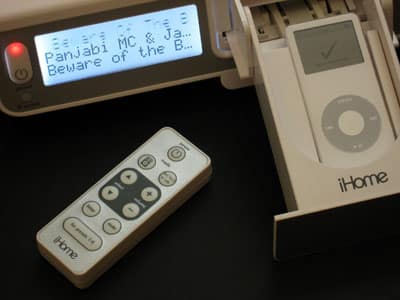
iHome’s first-of-kind iH36 audio system radically evolves the company’s earlier iH5 Alarm Clock design into a full-fledged “under the cabinet” iPod entertainment system. Designed to be mounted in a kitchen, laundry room, bathroom, or anywhere else in your house with exposed-bottom cabinets, the iH36 features a clock, two iPod docks, and radio. The package includes plastic mounting nubs, three iPod dock sizing inserts, and an Infrared remote control for distance access.
It’s official: there are now too many iPod speaker systems. They arrive at iLounge at a rate of one or two per day, each looking much like the others, and only rarely offering something really distinctive. So today, surrounded by all-too-similar options, we’ve opted to review two appliance-styled speaker systems: iHome’s white and silver iH36 ($150 – lowered from its original $200 price), designed to be installed in a kitchen, laundry room, or bathroom under existing cabinets, and AFT’s cheaper iCarta, which is meant to be used in a home’s bathroom as a toilet paper holder.
Clearly, these two systems won’t appeal to everyone, but they’re the only offerings of their kind currently on the market.
Of the two systems, iH36 is unquestionably more aggressively engineered, and it’s also quite large, measuring 13” wide by 11” deep and 3.3” tall. Because it has been designed to mount under existing cabinetry, and because it has so many things on its front, its speakers are found on its bottom, rather than elsewhere. These speakers are angled and downfiring, producing an intentionally warm audio balance similar to iHome’s earlier and popular iH5 Clock Radio.

iHome’s complete package also includes the plastic mounting nubs, metal screws and washers you’ll need to mount the system under your cabinet, and both templates and instructions on using them, but not the tools to perform the installation. You’ll need a tape measure, drill, 1/4” drill bit, magic marker, scissors, screw driver, masking tape, and a “sharp pointed object” to complete the installation – quite a few items given how simple most iPod speakers are to install and use. Videos on the company’s website – one in iPod format, another in Windows format – partially step you through the installation procedure if the written instructions aren’t enough.

Mounting differences aside, iH36 is a fairly substantial evolution of the earlier iH5. It also features an integrated clock and radio, but expands upon the iH5’s bare feature set by including two iPod docks – one for the iPod shuffle, the other a retracting dock for 3G, 4G, 5G, mini, and nano models – plus sizing inserts and an Infrared remote control for distance access.

The front panel has a considerable number of buttons. From left to right are a power switch and light, a three-line, blue-backlit LCD screen, the retractable iPod dock, and a series of 13 buttons, constituting almost all of the unit’s controls. Volume, muting, mode, dock open/close, and track selection buttons are amongst those available on the system’s body for iPod control, but yes, theres more.

Below the clock, you’ll see a digital FM radio tuner – an antenna dangles from the unit’s back, enabling it to pick up local stations. You can even hear your choice of audio from TV channels 2-13, or several channels of weather broadcast information. Additional face buttons let you pick from 4 different FM and TV channel presets, and as in many car and home stereos, there are actually two different FM blocks, FM1 and FM2.

The only other controls are three switches on the iH36’s bottom.
These switches allow you to adjust the unit’s integrated clock, which displays on the screen when the iPod isn’t playing back music, while an adjacent AA battery compartment provides back-up juice for the clock in the event of a power outage.

Our button list ends with iHome’s included remote. There are toggle buttons for power, iPod/radio/TV, track, volume, timer mode, mute, and FM presets, basically replicating the features on the unit’s face. For convenience, the remote is magnetic, and can attach to either the iH36 or another metal surface when not in use. We were pleased that iHome included this remote with the unit, but disappointed that it had major problems communicating with the unit under common kitchen fluorescent lighting; with such lights on, it worked only from under 6 feet away, but with the lights off, it had no problems at 20-foot distances.

iHome’s most significant electrical innovation here is the iH36’s standard iPod dock: it’s obvious that the company went significantly out of its way to engineer this part of the system. The dock actually ejects from iH36’s center, exposing a cradle that can be resized for various iPods. You have to place your iPod in the cradle, which if desired will suck the iPod back into iH36, entirely out of view – and possibly harm’s way. If you’re worried about grease splatters or other iPod damage, don’t; no matter what punishment iH36 takes, save perhaps an all-kitchen fire, the iPod’s safe inside.

When the iPod is inside iH36, the unit almost instantly pulls up the iPod’s current track information, displaying it on the system’s left-side LCD screen, then begins to play whatever song you were listening to prior to insertion, at the point you were hearing it. As a substitute for the iPod’s screen, this is adequate but not great – lacking menus, you can only step through iPod music track by track in iPod shuffle style, which will be adequate for some users, but not others.

Thankfully, you don’t need to retract the dock, and if you keep it down, you can still use the iPod’s screen, controls, and menus – a totally reasonable alternative for the less than dangerous places iH36 can be mounted. The one and only annoyance here is the unit’s remote control, which lets you adjust tracks and volume levels without a problem from afar, but automatically puts the iPod into iH36-on-screen mode when you press the play/pause button. We think this is a bug that can and should be fixed.
On the subject of audio quality, our feelings about iH36 are mixed, but generally positive.











