
The iPod and iPhone speaker market has become crowded over the last five years, and complicated too, thanks to the introduction of new charging standards and dimensions for devices such as the iPad. So it’s a rare treat to see a new option that’s well-focused, affordable, and different enough from the pack to merit attention: that’s iHome’s new iA63 ($100) in a nutshell, which perhaps not surprisingly given the company’s history combines an alarm clock, stereo speakers, and an FM radio into a single unit.
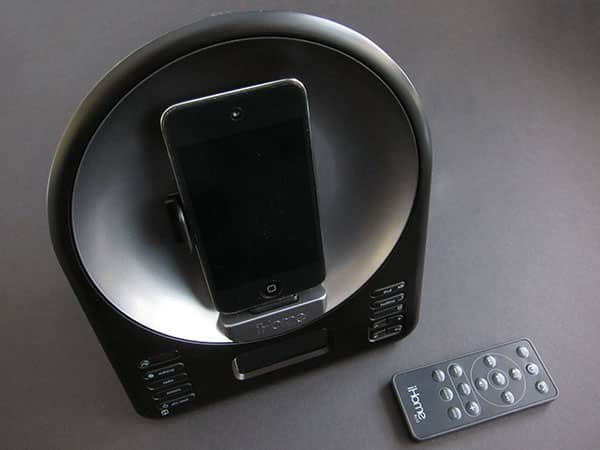
iA63 stands out mostly because it breaks with tradition in two key ways. The attractive and largely matte black plastic unit has an unusual shape that requires less of a footprint on your nightstand or desk than most of the company’s iPhone- and iPod-ready speaker systems, measuring a little under 5.5” deep only if you don’t take into account the reclining slopes of its front and back; the actual depth is 4.5” or less at any given point, with a 6.5” width. Nestled in its front is an attractive gunmetal-colored rotating dock that’s built to accommodate even encased iPods and iPhones, using a side railing to support the devices when they’ve been turned to landscape mode.

You control the dock with a button on the unit’s front, or with an included Infrared remote, which is the only pack-in besides a required wall adapter. Also, as the “iA” model name indicates, iA63 is compatible with iHome’s free iHome + Sleep application, which integrates with the unit to add additional alarms, control over timers, and other handy options to the hardware. (A $2 app, iHome + Radio, is sold separately and does not as of the date of this review work properly with iA63; an update is forthcoming.)

It’s important to understand what these various features really mean when they’re considered together at a $100 price point—the same dollars that one year ago would have purchased the considerably less impressive iA5.
With iA63, you get two speakers rather than one, a digital FM tuner instead of a radio-less system, and the motorized central dock, all in a more compact enclosure. iA5 didn’t include a remote, nor did it have a built-in alarm. iA63 is a big step forward for the same price, and the new dock alone enables it to be a much better bedside companion for users who enjoy watching movies, TV shows, or other video content on an iPhone’s or iPod’s small screen.


Of course, there are some tradeoffs with iA63 relative to the company’s flagship $100 model iP90, which was released roughly a year ago. Whereas iP90 offers dual 7-5-2 integrated alarms that can be programmed to go off every day, only on weekdays, or only on weekends, iA63’s single integrated alarm is limited to always on or always off settings. You can add additional software-based alarms with added day versatility by using iHome + Sleep, but they’ll only work when the iPhone or iPod touch is plugged into the unit and running the app. iA63 also gives up the AM radio tuner entirely, though it works pretty well for FM tuning, with six presets and generally strong if not quite crystal-clear pick-ups of local stations.

iA63 also loses a little speaker performance. Unlike iP90 and most of iHome’s other systems, iA63 mounts its speakers in a manner that sees them performing through fabric grilles on the system’s left and right sides.
Due to the way sound waves work, this reduces their perceived ability to perform higher-frequency sounds when heard from the unit’s front. Consequently, though iA63 can be turned up pretty loud—more than loud enough to wake even the deepest slumberer on the other side of a bed—it sounds a little flat, despite including legitimate left- and right-channel stereo separation that was entirely missing from iA5. Music and the audio portions of videos have a bass and midrange emphasis that won’t surprise fans of iHome’s prior alarm clocks, but won’t thrill audiophiles, either. All things considered, we’d call iA63 sonically more than acceptable for the price, though it clearly compromised the speaker performance a little to reduce the width of its chassis.

On the other hand, iA63’s included remote works better than the ones that have been included with iP90, transmitting without problems from 30-foot distances. Both it and the iA63 unit come with replaceable disc-shaped batteries, the latter for backup of the integrated clock.

One other small issue is in iHome + Sleep’s performance with iA63. As this is the first iA-series system to include a rotation feature, iHome needed to make some UI adjustments to accommodate the app’s performance in landscape mode, and for the most part, they work: the time, bedtime/wakeup swipe toggle, and iPod controls all remain when rotated, and iA63-specific device and alarm settings can be called up on a second screen.











