
Roughly two years ago, iHealth Lab debuted the $100 dock-dependent Blood Pressure Dock BP3 with a pneumatic arm cuff, which was followed by Withings’ Smart Blood Pressure Monitor, a portable $130 alternative that instead used a Dock Connector cable. At the time, we noted that both were useful but too expensive for what they offered, with rough edges that could benefit from additional polish. Now iHealth has returned with two new options: the Wireless Blood Pressure Wrist Monitor ($80, aka BP7) and the Wireless Blood Pressure Monitor ($100, aka BP5). While neither is perfect, both are so considerably improved that they’re worthy of serious consideration.
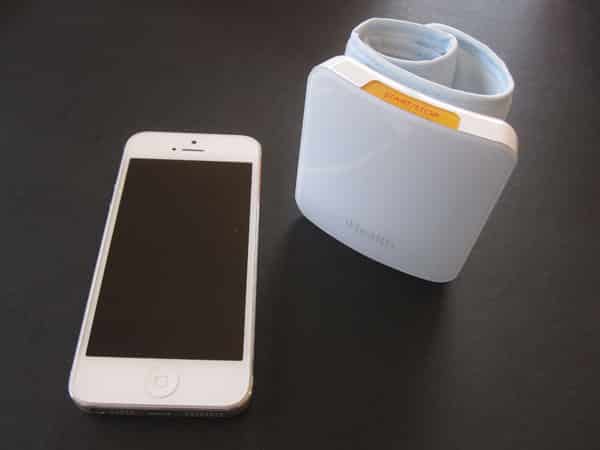
As their names suggest, the Wireless Blood Pressure Wrist Monitor and Wireless Blood Pressure Monitor have far more in common than not: they each combine a rounded, white and clear plastic box with a fabric, Velcro-adjustable cuff that wraps around your arm. Because they use Bluetooth 3.0 wireless chips powered by rechargeable batteries, they can be operated without the need for a dock—an issue with the original iHealth model—or even a cord, except when they’re recharging with included detachable mini-USB cables. Their functionality is basically identical; the differences are only in their sizes, shapes, and pack-ins.

The key visual feature of the Wireless Blood Pressure Wrist Monitor is a nearly square 2.75” by 2.85” box that curves gently in the center to match the contour of a wrist. You use Velcro inside a light gray cuff to mount the box on your wrist right below your open palm, and an accelerometer inside helps you adjust your arm’s angle for proper measurement.
A micro USB port is on one edge, and a large yellow “start/stop” button is on the other; pressing it leads a Bluetooth logo to glow through the unit’s white and clear top surface. When the Wrist Monitor is plugged into a USB port for recharging, a green square icon appears on the top, flashing until charging is complete. The battery is powerful enough to let you make around 80 measurements on a single charge, though this will depend somewhat on the time that passes between accessory uses. iHealth includes a nicely designed hard plastic box to hold the Wrist Monitor when it’s not in use.

By comparison, the Wireless Blood Pressure Monitor is twice as tall and somewhat thicker, visually dominated by a 5.9” by 2.5” pill-shaped box that looks almost identical to an elongated Apple Magic Mouse, complete with a tapered silver bottom shell. Here, the mini-USB port is on a short edge, and an orange Start/Stop button is on a long edge, but the top indicator lights are the same—a blue Bluetooth indicator and a larger green recharging indicator glow through the top surface. Using red up and blue down arrow labels on the soft gray cuff, you place this Monitor on your forearm, tighten it with a silver metal O-ring, and secure its position with Velcro. iHealth uses a gray and orange soft neoprene sleeve to hold this Monitor when it’s not in use, with a zipper holding the otherwise simple fabric container shut.
Just like the Wrist Monitor, the larger Monitor promises over 80 measurements on a single battery charge; here, you need to pop open a rubber port protector for USB recharging.

Although there’s an earlier app called iHealth BPM designed solely for blood pressure monitoring, iHealth recommends that you use a newer app called iHealth MyVitals, which can aggregate multiple types of health monitoring data within one interface. Some users might pause at this, but iHealth has users sign up for an account to store and track their health data over time, enabling the app to access web-stored blood pressure, weight, calorie, activity, and sleep trends, assuming that you link the app with appropriate accessories or manually input data. The app lets you toggle iHealth’s blood pressure monitors, scales, and activity/sleep-tracking wristwatches on and off, collecting data when the app is loaded. Pairing for the Wireless Blood Pressure Monitors is as simple as going to the Bluetooth menu one time and linking the devices; after that, the app works seamlessly to activate the accessories and store their data.

As of press time, the MyVitals app still isn’t iPhone 5/iPod touch 5G-optimized, but it does have an iPad interface with proper Retina display support, and iHealth has otherwise done a very nice job of making interactivity both intuitive and visually satisfying. The app provides a preview of how to use each accessory properly, including an explanation of how to properly position your wrist for proper measurement with the Wrist Monitor, and only lets you activate the pneumatic pumps once everything is in place. Measurement takes less than a minute with each accessory, during which the cuff expands with air to really grip your arm before deflating and giving you systolic, diastolic, and pulse readings, plus optional brief text-based guidance on what the readings mean. The data is immediately stored in the app for future comparison unless you manually enable an offline reading mode; each Monitor can store up to 120 offline readings for later synchronization in built-in memory.
Measurements we took with the two Monitors were substantially similar, but some users may have a reason to prefer one over the other—the reason iHealth is offering both as options.











