
iLoungeiLounge
  • News
    • Apple
      • AirPods Pro
      • AirPlay
      • Apps
        • Apple Music
      • iCloud
      • iTunes
      • HealthKit
      • HomeKit
      • HomePod
      • iOS 13
      • Apple Pay
      • Apple TV
      • Siri
    • Rumors
    • Humor
    • Technology
      • CES
    • Daily Deals
    • Articles
    • Web Stories
  • iPhone
    • iPhone Accessories
  • iPad
  • iPod
    • iPod Accessories
  • Apple Watch
    • Apple Watch Accessories
  • Mac
    • MacBook Air
    • MacBook Pro
  • Reviews
    • App Reviews
  • How-to
    • Ask iLounge
Font ResizerAa
iLoungeiLounge
Font ResizerAa
Search
  • News
    • Apple
    • Rumors
    • Humor
    • Technology
    • Daily Deals
    • Articles
    • Web Stories
  • iPhone
    • iPhone Accessories
  • iPad
  • iPod
    • iPod Accessories
  • Apple Watch
    • Apple Watch Accessories
  • Mac
    • MacBook Air
    • MacBook Pro
  • Reviews
    • App Reviews
  • How-to
    • Ask iLounge
Follow US

Reviews

Reviews

Review: iGraffiti by Big Stone Phone

Last updated: May 13, 2021 6:56 am UTC
By Charles Starrett
Review: iGraffiti by Big Stone Phone

This review originally appeared within iLounge’s iOS Gems series within the compilation article, iPhone Gems: Every Drawing Application, Reviewed. Additional details may be found in the original article.


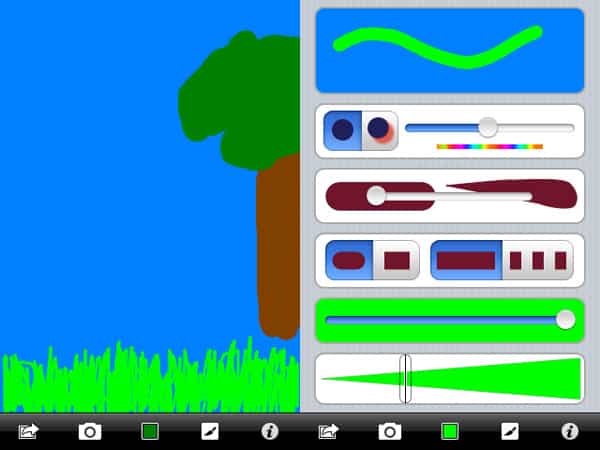
The second application from Big Stone Phone to be reviewed in this article, iGraffiti ($5) differs from Gesture in that it is designed primarily for drawing. The app’s main drawing screen features a small row of buttons at the bottom, including an action button to save the drawing, assign it to a contact, or make a new drawing, a camera button that lets you use an image from the iPhone or iPod touch’s photo library as the background, and a color button.

Review: iGraffiti by Big Stone Phone

This brings up differently-colored crayons—tap to set the color, hold to set the background color—and an eraser. There’s also a brush button that brings up various sliders and buttons for turning a drop shadow effect on and off, setting the color of the shadow, and adjusting the shape, opacity, and size of the brush. An info button displays a quick tip page.

In addition to normal erase controls, the user is supposed to be able to shake the device once to undo the last stroke or shake back and forth to clear the image; in our testing, we never got the single shake undo to work.


Users can also use pinch and drag gestures to zoom in and out. Although it possesses a fairly easy to use interface, iGraffiti is missing several features found in competing applications, causing it to seem even more overpriced than it actually is. Big Stone Phone should immediately bring over the built-in gallery from Gesture to improve iGraffiti, and then consider adding more tools — including a pencil and shapes — to expand its drawing functionality to more closely match its competitors.



Latest News
The AirPods Pro 3 is $20 Off
1 Min Read
Exynos 2600 Chip 2nm Process Revealed by Samsung
1 Min Read
New Celebrity Ad Campaign Featuring Travis Scott Released by Beats
1 Min Read
Australia Getting Hypertension Notification Feature
1 Min Read
The 14-inch MacBook Pro with M5 Chip 16GB RAM/512GB is $250 Off
1 Min Read
Noise and Static on AirPods Pro 3 Still Unfixed
1 Min Read
New iMac with 24-inch OLED Display May be Brighter With 600 Nits
1 Min Read
The 15-inch M4 MacBook Air 256GB Is $250 Off
1 Min Read
Internal Kernel Debug Kit from Apple Reveals Tests for a MacBook with A15 Chip
1 Min Read
Apple Currently In Talks With Suppliers for Chip Assembly & Packaging of iPhones in India
1 Min Read
Apple Allows Easier Battery Replacement For M5 MacBook Pro with 14-inch Display
1 Min Read
The Apple Watch SE 3 44mm GPS is $50 Off
1 Min Read

iLounge logo

iLounge is an independent resource for all things iPod, iPhone, iPad, and beyond. iPod, iPhone, iPad, iTunes, Apple TV, and the Apple logo are trademarks of Apple Inc.

This website is not affiliated with Apple Inc.
iLounge © 2001 - 2025. All Rights Reserved.
  • Contact Us
  • Submit News
  • About Us
  • Forums
  • Privacy Policy
  • Terms Of Use
Welcome Back!

Sign in to your account

Lost your password?








