
While developers have mastered the art of producing basic iPad keyboard cases, laptop/clamshell-style keyboard cases remain difficult to get “right.” Between the need for a sturdy hinge to hold the iPad upright and the challenges of getting the typing surface, iPad protection, and other details to all feel good, few companies have conquered this accessory genre — and the top alternatives have generally been offered at crazy price points. Continuing the prior trend, iGear has released the Flip Turn Keyboard Case for iPad Air ($129), a clamshell design that roughly doubles the Air’s thickness while turning it into a miniature, plasticky laptop.
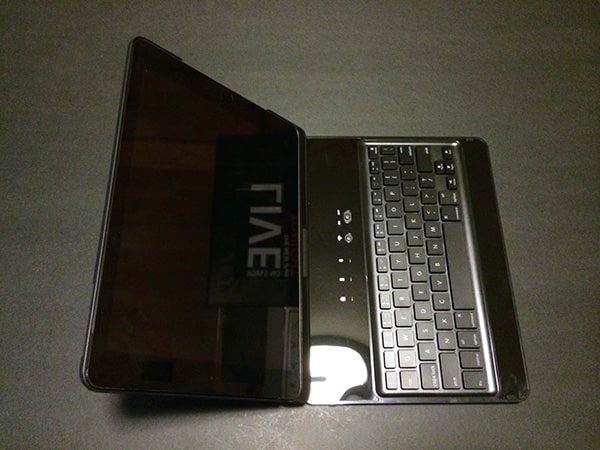
Made from soft touch rubber-coated black plastic with a glossy interior, Flip Turn is a larger and tweaked sequel to the Flip Turn Case for iPad mini we reviewed late last year. Once again, you get five rows of island-style keys underneath a row of caps lock, battery, and Bluetooth lights, adjacent to a pairing button and power switch. On the right edge next to the iPad Air’s Lightning port, there’s a micro-USB port for an included USB charging cable, while the left edge has a spring-loaded stylus holder near the headphone port. While the rubber dome stylus isn’t fancy or particularly precise, it’s a nice bonus in the package, and works as expected for occasional touchscreen input.


Judged strictly as an iPad Air case, Flip Turn is respectable rather than great. The best cases we’ve tested generally make an attempt to cover the buttons and speakers, typically leaving ports, microphone holes, and the rear camera only minimally exposed. Flip Turn’s approach is closest to a simple iPad rear shell cover, with a long strip at the bottom exposing the speakers, a pill-shaped hole for the side buttons and switch, and a smaller hole for the top sleep/wake button.
These aren’t huge issues, but the iPad Air could have been better covered. There’s also no divot or other design element on either side of the shell to make the laptop-like design easy to open.

Although it’s hard to predict how iGear’s hinge will work months from now — it notably doesn’t have any ratcheting mechanism to hold the tablet in place — it worked well enough in our testing. The iPad Air can stand on a 90-degree upright angle or on a 15- or 20-degree recline without additional support, but the case will fully open or fully close if you try to use a steeper screen angle. You can also twist the iPad 180-degrees and double it back against the keyboard to use the Air in a more tablet-like configuration, with the aforementioned added thickness, 0.65” of extra width, and noticeable additional weight as the only issues. While you probably won’t want to hold the tablet for extended periods in this way, and pulling the stylus out of the bottom of the portrait-orientation device feels a bit unnatural, this is a better option than needing to fully remove the iPad from the case every time you want to use it like a tablet.

Flip Turn’s keyboard is good rather than great. To start with the positives, it’s been considerably expanded from the iPad mini version, with a full set of character keys off to the right hand side rather than unnatural re-mappings onto letters. Like many other companies, iGear compromised a little by narrowing the | and \ key, as well as combining the top number keys and F-keys into a single half-height row, but these changes require only a brief period of user adjustment.
Somewhat novel to Flip Turn is the inclusion of a key illumination system that is effectively a four-stage LED backlight underneath the keyboard, brightest near the space bar and somewhat dimmer on the keys above it.

For the most part, typing on Flip Turn is easy — a little more cramped than using a typical laptop keyboard, and in the same general performance range as most of the good iPad Air keyboards we’ve tested, though slightly more susceptible to accidental key repetition for certain keys. Our review unit’s space bar sometimes registered two or three spaces when it was only hit once, and other keys occasionally did the same thing. Even so, we found the typing experience to be better than with the iPad’s own on-screen keyboard.

There was one serious visual oddity — the “Z” key was for whatever reason replaced with a second “N” key — but it thankfully didn’t change the ability of the key to register a Z when it was pressed. This was one of several little quality-control issues, including some small molding problems at joined points, that detract from Flip Turn’s overall feeling of quality relative to top-tier keyboard cases we’ve tested.


Bluetooth performance on Flip Turn was trouble-free in our testing — quick to pair and re-pair via Bluetooth 3.0, with no connectivity issues despite an in-box warning that one prior minor release of iOS 7.0 had a Bluetooth pairing problem. Just as was the case with the iPad mini version of Flip Turn, however, no specific claims are made as to battery life for the iPad Air accessory; there’s a rechargeable battery inside that should be good for many hours of continuous use.











