
iLoungeiLounge
  • News
    • Apple
      • AirPods Pro
      • AirPlay
      • Apps
        • Apple Music
      • iCloud
      • iTunes
      • HealthKit
      • HomeKit
      • HomePod
      • iOS 13
      • Apple Pay
      • Apple TV
      • Siri
    • Rumors
    • Humor
    • Technology
      • CES
    • Daily Deals
    • Articles
    • Web Stories
  • iPhone
    • iPhone Accessories
  • iPad
  • iPod
    • iPod Accessories
  • Apple Watch
    • Apple Watch Accessories
  • Mac
    • MacBook Air
    • MacBook Pro
  • Reviews
    • App Reviews
  • How-to
    • Ask iLounge
Font ResizerAa
iLoungeiLounge
Font ResizerAa
Search
  • News
    • Apple
    • Rumors
    • Humor
    • Technology
    • Daily Deals
    • Articles
    • Web Stories
  • iPhone
    • iPhone Accessories
  • iPad
  • iPod
    • iPod Accessories
  • Apple Watch
    • Apple Watch Accessories
  • Mac
    • MacBook Air
    • MacBook Pro
  • Reviews
    • App Reviews
  • How-to
    • Ask iLounge
Follow US

Reviews

Reviews

Review: iDoodle2 by Josiah Larson

Last updated: May 13, 2021 6:56 am UTC
By Charles Starrett
Review: iDoodle2 by Josiah Larson

This review originally appeared within iLounge’s iOS Gems series within the compilation article, iPhone Gems: Every Drawing Application, Reviewed. Additional details may be found in the original article.


Based on the popular iDoodle web app for the iPhone and iPod touch, iDoodle2 lite (Free) and iDoodle2 ($3) are fairly full-featured drawing applications.
Review: iDoodle2 by Josiah Larson

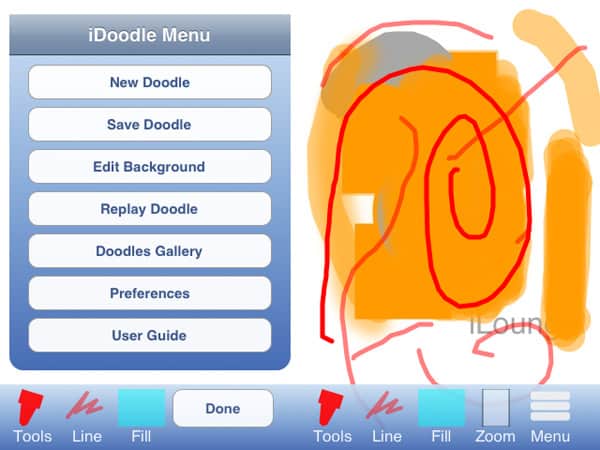
The paid full version adds the ability to use photos as a background, a text tool, the ability to save in-progress images and work on them later, an eyedropper tool, gradients, and adjustable pen softness; the two apps are otherwise equals. A main menu lets users start a new doodle, save the current doodle to the photo library or doodle gallery, open the doodle gallery, edit the background, replay the current doodle, turn the auto-save preference on and off, and access the user guide.


Buttons on the main drawing screen for tools, line, and fill settings actually all lead to the same multi-pane box, making two of the buttons redundant; buttons for zooming in on the image or opening the menu are also found along the bottom.

iDoodle offers a number of common drawing tools, including pen, line, rectangle, oval or custom shapes, an eraser, and on the paid version, the text and eyedropper features. Users can adjust the color of the line or fill by picking from 16 pre-determined colors, or by tapping an advanced button that uses RGB sliders to choose the color; the paid version also lets users pick two colors for gradient fills.



Latest News
Teardown Video For AirTag 2 Shared By iFixit
1 Min Read
The Apple Watch Series 11 42mm GPS is $100 Off
1 Min Read
Apple Launching A New Education Hub In India Teaching Robotics and Swift Programming
1 Min Read
Women’s and Men’s Golf Added to Apple Sports
1 Min Read
Apple Adding Civilization VII and Other Games To Apple Arcade
1 Min Read
AirPods 4 ANC Is $59 Off
1 Min Read
Apple Using 2NM Process For Their M6 and A20 Chip
1 Min Read
iPhone 18 Models Will Not Have a Big Redesign
1 Min Read
Launch of MacBook Pro M5 Pro and M5 Max Models is Approaching
1 Min Read
Get the iPad Mini 7 256GB Wi-Fi at $99 Off
1 Min Read
Mozilla Now Allows Turning AI Features Off
1 Min Read
Barcelona Passeig de Gràcia Apple Store Temporarily Closing
1 Min Read

iLounge logo

iLounge is an independent resource for all things iPod, iPhone, iPad, and beyond. iPod, iPhone, iPad, iTunes, Apple TV, and the Apple logo are trademarks of Apple Inc.

This website is not affiliated with Apple Inc.
iLounge © 2001 - 2025. All Rights Reserved.
  • Contact Us
  • Submit News
  • About Us
  • Forums
  • Privacy Policy
  • Terms Of Use
Welcome Back!

Sign in to your account

Lost your password?








