
Back in 2011, iDevices released iGrill, a $100 Bluetooth-enabled grilling thermometer that ran off of four AA batteries and included one temperature probe. Last year, it released the much-improved $40 iGrillmini, which radically reduced battery consumption with Bluetooth 4 technology, requiring only a single coin-sized cell. Now there’s a new option called the Kitchen Thermometer ($80), which arrives with two temperature probes, Bluetooth 4 support, and two AA batteries. Considerably larger than iGrillmini and selling for twice the price, Kitchen Thermometer works as it’s supposed to, but again offers too little added value relative to otherwise comparable non-Bluetooth alternatives.
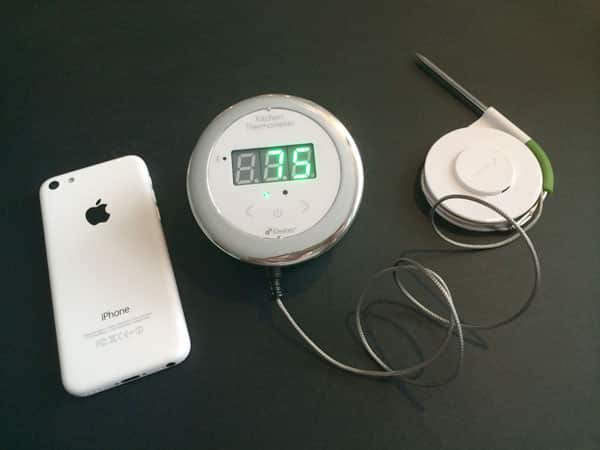
As a hybrid of the prior iGrill and iGrillmini designs, Kitchen Thermometer uses an attractive combination of glossy white and chrome plastics, plus a bright, easily-read green display. Measuring 3.25” in diameter with a 1.2” to 2.3” sloping height — the base angles the screen for viewing — it detaches into two pieces, hiding a dual AA battery compartment behind its large screen, while the bulk of the thickness comes from a plastic mounting base. iDevices includes a metal, coin-sized magnet with 3M adhesive on one side, enabling you to stick the coin to your chosen surface and then attach or detach the base magnetically as needed. A ring of rubber on the base’s bottom reduces what would otherwise be its ability to slide around on a flat surface.

Each of the temperature probes consists of a four-foot-long metal-wrapped wire with a 2.5mm connector at one end and a 3.5”-long metal probe at the other.
One of the probes has a blue rubber grip, while the other has a green grip, and both have detachable plastic cable managers that should be removed before use in high-temperature cooking applications. Using the cable managers, the probes can be stacked together for storage, though there’s no way to attach them to the Kitchen Thermometer for compact storage. You connect them electronically via 2.5mm ports on the front bottom of the base unit, and they dangle from there.

Actually using the Kitchen Thermometer to measure temperatures is — as would be expected — pretty easy. Press a lower central power button on the face, and you’ll see a three-character/digit screen with two green dots below it, the left dot indicating that you’re seeing the temperature from the left-connected probe, and the right dot doing the same for the right probe. Arrow buttons let you switch the display between the left and right probes, and the power on/off button obviously turns the unit on and off. If you don’t want to do anything else, the thermometer can be used in this way… just like any $30 non-Bluetooth dual-probe thermometer.

We found temperature readouts from the Kitchen Thermometer to be respectably accurate — within a couple of degrees of traditional analog thermometers, and roughly on point with a laser thermometer we used as reference. The underlying measurement technology here isn’t exactly rocket science, but the sensors worked within the expected range of 70 to 180 degrees, appropriate for cooking (or overcooking) pretty much any kind of meat or fish you can imagine.

The $50 of extra value is supposed to come from the Bluetooth connection, which initially works a little differently here than one might think. Most past Bluetooth 2 and 3 accessories began by having you pair your device using the iOS Settings and Bluetooth menus, after which you might be prompted to download an app. Kitchen Thermometer’s low-energy Bluetooth 4 process instead has you manually download iDevices’ new, free iDevices Connected app, which then establishes the Bluetooth connection on its own, pushes a firmware update to the accessory, and then begins to provide second-by-second temperature data on your iOS device’s screen. The app shows you output from both probes at once as long as they’re both connected, and graphs their temperature changes over time. If there’s a “killer” feature here — and underscore the quotes — it’s that each probe can have an individual alarm go off when the temperature reaches a specific point, with each alarm based upon an app-selected type of food (say, pork or fish) and your preferred level of cooking doneness.

While the iDevices Connected app does what it’s supposed to do, it’s not as well-executed as it could be. Font sizes for everything except the temperature numbers are too small, and the font weights are thin, so you’ll need sharp vision to read the graphs and arguably to navigate the menus. Frills in the app are largely of the “who cares” variety – a “globe” to see other iGrill users around the world, including photos of whatever they were cooking, plus a shop to buy more iGrill products – except for timers, plus some steak, burger, and turkey recipes supplied by Omaha Steaks and Jennie-O, which may be of use to some people.











