
iLoungeiLounge
  • News
    • Apple
      • AirPods Pro
      • AirPlay
      • Apps
        • Apple Music
      • iCloud
      • iTunes
      • HealthKit
      • HomeKit
      • HomePod
      • iOS 13
      • Apple Pay
      • Apple TV
      • Siri
    • Rumors
    • Humor
    • Technology
      • CES
    • Daily Deals
    • Articles
    • Web Stories
  • iPhone
    • iPhone Accessories
  • iPad
  • iPod
    • iPod Accessories
  • Apple Watch
    • Apple Watch Accessories
  • Mac
    • MacBook Air
    • MacBook Pro
  • Reviews
    • App Reviews
  • How-to
    • Ask iLounge
Font ResizerAa
iLoungeiLounge
Font ResizerAa
Search
  • News
    • Apple
    • Rumors
    • Humor
    • Technology
    • Daily Deals
    • Articles
    • Web Stories
  • iPhone
    • iPhone Accessories
  • iPad
  • iPod
    • iPod Accessories
  • Apple Watch
    • Apple Watch Accessories
  • Mac
    • MacBook Air
    • MacBook Pro
  • Reviews
    • App Reviews
  • How-to
    • Ask iLounge
Follow US

Reviews

Reviews

Review: iDevices iGrillmini

Last updated: May 16, 2021 7:57 pm UTC
By Nick Guy
Review: iDevices iGrillmini

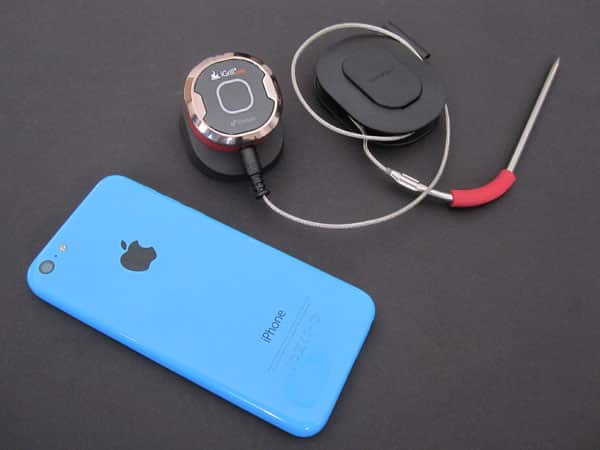
iGrillmini ($40) is iDevices’ sequel to its late 2010/early 2011 product, iGrill. The core concept is the same, but the Bluetooth app-enabled grilling thermometer has been significantly redesigned, and now comes in a much smaller and more affordable package. Instead of using a large plastic rectangle to serve as the brain of the device, there’s now a small, half-dollar-sized control center. It sits atop a plastic base, and has a port to connect the included thermometer probes. Using Bluetooth 4, the accessory connects to the iDevices app, and is able to let you know when grilled food is ready. A magnetic mounting disc is also included, as is a wrap for the probe cable.

Review: iDevices iGrillmini

While the first version of iGrill was larger than an iPhone, and ran on four AA batteries, this newer edition is only an inch and a half wide and deep, and three-quarters of an inch tall. On top of the red plastic body is a silver plastic ring, with a black face inside it.

There, you’ll find a glowing rounded square, which changes color to indicate how close your food is to the proper level of doneness.


Review: iDevices iGrillmini

Instead of relying on user-provided batteries, a coin-cell CR2032 is included, and is easily replaceable after its 150 hour life is up. The module fits into a black, rubber coated base, which holds it at a 20° angle. Although optional, the magnetic disc can be fixed in place onto the bottom of the base with adhesive, allowing iGrillmini to attach to an oven face or other surface. The only input is a single port on the bottom edge, allowing for one probe to be connected at a time; the cable is almost four feet long.


Review: iDevices iGrillmini

The heart of this solution lies in the iDevices app, which is used not only for iGrillmini, but all of the company’s accessories. It allows you to have multiple devices connected at once, including more than one iGrillmini, for times when you may be cooking a multi-component meal. Once Bluetooth pairing has taken place, the main page of the app shows a histogram of the temperature over time.


Review: iDevices iGrillmini

The app looks quite nice, but it’s not laid out as well as it could be. Tapping on the “edit” menu brings up the ability to activate preset temperature alarms for different meats and levels of doneness. For example, you can choose “Beef – Medium Rare,” setting iGrillmini to let you know when your steak reaches 130°. Temperature ranges are available too, for when you want to keep food at a certain level. There are also options to see food that other people are making, set timers, and view recipes, all from a separate menu.


Review: iDevices iGrillmini

It doesn’t matter how nicely designed an accessory is if it doesn’t work well — this one works well. We tested it both with a pot of boiling water, and a steak that was first seared and then finished off in the oven. The first test showed a clear upward progression as the water heated.



Latest News
The 14-inch MacBook Pro with M5 Chip 16GB RAM/512GB is $250 Off
1 Min Read
Noise and Static on AirPods Pro 3 Still Unfixed
1 Min Read
New iMac with 24-inch OLED Display May be Brighter With 600 Nits
1 Min Read
The 15-inch M4 MacBook Air 256GB Is $250 Off
1 Min Read
Internal Kernel Debug Kit from Apple Reveals Tests for a MacBook with A15 Chip
1 Min Read
Apple Currently In Talks With Suppliers for Chip Assembly & Packaging of iPhones in India
1 Min Read
Apple Allows Easier Battery Replacement For M5 MacBook Pro with 14-inch Display
1 Min Read
The Apple Watch SE 3 44mm GPS is $50 Off
1 Min Read
20th Anniversary iPhone May Launch in Two Years
1 Min Read
Better Image Generation Capabilities and Apple Music Integration Coming to ChatGPT
1 Min Read
A20 Pro Chip Coming to Next Gen iPad Mini OLED
1 Min Read
Amazon has the AirTag 4 Pack Marked $29 off
1 Min Read

iLounge logo

iLounge is an independent resource for all things iPod, iPhone, iPad, and beyond. iPod, iPhone, iPad, iTunes, Apple TV, and the Apple logo are trademarks of Apple Inc.

This website is not affiliated with Apple Inc.
iLounge © 2001 - 2025. All Rights Reserved.
  • Contact Us
  • Submit News
  • About Us
  • Forums
  • Privacy Policy
  • Terms Of Use
Welcome Back!

Sign in to your account

Lost your password?








