
Pros: A lightweight pair of dual-screened, 640×480-resolution video goggles that work – with an optional cable – to turn iPod video output into a comfortable wearable display. Simple to connect and use, the goggles include AA batteries and a wall power adapter, allowing you to watch your iPod for at roughly as long as its internal battery can naturally output video, if not longer. Better-looking than similar headsets previously released for non-iPod devices. An easy option for travelers.
Cons: High price tag. Inconsistent video and audio output traceable to loose connections and a somewhat noisy amplifier. Though superior on detail, LCD screens aren’t up to snuff on color balance with the iPod’s internal screen; immersion is partial.
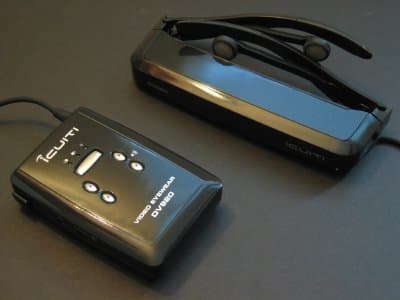
As with several other iPod-related items we’re covering on the site today, Icuiti’s DV920 Video Eyewear ($549-579) is an accessory that we’re covering “in progress” – we’ve opted not to finalize our conclusions or rate it for now because of the present lack of similar items to compare it against. Our intention is to add additional comments once comparable options are available.
We’ve previously covered wearable video displays in an extended feature article, but if you haven’t seen it, here’s the recap. Several companies are working on video goggles that let you watch 5G iPod-stored movies (and, less appealingly, 4G iPod photo slideshows) without using the iPod’s screen. The intent in each case is to provide a video experience that’s less squint-inducing than what the iPod offers, combining headphones and displays into a single unit you can wear while sitting, standing, and in some cases even walking. These new displays are radically smaller and lighter than the “virtual reality goggles” that appeared and then fizzled out a dozen years ago – hulking devices that extended inches off your nose and weighed literally pounds.
While not as light as a pair of sunglasses, the DV920 is hardly heavy – it weighs only 3.5 ounces, not including its required 3.8 ounce control pack, and causes no head fatigue when worn. That’s despite the fact that each DV920 packs serious technology: there are actually two 640×480-resolution, “true color” (24-bit) LCD screens inside, one for each of your eyes, focused to create a single image that – in marketing terms – appears to be a 42” (4:3) TV as viewed from 11 feet away. Another way to put this is that it looks like an iPod screen held several inches in front of your eyes. However, unlike the other iPod-ready displays we’ve seen, the screens can also be programmed separately to display images that appear to be in 3-D; you’ll need special video files and appropriate encoding tools to use this feature.

Icuiti sells four different versions of its DV920 Video Eyewear kit, varying in price by color. The black version shown in most of our photographs sells for $549, with pearl white, metallic blue, and metallic red versions priced at $579.
In addition to the headset, several customizing pieces and a tethered control box, each kit includes two non-rechargeable AA batteries, a wall power adapter, a composite video cable, RCA barrel connectors, a VGA cable, carrying bag, and lens cleaning cloth. The company separately sells a “Video iPod Cable” in black or white colors for $20 each, one of which you’ll obviously need to use DV920 with an iPod, as well as an S-Video Cable ($40) and a USB Power Cable ($15), which may be useful for certain video and computer applications.
Adjusting the DV920
You need to take three basic steps to customize the DV920 for your head, and then it’s ready to use. The first is sizing: Icuiti’s kit includes two flexible earbuds that you shape to fit in your ears, as well as two different sets of stems that resize the goggles for your head. Attaching your preferred pieces is simple, but if you don’t want to use Icuiti’s earbuds, you can unplug them from the goggles and use your own.

Next, you use one of three included soft rubber nose bridge pieces to provide appropriately comfortable support for the DV920 on your nose. Popping the bridges in or taklng them out is similarly problem-free.

Finally, there’s a focus adjustment step. You put the goggles on, power them up with the included control pack, and then use these two sliders (found under the left and right corners of the DV920 headset) to bring each of the unit’s two screens into focus. An Icuiti logo appears on a black background, helping you unite the screens in front of your eyes.

Once those adjustments have been made, the DV920’s ready to wear and enjoy. The stems are attached to the screens with a joint that permits 15 screens of vertical tilt freedom, giving the headset a little bit of extra space to find a comfortable resting position and viewing angle on your face. Similarly, the flexibility of the earbuds makes them feel largely comfortable in your ears – a bit off of perfection, but certainly not bad. More on that in a moment.
The Control Box
The last major component in the package is the DV920’s control box, which must be carried at all times, but includes a detachable belt clip to lessen the hassle. On the bright side, this box is easy to use regardless of whether the goggles are running off of batteries or connected to a wall outlet. Its right side has a silver power button, which not surprisingly worked reliably in our testing to turn the unit on and off, and its face has five buttons and three lights.

The top button toggles between left, right, and double-screened displays – you’ll want to have the unit on double-screened mode, indicated by the third power light. Holding this button down for a couple of seconds brings up an icon-based screen adjustment menu on the displays, with icon navigation using two buttons to its bottom left, and setting adjustments with the two buttons to its bottom right. Brightness, contrast, and other settings are accessible via icons that change depending on the device connected to the DV920 system.
The latter two buttons also serve as volume controls when the menu is not active.
Its left and top sides are reserved for ports. The left side has input ports for wall power and/or separate headphones, if you don’t want to use the ones built into the headset. Two more ports are on the top; there’s a digital port labeled AUX, and a standard minijack-style port labeled AV In. You connect your iPod to the AV In port with a special video cable, which is a relatively easy process, and the goggles are permanently bonded to the box with another cable.

There are two major reasons that this control box exists. First, it enables the DV920 to work with all sorts of different video devices – our review is only concerned with the iPod functionality, but computer gamers in particular will find plenty more to like about the twin 640×480 displays. Second, it channels either battery or wall power to the headset. Two AA batteries are estimated to provide between 2.5 and 4.5 hours of play time, depending on the batteries used; our sample batteries ran for around 3.5 hours. Wall power worked without a hitch.
Benefits aside, Icuiti says that the control box will not be a component in the less expensive but also less powerful iPod-specific version of DV920 planned for release later this year – the early prototype we tested used nothing more than a Dock Connecting iPod cable. This was obviously largely a positive thing, saving space – you carry the glasses and your iPod, nothing else – and simplifying both connections and controls, which were essentially absent in the new version. On the flip side, you’ll drain the iPod’s battery with the newer model, while the self-powered DV920 will enable 30GB and 60GB iPod owners to enjoy an hour or two more of video playback time.
General Impressions and Performance
If the following comments on DV920 come across as nuanced, they’re not intended to be; we want to fairly portray our experiences with this new accessory in light of alternatives we’ve tested, but also want to provide due deference to the DV920 as a first-of-its-kind option for the iPod. So we’ll acknowledge several major points up front: first, when it’s working properly, the DV920 provides a video viewing experience that’s in some ways superior to looking down at the screen on the iPod, and as partially immersive as intended by its designers. Second, it’s a matter of personal preference as to whether it’s worth $569 for the benefits it achieves, but our gut feeling is that mainstream users will say “no,” while certain early adopters and frequent travelers may say “yes.” Third, several irritating technical issues with our review DV920 unit, currently shipping to customers, limit the appeal of what would otherwise be a much easier item to recommend. Though we think that the third issue is capable of being resolved easily, we’re not as sure about the first and second ones.
Let’s consider the units exterior and interior looks, bearing in mind that the price tag is naturally going to limit DV920 buyers to the early adopter crowd. The good news is that by contemporary standards, it’s not a total fashion faux-pas.











