
iLoungeiLounge
  • News
    • Apple
      • AirPods Pro
      • AirPlay
      • Apps
        • Apple Music
      • iCloud
      • iTunes
      • HealthKit
      • HomeKit
      • HomePod
      • iOS 13
      • Apple Pay
      • Apple TV
      • Siri
    • Rumors
    • Humor
    • Technology
      • CES
    • Daily Deals
    • Articles
    • Web Stories
  • iPhone
    • iPhone Accessories
  • iPad
  • iPod
    • iPod Accessories
  • Apple Watch
    • Apple Watch Accessories
  • Mac
    • MacBook Air
    • MacBook Pro
  • Reviews
    • App Reviews
  • How-to
    • Ask iLounge
Font ResizerAa
iLoungeiLounge
Font ResizerAa
Search
  • News
    • Apple
    • Rumors
    • Humor
    • Technology
    • Daily Deals
    • Articles
    • Web Stories
  • iPhone
    • iPhone Accessories
  • iPad
  • iPod
    • iPod Accessories
  • Apple Watch
    • Apple Watch Accessories
  • Mac
    • MacBook Air
    • MacBook Pro
  • Reviews
    • App Reviews
  • How-to
    • Ask iLounge
Follow US

Reviews

Reviews

Review: Hex Fleet Cross Body for iPad

Last updated: May 17, 2021 11:54 am UTC
By Nick Guy
Review: Hex Fleet Cross Body for iPad

Pairing an 11″ MacBook Air with an iPad has become a popular combination, particularly for users who travel. All of our editors carry these devices, so we’re not surprised that we’re starting to see bags that hold both of them together. The most recent is Hex’s Fleet Cross Body for iPad ($60), which we first saw in January when it received one of our Best of Show Awards at the 2012 Consumer Electronics Show. Born from the same concept as the company’s earlier Varsity Messenger Bag and Versetta’s Angela before it, the idea is to provide storage for your computer, and easy access to your tablet — it’s especially well-suited for quick iPad access during travel.

Review: Hex Fleet Cross Body for iPad

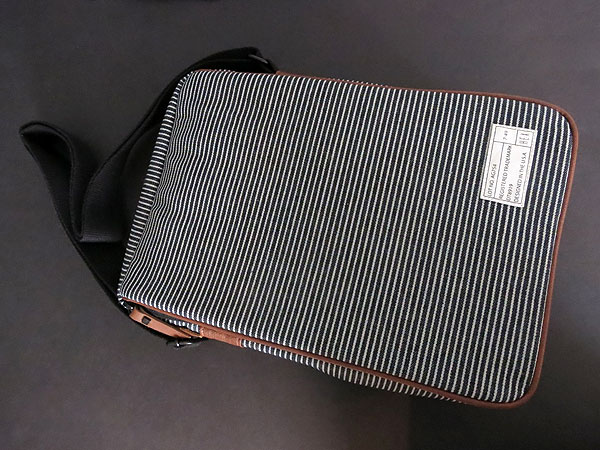
For its Fleet series—which also includes backpacks, sleeves, and other styles of bags—Hex uses a very nice black and gray striped canvas shell. Our editors had mixed feelings about the color combination in conjunction with the brown leather trim, but the materials are unquestionably nice.

The adjustable cotton shoulder strap is quite sturdy, and rather than plastic loops, Hex strung it through metal ones. We also liked the leather zipper pulls and the patch on the front of the bag; these little elements give Fleet Cross Body a sort of army surplus look and feel. 


Review: Hex Fleet Cross Body for iPad

On the front of the 13.25” x 8.5” bag is a zipper that runs down from the top left corner around to the top right, securing a front flap that might otherwise have been left dangling or less enclosed on the sides. Opening the flap reveals the company’s familiar “Hex PadPort” frame, which is pretty much identical to Varsity Messenger Bag’s, except that it’s been rotated to portrait orientation. It’s a simple frame that fits either generation iPad—caseless—with three sides mostly closed off with elastic material; the left edge has a Velcro strap to hold itself shut. The openings are such that the iPad can only be inserted one proper way, with the Home button on the bottom. Along the top edge, the headphone port and Sleep/Wake button are accessible, but the microphone isn’t visible.


All of the other ports and buttons can also be reached.


Review: Hex Fleet Cross Body for iPad

The uncontoured flat back makes the ports and buttons a bit harder to get at, but because the material is not rigid, this is not a significant problem. One downside is the rear camera is completely blocked, and the front-facing camera and Home button are partially obscured—the latter is still usable. We can’t see a lot of people wanting to use either camera with their tablets in the bag like that, but better access to the button and front camera would be welcome.


Review: Hex Fleet Cross Body for iPad

Review: Hex Fleet Cross Body for iPad

A zipper along the top of the bag reveals the main compartment. This is where the MacBook Air goes; there’s a dedicated, padded pocket with a Velcro strap to hold it in place. Additionally, there are three pockets of varying sizes, two pen holders, and a removable keyring on a plastic clip on the other side of the main cavity.



Latest News
The 14-inch MacBook Pro with M5 Chip 16GB RAM/512GB is $250 Off
1 Min Read
Noise and Static on AirPods Pro 3 Still Unfixed
1 Min Read
New iMac with 24-inch OLED Display May be Brighter With 600 Nits
1 Min Read
The 15-inch M4 MacBook Air 256GB Is $250 Off
1 Min Read
Internal Kernel Debug Kit from Apple Reveals Tests for a MacBook with A15 Chip
1 Min Read
Apple Currently In Talks With Suppliers for Chip Assembly & Packaging of iPhones in India
1 Min Read
Apple Allows Easier Battery Replacement For M5 MacBook Pro with 14-inch Display
1 Min Read
The Apple Watch SE 3 44mm GPS is $50 Off
1 Min Read
20th Anniversary iPhone May Launch in Two Years
1 Min Read
Better Image Generation Capabilities and Apple Music Integration Coming to ChatGPT
1 Min Read
A20 Pro Chip Coming to Next Gen iPad Mini OLED
1 Min Read
Amazon has the AirTag 4 Pack Marked $29 off
1 Min Read

iLounge logo

iLounge is an independent resource for all things iPod, iPhone, iPad, and beyond. iPod, iPhone, iPad, iTunes, Apple TV, and the Apple logo are trademarks of Apple Inc.

This website is not affiliated with Apple Inc.
iLounge © 2001 - 2025. All Rights Reserved.
  • Contact Us
  • Submit News
  • About Us
  • Forums
  • Privacy Policy
  • Terms Of Use
Welcome Back!

Sign in to your account

Lost your password?








