
iLoungeiLounge
  • News
    • Apple
      • AirPods Pro
      • AirPlay
      • Apps
        • Apple Music
      • iCloud
      • iTunes
      • HealthKit
      • HomeKit
      • HomePod
      • iOS 13
      • Apple Pay
      • Apple TV
      • Siri
    • Rumors
    • Humor
    • Technology
      • CES
    • Daily Deals
    • Articles
    • Web Stories
  • iPhone
    • iPhone Accessories
  • iPad
  • iPod
    • iPod Accessories
  • Apple Watch
    • Apple Watch Accessories
  • Mac
    • MacBook Air
    • MacBook Pro
  • Reviews
    • App Reviews
  • How-to
    • Ask iLounge
Font ResizerAa
iLoungeiLounge
Font ResizerAa
Search
  • News
    • Apple
    • Rumors
    • Humor
    • Technology
    • Daily Deals
    • Articles
    • Web Stories
  • iPhone
    • iPhone Accessories
  • iPad
  • iPod
    • iPod Accessories
  • Apple Watch
    • Apple Watch Accessories
  • Mac
    • MacBook Air
    • MacBook Pro
  • Reviews
    • App Reviews
  • How-to
    • Ask iLounge
Follow US

Reviews

Reviews

Review: Helium Digital KeyCover Folio Keyboard Case for iPad mini

Last updated: May 17, 2021 2:35 am UTC
By Nick Guy
Review: Helium Digital KeyCover Folio Keyboard Case for iPad mini

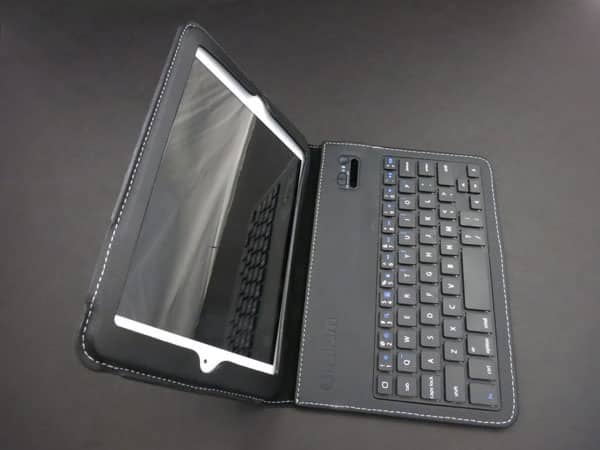
Modeled after the earlier KeyCover for iPad, Helium Digital’s KeyCover Folio Keyboard Case for iPad mini ($60) is the least expensive iPad mini keyboard case to hit our office so far. Unlike the hard plastic iPad mini keyboard cases we’ve already seen, this one is a faux leather folio, with chiclet-style keys inside the “5mm thick” front cover. In addition to Bluetooth 3.0 wireless support, the keyboard has a rechargeable battery that promises to last 120 hours on a charge, and a Micro-USB cable is included for charging.


Review: Helium Digital KeyCover Folio Keyboard Case for iPad mini

Because of its form-fitting tablet holder, KeyCover Folio is the thinnest iPad mini keyboard case around right now. Like with any number of folios, you slip the device in through the left edge, and tuck a flap underneath to hold it in place. It’s not an ideal fit, though, for a few reasons. The faux leather over the bezel doesn’t rest flat, and the openings along the edge are all at least a little off-center, leading to some issues. Headphone port access is problematic because of the placement of the seam at the top of the case, which prevented us from making a proper connection even with the thinnest of 3.5mm plugs.


The microphone is just barely exposed through the large circle, though its performance doesn’t seem to be affected. And the Lightning port opening is also poorly positioned, but thankfully, there’s enough wiggle room to fit even larger-than-average connectors. In short, the frame isn’t bad, but could stand to be improved.


Review: Helium Digital KeyCover Folio Keyboard Case for iPad mini

Review: Helium Digital KeyCover Folio Keyboard Case for iPad mini

When you open or close the lid, you’ll sometimes hear the auto-locking feature click, and sometimes not. The cover really has to be lined up properly for it to work, which can be problematic if you have your screen set to stay awake; you could potentially run your battery down. We also noted that the cover inadvertently triggered Siri from time to time. In a rare design twist, Helium Digital uses a magnetic tab strap to hold the case shut. An exposed magnetic strip on the case’s back holds the strap in place during normal use, but also allows it to transform into a stand.


Proper folding into the stand position is not initially intuitive, but once you’ve figured it out, the stand does work to prop up the iPad mini inside.


Review: Helium Digital KeyCover Folio Keyboard Case for iPad mini

Review: Helium Digital KeyCover Folio Keyboard Case for iPad mini

If the roughly 3/8” square keys on KeyCover Folio aren’t the smallest we’ve yet used with the iPad mini, they sure seem to be. Rather than running all the way to the edges, the keys stop about half an inch short of the keyboard’s sides. Consequently, even users with small hands will likely feel cramped. But we were surprised that typing was pretty good once we got a feel for the keyboard. The keys are all very responsive, with enough empty space that they’re easy to distinguish from one another. Thankfully, the apostrophe key is in the right place, which has been an issue on other iPad mini keyboards, though Helium Digital had to forego command and option keys on the right side of the keyboard, and move the question mark and colon/semicolon keys down next to a shortened spacebar. The delete key is also realigned, next to the P key rather than at the end of the number row, a change that took some time to learn.



Latest News
The AirPods Pro 3 is $20 Off
1 Min Read
Exynos 2600 Chip 2nm Process Revealed by Samsung
1 Min Read
New Celebrity Ad Campaign Featuring Travis Scott Released by Beats
1 Min Read
Australia Getting Hypertension Notification Feature
1 Min Read
The 14-inch MacBook Pro with M5 Chip 16GB RAM/512GB is $250 Off
1 Min Read
Noise and Static on AirPods Pro 3 Still Unfixed
1 Min Read
New iMac with 24-inch OLED Display May be Brighter With 600 Nits
1 Min Read
The 15-inch M4 MacBook Air 256GB Is $250 Off
1 Min Read
Internal Kernel Debug Kit from Apple Reveals Tests for a MacBook with A15 Chip
1 Min Read
Apple Currently In Talks With Suppliers for Chip Assembly & Packaging of iPhones in India
1 Min Read
Apple Allows Easier Battery Replacement For M5 MacBook Pro with 14-inch Display
1 Min Read
The Apple Watch SE 3 44mm GPS is $50 Off
1 Min Read

iLounge logo

iLounge is an independent resource for all things iPod, iPhone, iPad, and beyond. iPod, iPhone, iPad, iTunes, Apple TV, and the Apple logo are trademarks of Apple Inc.

This website is not affiliated with Apple Inc.
iLounge © 2001 - 2025. All Rights Reserved.
  • Contact Us
  • Submit News
  • About Us
  • Forums
  • Privacy Policy
  • Terms Of Use
Welcome Back!

Sign in to your account

Lost your password?








