
iLoungeiLounge
  • News
    • Apple
      • AirPods Pro
      • AirPlay
      • Apps
        • Apple Music
      • iCloud
      • iTunes
      • HealthKit
      • HomeKit
      • HomePod
      • iOS 13
      • Apple Pay
      • Apple TV
      • Siri
    • Rumors
    • Humor
    • Technology
      • CES
    • Daily Deals
    • Articles
    • Web Stories
  • iPhone
    • iPhone Accessories
  • iPad
  • iPod
    • iPod Accessories
  • Apple Watch
    • Apple Watch Accessories
  • Mac
    • MacBook Air
    • MacBook Pro
  • Reviews
    • App Reviews
  • How-to
    • Ask iLounge
Font ResizerAa
iLoungeiLounge
Font ResizerAa
Search
  • News
    • Apple
    • Rumors
    • Humor
    • Technology
    • Daily Deals
    • Articles
    • Web Stories
  • iPhone
    • iPhone Accessories
  • iPad
  • iPod
    • iPod Accessories
  • Apple Watch
    • Apple Watch Accessories
  • Mac
    • MacBook Air
    • MacBook Pro
  • Reviews
    • App Reviews
  • How-to
    • Ask iLounge
Follow US

Reviews

Reviews

Review: GritPix, HiCon, and GothPix by Weburban LLC

Last updated: May 13, 2021 6:55 am UTC
By Charles Starrett
Review: GritPix, HiCon, and GothPix by Weburban LLC

This review originally appeared within iLounge’s iOS Gems series within the compilation article, iPhone Gems: Top Photography and Image Manipulation Apps. Additional details may be found in the original article.


Differentiated only by name and effect, GritPix, HiCon, and GothPix ($1 each) are essential three slightly different versions of the same basic photo filtering application. Available exclusively for the iPhone, each application opens directly into the iPhone’s camera view, allowing the user to snap a picture, which can then be moved and scaled or rejected and re-shot.
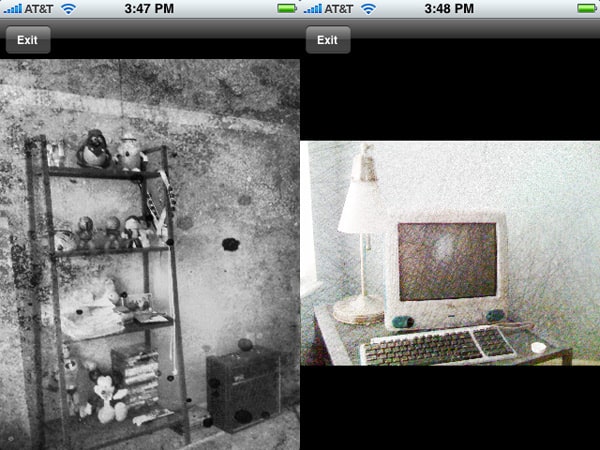
Review: GritPix, HiCon, and GothPix by Weburban LLC

Unfortunately, the apps do not let the user apply the filters to a saved image, limiting their usefulness. Once an image has been decided upon, each application applies a different filter to the image, saving it to the Camera Roll and displaying the resulting image to the user on a simple screen with an exit button. Images are saved in 1600×1200 resolution, the maximum possible resolution of the iPhone’s camera.


With nothing notably wrong with the functionality of any of these three applications — all three do exactly what they claim, and do so without any noticeable hang-ups, crashes, or other problems — the only issues are pricing and value.

When one considers that for the combined price of all three, they could purchase a more full-featured version of the same idea in CameraBag—which offers the ability to work with saved images—or spend an extra $2 and get filter capability along with more robust image adjustment tools, it’s hard to justify the $1 price per app here. Judging each on its own is more an evaluation of personal taste rather than technical merit, and each is likely to appeal to a different group of users. Because it’s hard for us to want to keep multiple apps around to perform one function with only slight differences, all three miss earning our recommendation; if they were combined into an app with the same or similar pricing, and the developer added the ability to apply the filters to saved images, it would be a better value.



Latest News
The AirPods Pro 3 is $20 Off
1 Min Read
Exynos 2600 Chip 2nm Process Revealed by Samsung
1 Min Read
New Celebrity Ad Campaign Featuring Travis Scott Released by Beats
1 Min Read
Australia Getting Hypertension Notification Feature
1 Min Read
The 14-inch MacBook Pro with M5 Chip 16GB RAM/512GB is $250 Off
1 Min Read
Noise and Static on AirPods Pro 3 Still Unfixed
1 Min Read
New iMac with 24-inch OLED Display May be Brighter With 600 Nits
1 Min Read
The 15-inch M4 MacBook Air 256GB Is $250 Off
1 Min Read
Internal Kernel Debug Kit from Apple Reveals Tests for a MacBook with A15 Chip
1 Min Read
Apple Currently In Talks With Suppliers for Chip Assembly & Packaging of iPhones in India
1 Min Read
Apple Allows Easier Battery Replacement For M5 MacBook Pro with 14-inch Display
1 Min Read
The Apple Watch SE 3 44mm GPS is $50 Off
1 Min Read

iLounge logo

iLounge is an independent resource for all things iPod, iPhone, iPad, and beyond. iPod, iPhone, iPad, iTunes, Apple TV, and the Apple logo are trademarks of Apple Inc.

This website is not affiliated with Apple Inc.
iLounge © 2001 - 2025. All Rights Reserved.
  • Contact Us
  • Submit News
  • About Us
  • Forums
  • Privacy Policy
  • Terms Of Use
Welcome Back!

Sign in to your account

Lost your password?








