
iLoungeiLounge
  • News
    • Apple
      • AirPods Pro
      • AirPlay
      • Apps
        • Apple Music
      • iCloud
      • iTunes
      • HealthKit
      • HomeKit
      • HomePod
      • iOS 13
      • Apple Pay
      • Apple TV
      • Siri
    • Rumors
    • Humor
    • Technology
      • CES
    • Daily Deals
    • Articles
    • Web Stories
  • iPhone
    • iPhone Accessories
  • iPad
  • iPod
    • iPod Accessories
  • Apple Watch
    • Apple Watch Accessories
  • Mac
    • MacBook Air
    • MacBook Pro
  • Reviews
    • App Reviews
  • How-to
    • Ask iLounge
Font ResizerAa
iLoungeiLounge
Font ResizerAa
Search
  • News
    • Apple
    • Rumors
    • Humor
    • Technology
    • Daily Deals
    • Articles
    • Web Stories
  • iPhone
    • iPhone Accessories
  • iPad
  • iPod
    • iPod Accessories
  • Apple Watch
    • Apple Watch Accessories
  • Mac
    • MacBook Air
    • MacBook Pro
  • Reviews
    • App Reviews
  • How-to
    • Ask iLounge
Follow US

Reviews

Reviews

Review: Griffin Technology Dock800 and Dock400 Cables

Last updated: May 16, 2021 8:58 am UTC
By Jeremy Horwitz
Review: Griffin Technology Dock800 and Dock400 Cables

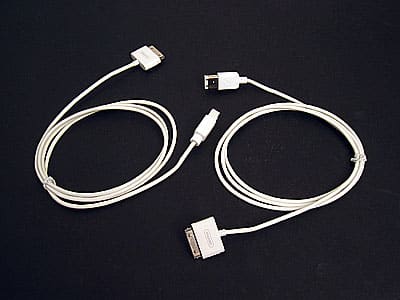
Pros: White, licensed FireWire-to-iPod Dock Connector cables for either typical FireWire (400) ports or high-speed FireWire (800) ports, at reasonable prices.


Cons: While affordable, neither cable is cheap. As accurately advertised, Dock800 offers no speed benefit, just the convenience of tapping an unused port for power and syncing.
Review: Griffin Technology Dock800 and Dock400 Cables

The only reason we’re reviewing Griffin Technology’s new ClearChoice Dock 800 Cable for Dock Connecting iPods ($19.99) is this: some high-end Mac owners will like them. At a time when Apple’s standard FireWire (aka FireWire 400) ports are widely viewed as having given way to USB 2.0 in Apple’s current and future plans, FireWire 800 ports are even less common – arguably almost irrelevant to 99% of the population.


They’re found only on Macintosh computers of recent vintage, and intended for super high-end data transfers – say, high-definition digital video that needs to be quickly transferred from tape to computer.

The good news is that since most Mac owners don’t use these FireWire 800 ports, they’re perfect places to keep cables connected for synchronizing and charging iPods. And we mean perfect. Dock 800 frees up a more precious USB or standard FireWire port for whatever you might need. Just like a standard FireWire cable, it will sync and charge your iPod at the same time when connected to a computer.


The bad news is that Griffin has said since the beginning that the Dock 800 Cable provides no other benefit in terms of transfer speeds over a standard FireWire cable – which Griffin incidentally now sells as a Dock 400 Cable ($14.99).

The Dock 400’s just like Apple’s cable and uses Apple-licensed parts, but sells for $4 less.


Review: Griffin Technology Dock800 and Dock400 Cables

Griffin’s claims about Dock 800 proved accurate in our testing: transfer speeds for 400 Megabytes worth of files were a mere one second apart between the Dock 800 and a standard Apple FireWire cable. This difference was almost certainly attributable to a brief iTunes pause at the beginning of the Apple cable’s transfer process, not anything in the cables themselves.

Our feelings about both cables are about the same. While there’s no reason to rush out and get a Dock 800 for performance reasons, if you have a Mac with an unused FireWire 800 port and didn’t get a FireWire cable with your (recent-model) iPod, it’s definitely a better purchase than one of Apple’s standard iPod cables – even for a $1 additional premium.



Latest News
The 14-inch MacBook Pro with M5 Chip 16GB RAM/512GB is $250 Off
1 Min Read
Noise and Static on AirPods Pro 3 Still Unfixed
1 Min Read
New iMac with 24-inch OLED Display May be Brighter With 600 Nits
1 Min Read
The 15-inch M4 MacBook Air 256GB Is $250 Off
1 Min Read
Internal Kernel Debug Kit from Apple Reveals Tests for a MacBook with A15 Chip
1 Min Read
Apple Currently In Talks With Suppliers for Chip Assembly & Packaging of iPhones in India
1 Min Read
Apple Allows Easier Battery Replacement For M5 MacBook Pro with 14-inch Display
1 Min Read
The Apple Watch SE 3 44mm GPS is $50 Off
1 Min Read
20th Anniversary iPhone May Launch in Two Years
1 Min Read
Better Image Generation Capabilities and Apple Music Integration Coming to ChatGPT
1 Min Read
A20 Pro Chip Coming to Next Gen iPad Mini OLED
1 Min Read
Amazon has the AirTag 4 Pack Marked $29 off
1 Min Read

iLounge logo

iLounge is an independent resource for all things iPod, iPhone, iPad, and beyond. iPod, iPhone, iPad, iTunes, Apple TV, and the Apple logo are trademarks of Apple Inc.

This website is not affiliated with Apple Inc.
iLounge © 2001 - 2025. All Rights Reserved.
  • Contact Us
  • Submit News
  • About Us
  • Forums
  • Privacy Policy
  • Terms Of Use
Welcome Back!

Sign in to your account

Lost your password?








