
iLoungeiLounge
  • News
    • Apple
      • AirPods Pro
      • AirPlay
      • Apps
        • Apple Music
      • iCloud
      • iTunes
      • HealthKit
      • HomeKit
      • HomePod
      • iOS 13
      • Apple Pay
      • Apple TV
      • Siri
    • Rumors
    • Humor
    • Technology
      • CES
    • Daily Deals
    • Articles
    • Web Stories
  • iPhone
    • iPhone Accessories
  • iPad
  • iPod
    • iPod Accessories
  • Apple Watch
    • Apple Watch Accessories
  • Mac
    • MacBook Air
    • MacBook Pro
  • Reviews
    • App Reviews
  • How-to
    • Ask iLounge
Font ResizerAa
iLoungeiLounge
Font ResizerAa
Search
  • News
    • Apple
    • Rumors
    • Humor
    • Technology
    • Daily Deals
    • Articles
    • Web Stories
  • iPhone
    • iPhone Accessories
  • iPad
  • iPod
    • iPod Accessories
  • Apple Watch
    • Apple Watch Accessories
  • Mac
    • MacBook Air
    • MacBook Pro
  • Reviews
    • App Reviews
  • How-to
    • Ask iLounge
Follow US

Reviews

Reviews

Review: Griffin StudioConnect for iPad

Last updated: May 16, 2021 4:27 pm UTC
By Jesse Hollington
Review: Griffin StudioConnect for iPad

For many amateur and professional musicians alike, the iPad has become an extremely convenient and versatile device for handling a variety of music recording and composition needs. The portability of the device combined with its intuitive touch screen interface has created a market for a wide range of apps that allow musicians to easily manipulate controls and adjust settings when recording and mixing both studio and live performances, and the analog audio and Core MIDI recording and playback capabilities in iOS have allowed the iPad to integrate into a digital studio alongside other equipment ranging from microphones and guitars to keyboards and MIDI sequencers.

Review: Griffin StudioConnect for iPad

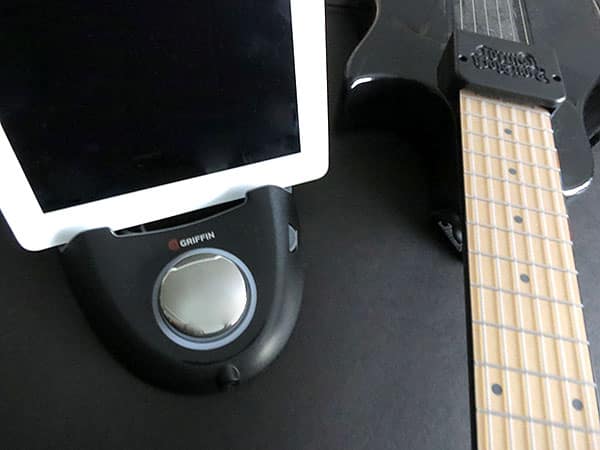
Griffin’s new StudioConnect ($150) is the company’s new flagship audio accessory for iPads, designed to facilitate connection with both analog audio and MIDI components in a single accessory. Borrowing its general shape from the earlier Loop stand, StudioConnect combines a unique dock, MIDI and guitar connectors, and dual monitoring options into an attractive, streamlined product.


Review: Griffin StudioConnect for iPad

StudioConnect is made from a mix of matte and glossy black plastics with an integrated stand that can support the iPad in either portrait or landscape orientations—an important feature for an accessory designed to be used in a studio environment where easy access and visibility of the iPad while performing other tasks is necessary. A flexible Dock Connector cable connects to the iPad in both standard portrait or either landscape orientation and charges the iPad using power from the included wall adapter. Both the docking area and the Dock Connector plug are highly case-compatible as well; most users should be able to simply drop their iPad in without having to worry about taking it out of the case, and then simply disconnect the iPad and walk away when they’re done.


Review: Griffin StudioConnect for iPad

In front of the iPad docking area is a prominent chrome volume dial and a 3.5mm headphone port for previewing the audio output from whatever recording or mixing app is being used. RCA-style stereo outputs on the rear provide a line-level output, unaffected by the front volume dial, for connecting to speakers or to an external mixing or recording deck. The rear of the device also includes a monaural 1/4” high impedance input jack designed for connecting an electric or bass guitar alongside a stereo 3.5mm audio input port for a standard audio source such as an external mixing board. A gain control on the side allows for adjustment of levels from the analog audio inputs. When connected, audio output from the iPad is sent via the StudioConnect instead of the internal speaker, meaning users will need to connect their own headphones or speakers directly to the device to monitor recording or playback.


Review: Griffin StudioConnect for iPad

In addition to support for analog input and output, StudioConnect also provides two standard Musical Instrument Digital Interface (MIDI) ports. The MIDI IN port allows for a connection to an external MIDI source such as a keyboard or MIDI controller deck while the MIDI OUT port can be used to send MIDI signals to an external MIDI playback or recording device such as a sound machine or sequencer.

A MIDI THRU port is unfortunately not provided here—an omission that will probably not concern most users, but may affect those with more sophisticated studio configurations. It’s also worth noting, however, that some iOS apps can provide a Soft-THRU mode, effectively passing all Core MIDI data through the MIDI OUT port in unmodified form for sending along to another sequencer or patch bank.



For those who might not know the background details, here’s a brief primer. The Musical Instrument Digital Interface standard, more commonly known as MIDI, enables accessories such as electronic piano keyboards, synthesizers, and drum machines to interface with each other and computer software for recording and editing of compositions. Rather than sending out actual audio streams, MIDI devices operate by sharing digital information—notes, tempos, sound references, and volume levels—with one another. This information can be recorded and played back on MIDI hardware, or edited using a number of desktop computer applications. MIDI has also been expanded beyond traditional music and audio to include a wide array of other studio and performance equipment, such as stage lighting systems. Prior to the introduction of Core MIDI in November 2010, accessory manufacturers—and software developers—had to build proprietary MIDI solutions for iOS devices.

Latest News
The 14-inch MacBook Pro with M5 Chip 16GB RAM/512GB is $250 Off
1 Min Read
Noise and Static on AirPods Pro 3 Still Unfixed
1 Min Read
New iMac with 24-inch OLED Display May be Brighter With 600 Nits
1 Min Read
The 15-inch M4 MacBook Air 256GB Is $250 Off
1 Min Read
Internal Kernel Debug Kit from Apple Reveals Tests for a MacBook with A15 Chip
1 Min Read
Apple Currently In Talks With Suppliers for Chip Assembly & Packaging of iPhones in India
1 Min Read
Apple Allows Easier Battery Replacement For M5 MacBook Pro with 14-inch Display
1 Min Read
The Apple Watch SE 3 44mm GPS is $50 Off
1 Min Read
20th Anniversary iPhone May Launch in Two Years
1 Min Read
Better Image Generation Capabilities and Apple Music Integration Coming to ChatGPT
1 Min Read
A20 Pro Chip Coming to Next Gen iPad Mini OLED
1 Min Read
Amazon has the AirTag 4 Pack Marked $29 off
1 Min Read

iLounge logo

iLounge is an independent resource for all things iPod, iPhone, iPad, and beyond. iPod, iPhone, iPad, iTunes, Apple TV, and the Apple logo are trademarks of Apple Inc.

This website is not affiliated with Apple Inc.
iLounge © 2001 - 2025. All Rights Reserved.
  • Contact Us
  • Submit News
  • About Us
  • Forums
  • Privacy Policy
  • Terms Of Use
Welcome Back!

Sign in to your account

Lost your password?








