
iLoungeiLounge
  • News
    • Apple
      • AirPods Pro
      • AirPlay
      • Apps
        • Apple Music
      • iCloud
      • iTunes
      • HealthKit
      • HomeKit
      • HomePod
      • iOS 13
      • Apple Pay
      • Apple TV
      • Siri
    • Rumors
    • Humor
    • Technology
      • CES
    • Daily Deals
    • Articles
    • Web Stories
  • iPhone
    • iPhone Accessories
  • iPad
  • iPod
    • iPod Accessories
  • Apple Watch
    • Apple Watch Accessories
  • Mac
    • MacBook Air
    • MacBook Pro
  • Reviews
    • App Reviews
  • How-to
    • Ask iLounge
Font ResizerAa
iLoungeiLounge
Font ResizerAa
Search
  • News
    • Apple
    • Rumors
    • Humor
    • Technology
    • Daily Deals
    • Articles
    • Web Stories
  • iPhone
    • iPhone Accessories
  • iPad
  • iPod
    • iPod Accessories
  • Apple Watch
    • Apple Watch Accessories
  • Mac
    • MacBook Air
    • MacBook Pro
  • Reviews
    • App Reviews
  • How-to
    • Ask iLounge
Follow US

Reviews

Reviews

Review: Griffin iTrip AutoPilot

Last updated: May 15, 2021 2:44 pm UTC
By Jeremy Horwitz
Review: Griffin iTrip AutoPilot

Having only recently reviewed Griffin’s iTrip Auto with SmartScan, a good but not great FM transmitter and car charger released early this year for iPods, we don’t feel it necessary to rehash all of the details for today’s review of iTrip AutoPilot ($100) — a newly revised, iPhone- and iPod-compatible version. But there’s no question that iTrip AutoPilot is a substantially better product, limited only by a price tag that makes it as expensive as cabled FM transmitters get.

Review: Griffin iTrip AutoPilot

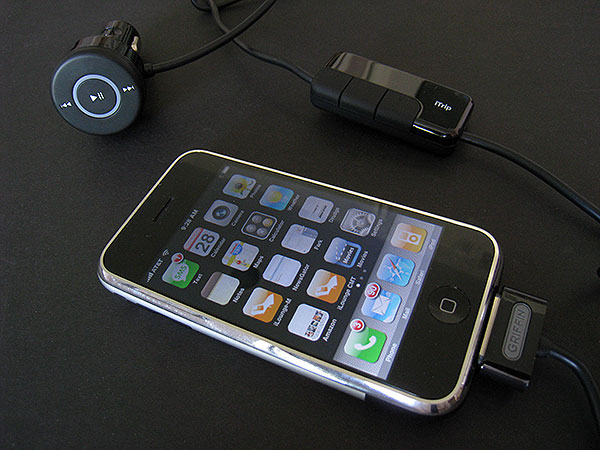
iTrip AutoPilot starts with two familiar pieces taken from iTrip Auto, first a Dock Connector cable, and then an FM transmitter that has been newly packaged in a mirror-less dark plastic box that makes the bright OLED display inside easier to see. While this transmitter’s generally the same in functionality as the last version, with three buttons that change features based on the menu you’re in, it’s now shielded from iPhone audio interference. Under some circumstances, it also features the ability to broadcast the current song and artist text information from your iPod or iPhone to the screen of a car radio using RDS text.


Review: Griffin iTrip AutoPilot

There are two things that make iTrip AutoPilot a better than average companion for in-car iPod or iPhone listening. First, there’s a tuning feature called SmartScan, which like many recent competing FM transmitters automatically scopes out empty stations on the radio dial; unlike competitors, iTrip AutoPilot does a very good job of finding clear stations, and then transforming them into presets for the unit’s integrated buttons.


Review: Griffin iTrip AutoPilot

iTrip AutoPilot also has some transmitter-specific features that can improve the sound of your iPod or iPhone’s audio, including a SmartSound audio optimizer, plus monaural and stereo broadcasting modes. Experimenting with these features, found in a three-button menu with a Griffin logo at center, can be used to make iTrip AutoPilot sound significantly better than its competitors, but if the settings aren’t optimal, it will sound as good as its best rivals, not better.


Review: Griffin iTrip AutoPilot

Review: Griffin iTrip AutoPilot

The other new part of iTrip AutoPilot is “AutoPilot,” which was previously sold as a separate, FM transmitter-less car charger that had some interesting features. First was a set of three remote control buttons that let you pause and change tracks on an iPhone or iPod; second was a multicolored charge indicator ring, and third was an audio output port. In iTrip AutoPilot, you get the charger, the multicolored charge indicator ring, and the remote control buttons, but not the line-out port.


Review: Griffin iTrip AutoPilot

Some users will find that AutoPilot’s buttons don’t add much—we’d prefer a true steering wheel-mounted remote control—but both the iPhone and iPod touch do benefit from them, enabling you to quickly change or pause tracks without needing to unlock or fidget with their touchscreens.



Latest News
The Apple Watch Series 11 46mm GPS Is $100 Off
1 Min Read
Clamshell Style iPhone Being Looked Into By Apple
1 Min Read
Foldable iPhones May Have the Largest Battery Ever
1 Min Read
Apple and TSMC’s 10-Year Collaboration May Be Ending
1 Min Read
The 13-inch M5 iPad Pro 256GB Wi-Fi Is $149 Off
1 Min Read
M5 Pro and M5 Max Chips for the MacBook Pro could Roll Out with macOS 26.3
1 Min Read
Mac Ordering Process Revamped
1 Min Read
Check Signed By Steve Wozniak and Steve Jobs Sold For $2.4 Million
1 Min Read
The Anker 140W 4-Port GaN USB-C Charger is $35 Off
1 Min Read
No iPhone Air 2 This Year, according to Latest Report
1 Min Read
New Report Corroborates Split iPhone Release Dates
1 Min Read
Apple Losing More Researchers As They Plan To Release 2 Siri Versions
1 Min Read

iLounge logo

iLounge is an independent resource for all things iPod, iPhone, iPad, and beyond. iPod, iPhone, iPad, iTunes, Apple TV, and the Apple logo are trademarks of Apple Inc.

This website is not affiliated with Apple Inc.
iLounge © 2001 - 2025. All Rights Reserved.
  • Contact Us
  • Submit News
  • About Us
  • Forums
  • Privacy Policy
  • Terms Of Use
Welcome Back!

Sign in to your account

Lost your password?








