
Most of Griffin’s recent upgrades to its iTrip line of FM transmitters have been bigger and more expensive versions, but the two we review today buck that trend. iTrip Universal ($40) is a battery-powered, USB stick-sized version that transmits audio from the headphone port of any iPod to an FM radio, and the 2008 version of iTrip Auto ($60) combines a highly similar FM transmitter with a car charging and iPod Dock Connecting cable. Both are welcome additions to the iTrip family, though each one has a caveat or two that’s worth noting. Updated January 30, 2009: Following our October 16, 2008 initial review, we have added details on a third version, iTrip Auto for iPhone ($70), which was released in late 2008.
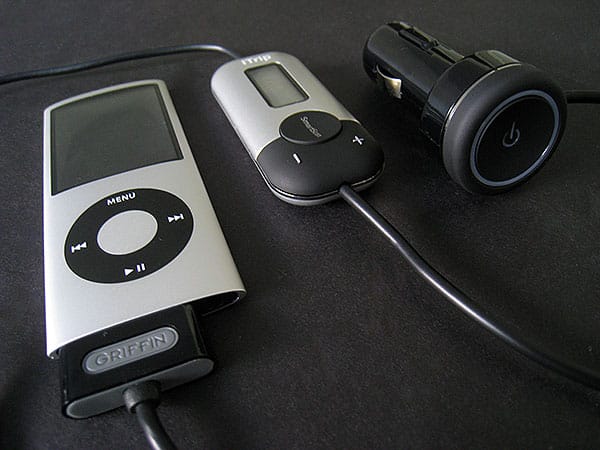
iTrip Auto is, like Universal, surprisingly stripped down from recent iTrip offerings. Back in January, Griffin released a similar $80 product called iTrip Auto with SmartScan, following it up in June with an even more complex version called iTrip AutoPilot, each with sophisticated on-screen menus. iTrip Auto takes the opposite approach. You get the same simple display as on Universal, plus three buttons: manual tune up, manual tune down, and instead of a Presets button, you get SmartScan.

Press the SmartScan button and iTrip Auto will find the clearest local radio station and set itself to broadcast there; you just need to tune your radio to match.
As in prior Griffin SmartScan products, this feature worked reliably to find clear stations. If you hold the SmartScan button, iTrip Auto lets you toggle between four presets; hold the two tuning buttons together and you can select monaural or stereo modes, as well as U.S. or “International” modes, the latter offering access to Japanese frequencies.
What’s interesting about iTrip Auto is that it doesn’t look as austere as Universal. The silver and black plastic casing has small silver metallic touches, and parrots the rear industrial design of the discontinued original iPhone. This is interesting both because the casing looks nice, and because iTrip Auto isn’t an iPhone-certified transmitter; though it works with a nag screen for iPhone 3G charging and audio-out, it’s labelled only for iPod use. Everything else in the Auto design is black plastic, including the charging bulb, which has a power button to keep the unit from drawing power from your car when not in use, illuminated with a light that glows to let you know how the connected iPod’s battery is charging.

There weren’t any major surprises in the audio performance of either of these transmitters. Like Griffin’s other recent iTrips, we’d describe the aggregate audio performance of both units as well above average, with low static and relatively clear, full-bodied sound, particularly when they’re placed in monaural mode and tuned to a clear station. There’s no need for any volume adjustment on iTrip Auto, but we noted that unlike Universal, there was a quiet but high-pitched squeal in its audio that could only be heard in silences—when music wasn’t playing.
The sound was otherwise very good.

These are two different types of products for different users. iTrip Universal is the go anywhere, use with anything FM transmitter that is limited solely by the life of its battery and your need to calibrate your iPod’s volume level to make the most of its output. The 2008 iTrip Auto is the car-only, docking iPod-only transmitter that sells for a very reasonable price, looks good, and offers simplified station tuning, but has a little whine in the audio that could stand to be removed. That noise is the only reason it didn’t rate a high recommendation. Though the price is right on each of these accessories, we’d give the slight edge on rating to Universal because of its comparative novelty and audio performance, but if you’re looking for a reasonably priced charger and FM transmitter, the latest iTrip Auto is a very good option, too.

Updated January 30, 2009: When Apple announced the iPhone, it knew—without question—that its decision to include the iPod’s four-year-old bottom Dock Connector would come with benefits and consequences. Some old iPod accessories would work. Others would not work at all. And still others would sort of work, but ultimately require developers to re-engineer everything from wiring to components, releasing similar but not identical versions that performed properly.











