
Pros: Hard plastic cases for the fifth-generation iPod and second-generation iPod nano, each including a clear front shell and a partially frosted, partially see-through iPod-specific back shell, plus three novel inserts that can be used to add a mirror, frame, or image to the back of your iPod. Simple but effective design allows full access to iPod’s control areas, and allows connection of many bottom-mounting accessories, particularly in the 5G version.
Cons: Clear, hard plastic is likely to accumulate scratches. Click Wheel and 5G iPod’s bottom exposed full time; iPod nano’s top and bottom are both exposed. No included belt clip or other carrying accessories.
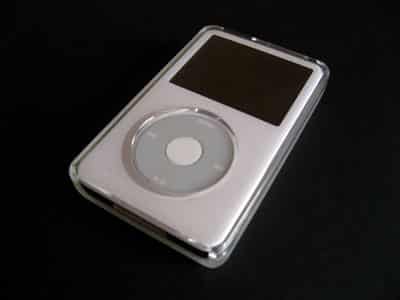
Innovatively expanding upon its earlier, me-too iClear cases for the fifth-generation iPod and iPod nano, Griffin Technology’s new iClear Photo cases add one new element – a user-selectable insert – to the prior two-piece clear hard plastic design. If you want to insert one of the three included inserts, you can add a mirror, a black frame, or a piece of art to the back of your iPod ($25) or iPod nano ($20); Griffin’s intent is for users to be able to add their own cut-down photographs, as an alternative. The iPod nano version is made solely for second-generation nanos; the iPod version works with 30GB, 60GB, and 80GB iPods thanks to a set of two semi-clear, semi-frosted back plates and a clear front plate.
Last year, Griffin released iClear (iLounge rating: B), a series of simple clear hard plastic cases for fifth-generation iPods and iPod nanos; this year, the company has introduced iClear Photo for iPods ($25) and second-generation nanos ($20), an enhanced edition. (Note: iClear Photo was previously named iClear Custom.) As before, iClear Photo for 5Gs includes a transparent front shell and two interchangeable frosted rear shells, one for 30GB iPods and one for 60 or 80GB iPods, while the iPod nano version’s single front and single rear shell fit any second-generation nano, regardless of capacity. In each case, the rear shell has a tiny molded-in gap just large enough for you to insert a trimmed-down photograph of your choice, or one of three included cards: a mirror, a clear card with a thick black frame, or a piece of sample artwork.
In other words, you can customize this version of iClear to let your iPod’s back look the way you want it – a feature we haven’t seen before in any iPod case. Our updated review, based upon our prior iClear review, follows.

As with iClear, iClear Photo’s simple design, construction, and material choices help it to score well in the Build Quality category. In both the 5G and nano versions, all of its holes line up properly with the iPod controls underneath, the two halves of the case are cleanly molded, and they mate tightly together. The only loss in this category is common to nearly all clear hard cases: scratching. Whereas iClear’s back surface is entirely frosted, and effective in preventing scratches from showing up, iClear Photo’s rear is largely transparent with only frosted edges, and the case’s front shell is completely transparent; both accumulate unsightly scratches over time. We’ve also noticed that Photo’s card inserts are relatively easy to scratch, so you’re best off keeping them inside the rear casing or equally well-protected outside.


Like iClear, iClear Photo scores high in the Ease of Use category, as each of the iPod’s key areas are fully accessible. On the 5G version, the hole in the case for the Hold switch is large enough so that even users with large fingers can easily toggle the switch, and – thankfully – the hole for the headphone plug is large enough to accept many of our larger third-party headphones. The nano version loses a point because its headphone port hole isn’t large enough for oversized headphones. The bottoms of the iClear and custom cases differ by model: in both cases, the 5G’s bottom is almost entirely uncovered, enabling most bottom-mounting iPod accessories to connect without removing the case.
Additionally, Griffin chose to design the bottom opening such that it lies flush with the iPod’s bottom surface. This further helps with accessory compatibility, and even allows the iClear to work with an Apple Universal Dock without an adapter. By comparison, the nano version recesses the Dock Connector beneath the same lip of plastic that precludes oversized headphones from working with the headphone port; it also prevents many bottom-mounting accessories, except ones with Apple-thin plugs and cables, from working. For that reason, the nano version of iClear Photo rates an 8 to the 5G’s 10 points. We did not deduct points for one factor worth noting: the cases aren’t always easy to remove, and you may actually need to follow Griffin’s instructions and insert something between the two shell layers to pry them open. The cases are secure, but not the best we’ve seen if you need to pull them off of any reason.


iClear Photo may lack for carrying pack-ins – there’s no lanyard, belt clip, or carabineer hook – but it does score a few points for its major novelty, the three packed-in rear surface changers. For the first time, second-generation iPod nano owners can regain the mirrored backing that was lost in the transition from plastic and steel to anodized aluminum, and fifth-generation iPod owners can insert fairly large photographs, pieces of artwork, or Griffin’s simple included items. Of course, 5G owners can add the full-sized mirror, and nano owners can use Griffin’s items or self-created imagery, but the mirror’s not as unique to the already-mirrored 5G, and pictures really need to be trimmed down for the nano. Regardless, you get your choice of looks with these cases, and that’s a cool new idea.


As with iClear, iClear Photo scores only modestly in the protection category, primarily due to its concentration on ease of use.











