
As challenging as it is for developers to create truly great apps for kids, additional talents are required to create child-specific accessories — particularly ones that can justify asking prices higher than the App Store’s currently sub-$2 average asking price. Thanks to its partnership with Crayola, Griffin Technology has fared better than most companies, releasing everything from the ColorStudio HD/iMarker stylus package to several crayon-themed earphones and DigiTools packs. Its latest effort is the Crayola Light Marker ($30), a fun and different accessory from these prior releases: it looks like a large Crayola marker, but works like a magic wand, enabling kids to interact with an iPad’s screen from between two and three feet away.
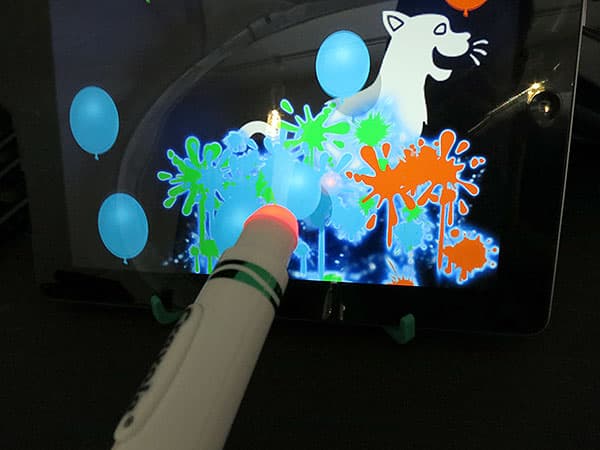
While the Light Marker is the star item in Griffin’s package, it ships with a couple of required components, and without one other thing you’ll need. In the box are one Light Marker and one AA battery, plus a flat-folding green stand to hold your iPad upright. Without the battery, Light Marker won’t work, and without the stand, you’ll have to figure out some other way to keep your iPad’s screen close to vertical. The accessory can be used with an iPad laying on a table or lap, but these positions will feel unnatural, and arm fatigue will likely set in quickly. Griffin regrettably leaves one thing out of the package: a way to easily insert and swap batteries. You’ll need to self-supply a small Philips head screwdriver to open the Light Marker for battery insertion, then re-seal it with the screwdriver, a modest inconvenience.

Once the battery is installed, the Light Marker is ready—and surprisingly easy—to use.
A silver rear power button activates a glowing red light in the tip, while a second, Crayola-marked action button on the marker’s side temporarily turns the tip green. Since the Light Marker doesn’t contain any wireless hardware, there’s no Bluetooth or Wi-Fi pairing process to worry about; instead, you need to optically calibrate the tip with the iPad’s front-facing camera each time you load the Light Marker app. This requires nothing more than bringing the glowing tip into direct physical contact with the camera for a couple of seconds, letting the camera measure the color level. Any child in the Light Marker’s three-or-older age group will be able to do this, and it should be noted that the accessory works equally well with full-sized iPads and iPad minis; the camera-less first-generation iPad is obviously not supported.

Like Sony’s PlayStation Move controllers, Light Marker leverages the iPad’s front camera to track the glowing tip’s location, translating the tip’s motions into movement of a red on-screen dot cursor. To Griffin’s considerable credit, the technology works far better than one might guess given the wide variety of positions a marker can be improperly held in by children, and when held correctly, the motion tracking is so accurate that you can draw and color with roughly as much precision as a similarly-sized marker. The key limitations and challenges are in the marker’s proximity to the camera and iPad: again, the required distance is between two and three feet away, without the marker moving so far afield of the front camera that the tip can’t be seen. In the event that you get too close or far, an on-screen reminder will tell you which way you should be moving; should you move outside of the camera’s view, the red cursor dot will disappear until you position it properly within the window again. It’s also worth noting that tracking accuracy diminishes a bit if the marker’s held limply or otherwise considerably off-angle; Light Marker works best when it’s pointed straight at the screen and waved like a wand.

Griffin’s free Crayola Light Marker app is a very nicely developed but somewhat shallow collection of games designed to be fun to use with the accessory.
Dot to Dot lets kids connect dots—one new dot at a time—with wiggly lines that are auto-corrected to correctly form constellation-like shapes. Splatter Paint lets kids pop balloons to fill a shape with colors; Hide ‘n Seek turns the marker into a flashlight to discover items hidden in dark rooms, and Puzzles lets kids choose from three difficulty levels of puzzles to assemble with drag and drop gestures. Each of these activities is overly limited in replay value by the number of included designs, but otherwise actually pretty fun.


Additionally, the app includes Coloring Pages and Free Draw sections, each enabling kids to enjoy traditional Crayola drawing and painting activities using the Light Marker. In the Coloring Pages, young kids will find the bucket-style fill tool particularly useful to completely color shapes within the pre-assembled black and white images, but there are plenty of other crayon, marker, and similar tools to choose from—even including numerous colors and several tip sizes. Most of these tools can also be used in the Free Draw section to create and share art.


Perhaps the biggest issue undermining Light Marker’s value is the indirect nature of its interaction with a device that is very close to excellent for direct on-screen touching. As we noted during our testing with a nearly five-year-old child, users will subconsciously wonder why they’re trying to draw or paint with a marker two or three feet away when they can just touch the screen directly.











