
One of the great things about the iPad 2 is the wide variety of places where it can be used — everywhere from the couch to the coffee shop to work. In some situations, though, it’s hard to physically juggle the tablet along with everything else, especially while you’re standing. For that reason a handful of manufacturers have introduced cases with integrated handles that are meant to make one-handed operation easier. Griffin’s entry into this category is AirStrap ($50), a sequel to its model for the original tablet. AirStrap challenges Hub International’s HandStand, a product we previously reviewed and liked, except for its bizarre obstruction of the iPad 2’s microphone hole. Overall, Griffin’s design winds up tying Hub International’s, but each product has different strengths and weaknesses.
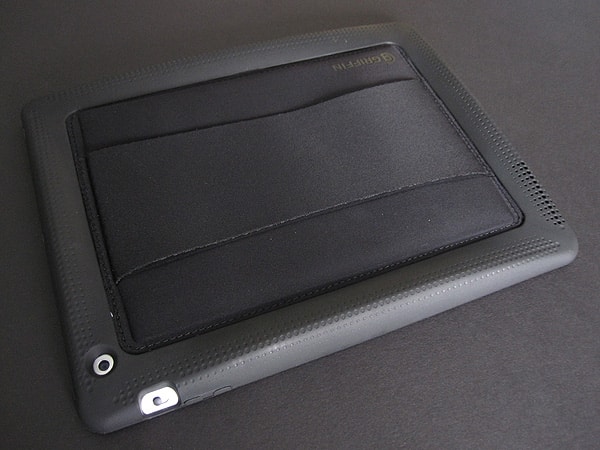
AirStrap is composed of an inch-wide dimpled, hard rubber frame surrounding a padded neoprene center. It fits snugly around the iPad 2 and comes over the bezel just a bit. The fit is very tight, which has the positive characteristic of holding the iPad 2 firmly in place, but the negative of interfering with screen protector films, causing them to bubble up at the corners.
Each of the four edges is curved upward, providing handles if you choose to hold the device in either portrait or landscape orientation.


There are cutouts along the top for the headphone port and microphone. Likewise, the rear camera, side switch, and Dock Connector port are exposed. All of the openings are quite tight and may inhibit the use of certain oversized accessories, but they work properly with Apple’s Earphones and Dock Connector cables, as well as similarly ultra-thin third-party offerings. At the bottom of the case there are a series of holes for the speaker that leave it protected but still functional. The Sleep/Wake button and volume rocker are both covered by the rubber. Because of the thickness of the material a firmer press than normal is required to use them.


Griffin’s strap runs the length of the neoprene center and is made of the same material, although it is not padded. Three inches at its widest, it has parallel concave edges and comes to about two and a half inches in the middle.
Lining the underside of the strap are rubber dots that provide some grip—some people may find them a bit irritating, however. The band has very little give so users with larger hands may feel an uncomfortable tightness, an issue that has persisted from the original AirStrap. Using a more flexible material would have solved this issue. People with long fingers should be able to curl them around either raised edge; others will have no option but to let them lay flat against the back, adding to the discomfort.


Another of our concerns with AirStrap is the use angle. As the strap cannot be adjusted, the user must move his or her wrist to get the appropriate iPad position. We found this to be an unnatural and uncomfortable angle in both landscape or portrait orientations, a problem that only intensifies with extended use. HandStand is more successful in this regard because it can be rotated to whatever position necessary. Another potential issue, and one that we saw firsthand with the original model, is overall degradation of the neoprene over time.











