
iLoungeiLounge
  • News
    • Apple
      • AirPods Pro
      • AirPlay
      • Apps
        • Apple Music
      • iCloud
      • iTunes
      • HealthKit
      • HomeKit
      • HomePod
      • iOS 13
      • Apple Pay
      • Apple TV
      • Siri
    • Rumors
    • Humor
    • Technology
      • CES
    • Daily Deals
    • Articles
    • Web Stories
  • iPhone
    • iPhone Accessories
  • iPad
  • iPod
    • iPod Accessories
  • Apple Watch
    • Apple Watch Accessories
  • Mac
    • MacBook Air
    • MacBook Pro
  • Reviews
    • App Reviews
  • How-to
    • Ask iLounge
Font ResizerAa
iLoungeiLounge
Font ResizerAa
Search
  • News
    • Apple
    • Rumors
    • Humor
    • Technology
    • Daily Deals
    • Articles
    • Web Stories
  • iPhone
    • iPhone Accessories
  • iPad
  • iPod
    • iPod Accessories
  • Apple Watch
    • Apple Watch Accessories
  • Mac
    • MacBook Air
    • MacBook Pro
  • Reviews
    • App Reviews
  • How-to
    • Ask iLounge
Follow US

Reviews

Reviews

Review: Gesture by Big Stone Phone

Last updated: May 13, 2021 6:56 am UTC
By Charles Starrett
Review: Gesture by Big Stone Phone

This review originally appeared within iLounge’s iOS Gems series within the compilation article, iPhone Gems: Every Drawing Application, Reviewed. Additional details may be found in the original article.


Unlike basically every other application in this article, Gesture ($5) is focused on artistic image manipulation.
Review: Gesture by Big Stone Phone

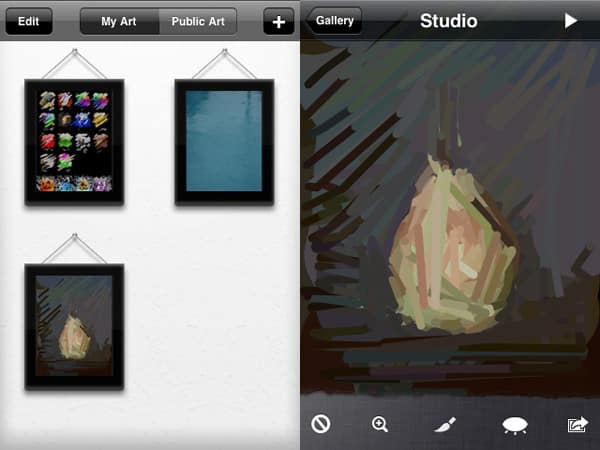
As such, users are first brought to a screen showing their works in frames, with options at the top for viewing the user’s art or art created and uploaded by other Gesture users, an edit button for deleting drawings, and an add button for creating a new painting based on an image from the user’s photo library.

In the image editing view, users are presented with buttons for undo, zoom in/out, brush size, show/hide the original image, and an action button. This lets the user save the image to his photo library, share it on the app’s user submission area, and pointilize the original image.


Since the application is meant as a tool for making artistic interpretations of existing images, users cannot select the line color — the app automatically selects the color based on the original image, letting the user focus on technique.

We seriously considered removing Gesture from this article since it doesn’t allow the user to actually draw anything from scratch; it remains here only due to the likelihood of it being confused with a real drawing/painting application. For what it’s worth, Gesture is a fairly powerful application in its own right, and potentially worth the purchase for fans of Corel Painter.



Latest News
The AirPods Pro 3 is $20 Off
1 Min Read
Exynos 2600 Chip 2nm Process Revealed by Samsung
1 Min Read
New Celebrity Ad Campaign Featuring Travis Scott Released by Beats
1 Min Read
Australia Getting Hypertension Notification Feature
1 Min Read
The 14-inch MacBook Pro with M5 Chip 16GB RAM/512GB is $250 Off
1 Min Read
Noise and Static on AirPods Pro 3 Still Unfixed
1 Min Read
New iMac with 24-inch OLED Display May be Brighter With 600 Nits
1 Min Read
The 15-inch M4 MacBook Air 256GB Is $250 Off
1 Min Read
Internal Kernel Debug Kit from Apple Reveals Tests for a MacBook with A15 Chip
1 Min Read
Apple Currently In Talks With Suppliers for Chip Assembly & Packaging of iPhones in India
1 Min Read
Apple Allows Easier Battery Replacement For M5 MacBook Pro with 14-inch Display
1 Min Read
The Apple Watch SE 3 44mm GPS is $50 Off
1 Min Read

iLounge logo

iLounge is an independent resource for all things iPod, iPhone, iPad, and beyond. iPod, iPhone, iPad, iTunes, Apple TV, and the Apple logo are trademarks of Apple Inc.

This website is not affiliated with Apple Inc.
iLounge © 2001 - 2025. All Rights Reserved.
  • Contact Us
  • Submit News
  • About Us
  • Forums
  • Privacy Policy
  • Terms Of Use
Welcome Back!

Sign in to your account

Lost your password?








