
iLoungeiLounge
  • News
    • Apple
      • AirPods Pro
      • AirPlay
      • Apps
        • Apple Music
      • iCloud
      • iTunes
      • HealthKit
      • HomeKit
      • HomePod
      • iOS 13
      • Apple Pay
      • Apple TV
      • Siri
    • Rumors
    • Humor
    • Technology
      • CES
    • Daily Deals
    • Articles
    • Web Stories
  • iPhone
    • iPhone Accessories
  • iPad
  • iPod
    • iPod Accessories
  • Apple Watch
    • Apple Watch Accessories
  • Mac
    • MacBook Air
    • MacBook Pro
  • Reviews
    • App Reviews
  • How-to
    • Ask iLounge
Font ResizerAa
iLoungeiLounge
Font ResizerAa
Search
  • News
    • Apple
    • Rumors
    • Humor
    • Technology
    • Daily Deals
    • Articles
    • Web Stories
  • iPhone
    • iPhone Accessories
  • iPad
  • iPod
    • iPod Accessories
  • Apple Watch
    • Apple Watch Accessories
  • Mac
    • MacBook Air
    • MacBook Pro
  • Reviews
    • App Reviews
  • How-to
    • Ask iLounge
Follow US

Reviews

Reviews

Review: Gear4 PocketParty V2 Micro Speaker System

Last updated: May 16, 2021 12:56 am UTC
By Jeremy Horwitz
Review: Gear4 PocketParty V2 Micro Speaker System

Pros: A good-looking pocket-sized speaker that mounts on any Dock Connecting iPod, including nanos and 5Gs, providing more than adequate sound and volume for its size. Powered by its own AA battery for 10 hours.


Cons: iPod has to lay on back when in use. Only two volume control positions, neither of which is really quiet. Left and right stereo channels are reversed, and left channel is inaudible in speaker’s “low” volume setting.
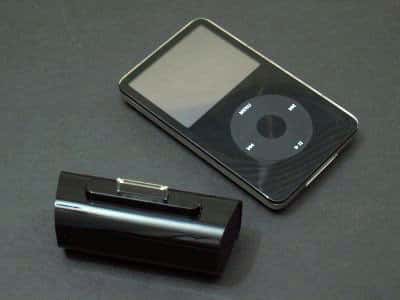
Review: Gear4 PocketParty V2 Micro Speaker System

This new version of Gear4’s (formerly PodGear) PocketParty connects to the bottoms of iPods rather than their tops, but does not feature a stand like the one used with PocketParty nano, and so cannot stand up while the iPod’s attached. Rather than a volume knob, a new two-position audio switch on each PocketParty V2’s rear lets you toggle betweeen high and low volume levels.


Back when Macally released its PodWave/AP-A111 (iLounge rating: A-) and PodGear (now Gear4) released PocketParty (iLounge rating: A-), we were pretty enthusiastic about the idea of an inexpensive, pocket-sized speaker system with just enough horsepower for two- or three-person listening. Each of these devices sat neatly on each iPod’s top, and the iPods could stand up while the speakers were plugged in.

Changes to recent iPods, however, have wreaked havoc with these devices: Apple’s decision to move iPod nano’s headphone port to its bottom, and the 5G’s port to its far right side, have made new pocket speakers all but necessary.


So Gear4 has taken up the revision challenge, first with PocketParty for iPod nano (iLounge rating: A-), and now this: the PocketParty V2 Micro Speaker System for Dock Connecting iPods (£25/approx. $45). In concept, these accessories should be rated near-identically: Gear4 uses the same general, attractive white- or black-colored chassis, preserves the same price point, and sounds basically the same. They both include a simple on-off switch, mounted on their bottom sides, and use a single AA battery for roughly 10 hours of playback.


Review: Gear4 PocketParty V2 Micro Speaker System

There are only three problems, one worse than the others. PocketParty V2 connects to an iPod’s Dock Connector port rather than its headphone port, which means that it’s always going to mount on an iPod’s bottom rather than its top. This wouldn’t be a problem if Gear4 repeated the smart decision it made with PocketParty for iPod nano, stabilizing the speakers’ bottom so that an iPod could stand up with the accessory attached.

Unfortunately, it hasn’t, so iPods have to be laid down on their backs when connected. If you don’t mind craning your neck to see the iPod’s screen, this won’t bother you, but in our view the company’s prior speakers were better in this regard.

Review: Gear4 PocketParty V2 Micro Speaker System

Second, connecting to an iPod’s Dock Connector has a known limitation: unlike the headphone port, you can’t use the iPod’s controls to change the Dock Connector’s output volume. For that reason, basically every company with a Dock Connector audio accessory includes dynamic volume controls. Gear4 hasn’t. Instead, it mounts a tiny two-position switch on V2’s back, labeled with plus and minus marks. “Minus” is low volume – roughly 70% on the iPod’s volume slider.



Latest News
The AirPods Pro 3 is $20 Off
1 Min Read
Exynos 2600 Chip 2nm Process Revealed by Samsung
1 Min Read
New Celebrity Ad Campaign Featuring Travis Scott Released by Beats
1 Min Read
Australia Getting Hypertension Notification Feature
1 Min Read
The 14-inch MacBook Pro with M5 Chip 16GB RAM/512GB is $250 Off
1 Min Read
Noise and Static on AirPods Pro 3 Still Unfixed
1 Min Read
New iMac with 24-inch OLED Display May be Brighter With 600 Nits
1 Min Read
The 15-inch M4 MacBook Air 256GB Is $250 Off
1 Min Read
Internal Kernel Debug Kit from Apple Reveals Tests for a MacBook with A15 Chip
1 Min Read
Apple Currently In Talks With Suppliers for Chip Assembly & Packaging of iPhones in India
1 Min Read
Apple Allows Easier Battery Replacement For M5 MacBook Pro with 14-inch Display
1 Min Read
The Apple Watch SE 3 44mm GPS is $50 Off
1 Min Read

iLounge logo

iLounge is an independent resource for all things iPod, iPhone, iPad, and beyond. iPod, iPhone, iPad, iTunes, Apple TV, and the Apple logo are trademarks of Apple Inc.

This website is not affiliated with Apple Inc.
iLounge © 2001 - 2025. All Rights Reserved.
  • Contact Us
  • Submit News
  • About Us
  • Forums
  • Privacy Policy
  • Terms Of Use
Welcome Back!

Sign in to your account

Lost your password?








