
Even the simplest accessories can succeed if they’re practical and reliable. That’s not a particularly high bar, but it must be hurdled before we’ll recommend a new product to our readers. Developed to serve as a Bluetooth-based six-sided die for board games, Game Technologies’ new Dice+ ($40) manages to trip over that bar despite its simple functionality. Like Scosche’s smartRoll, a wireless die that was announced in 2013 but is still seeking developers to use the technology, Dice+ feels more like a solution in search of a problem than the other way around.
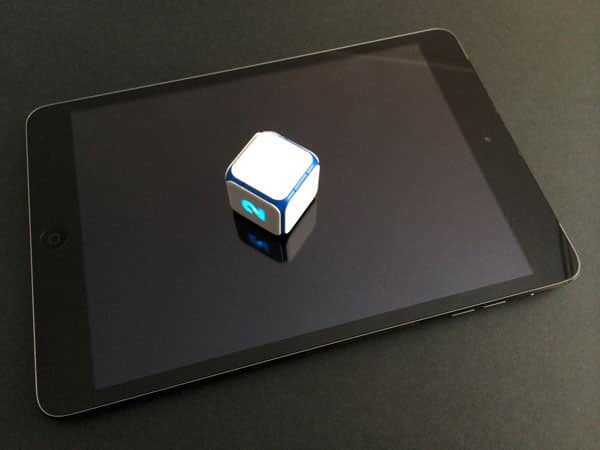
Measuring 1” on each side, the plastic Dice+ cube arrives bundled with a fabric micro USB charging cable and a drawstring carrying bag. When powered off, the cube’s six sides are blank white and completely nondescript, except for a tiny arrow-shaped set of dots on one side. Push just a little too strenuously in the arrow’s direction and you’ll reveal the micro-USB port hidden underneath the surface — the only metal element visible within the glossy blue undercarriage. Hidden inside Dice+ are a surprising collection of components: a Bluetooth 4 chip, an accelerometer and magnetometer for orientation sensing, a proximity sensor, and a temperature sensor designed to monitor “vital parameters of the charging process” for the integrated lithium-polymer battery. The battery takes a surprising two hours to charge, after which it promises 20 hours of continuous play.

If you flip Dice+ upside down, you’ll activate lights on all six sides that glow either blue or green, temporarily illuminating one number per side.
Because the lights remain off most of the time, you’ll only know that the USB port is hidden under the number 1 after rotating the unit 180 degrees, at which point the lights will strobe rather than staying flat; they’re also not particularly bright. There’s probably some reason that someone might claim that intermittently- or dimly-illuminated numbers are a good thing, but in practice, all this does is create ambiguity every time Dice+ is rolled improperly — by the developer’s standards. More on that point in a moment.

After unpacking and charging Dice+, you’re supposed to visit the Poweredboardgames.com web site, which directs you to the App Store to download a tablet-ready application called Powered Board Games. Every time you open the app, a video will instruct you to flip Dice+ upside down, which turns it on and connects over Bluetooth 4 so that no pairing is necessary. Once Dice+ is successfully connected, you’ll be presented with a grid of five free games to play, plus one box that’s ready to be filled with an additional downloadable title.

At first, you can choose between Backgammon, Chuchumba, Rainbow Jack, Rumble Stumble and This Way Up titles, a collection of single-screen board games meant to be played on an iPad. Tap on the Add More box and the app will display a list of 17 additional downloadable games, 7 of which are listed as “coming soon.” The other 10 are mostly paid downloads, and available via individual app links to the App Store rather than as in-app purchases. This appears to be a concession to third-party app developers, enabling them to handle their own transactions, but the Powered Board Games app will recognize that you’ve downloaded listed apps and link to them for convenience. As smart as this is, it means that the Powered Board Games app needs to drop you into the App Store to learn about the additional games; in our experience, the app sometimes crashed or restarted when returning back.


Dice+ has two key problems: one is software-related, and the other’s hardware-related.
Starting with the software, we found the included games to be only modestly engaging, and so frequently lacking for intuitiveness that we either wanted to quit out of confusion or found ourselves paging through somewhat convoluted instructions to understand what was going on. The cartoony choo-choo train game Chuchumba, for instance, is claimed to be for kids 3 and older, but the instructions on how to play — requiring addition and subtraction skills that kids won’t have until they’re twice that age — were confusing enough to befuddle even adult players. Another game called Rumble Stumble was similarly marked “3+,” but requires players to count colored tiles and keep a certain number of fingers on the screen until the other player finishes a turn. Even on its easiest setting, the game’s too difficult for young kids, though older players might enjoy it. We found this to be the case across all of the titles.

A hardware-related issue is the reason Dice+ might or might not appeal to older players: due to what Game Technologies describes as a “sophisticated fair-play/anti-cheat system,” you can’t just roll Dice+ on any surface and expect to see a number pop up. Instead, the accessory demands some minimum roll time, a rotation of 90 degrees or more, and that it will stop on a flat surface such that the inclination is under 5%. In practice, the “fair-play” system meant that Dice+ too often failed to register a roll unless we shifted to an uncarpeted, completely flat play surface and really jostled the die before it landed. When it worked, games proceeded fairly smoothly, but when you’re in the middle of playing a time-sensitive game — say, Rainbow Jack, which gives you two seconds after a roll to tap the corresponding number on the screen — the intensity and predictability become problematic when the die doesn’t register a response.











