
British audio accessory developer Focusrite has created a wide variety of USB audio interfaces for Mac and PC users. The iTrack Solo ($200) is its first foray into iPad audio, a single box with inputs for both a microphone and a guitar, allowing for rudimentary two-channel mixing of audio sources into supported audio applications such as Apple’s GarageBand. While iTrack Solo is a nice piece of hardware, a critical aspect of its design is far better suited for use with a stationary computer than an iPad, and really would benefit from a little post-release tweaking.
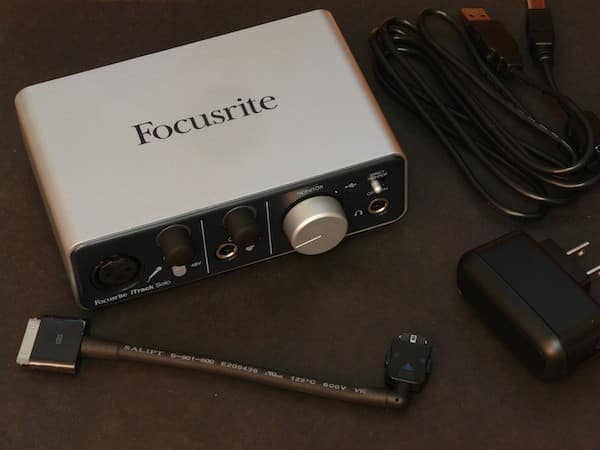
Sporting an aluminum housing, the iTrack Solo includes XLR and 1/4” inputs on the front for professional microphone and guitar connections, respectively, each with its own gain controls, plus a 48V phantom power button for the mic input. An additional 1/4” output port is provided for monitoring, along with a monitor volume control and direct monitoring switch. The rear panel includes a D-shaped USB Type B interface for power or PC/Mac connectivity, a proprietary Device Link connector for an iPad, left and right RCA line output ports for external speakers, and a Kensington hardware lock point. A standard USB cable and short 6” Dock Connector to Device Link cable are included in the package, along with an AC to USB power adapter; it’s worth noting that this pack-in isn’t mentioned in the documentation, which suggests that an Apple USB Power Adapter should be used with the USB cable to power the device.
A DIY power solution would have been a strange omission for a $200 accessory, and Focusrite was correct not to leave it out; external power via the USB connection is required to operate the device and optionally the external condenser microphone

An iPad is connected using the included Dock Connector to Device Link cable, which provides bi-directional audio, with the microphone and guitar inputs sent to the iPad on the left and right audio channels, respectively; output audio received from the iPad is sent out the front monitor headphone jack and rear phono outputs.
Unfortunately, the provided Dock Connector to Device Link cable is not only relatively short, but also constructed rather rigidly, limiting the user’s options for accessing the iPad while it’s in use. The connection is somewhat tolerable when using an iPad in landscape orientation, and might even possibly accommodate a stand so long as its height isn’t too high and its angle isn’t too steep; portrait orientation is somewhat more complicated, and even using Apple’s iPad Dock doesn’t provide a convenient placement of the iPad, as the iTrack Solo and iPad are forced to sit at an angle slightly away from each other, rather than fully side-by-side. The forced right angle in the Device Link cable also causes it to cross over or under the USB power connector, making the connection somewhat awkward in this regard as well. It’s unclear whether a proprietary connector is truly necessary here as opposed to simply providing a standard USB interface, but regardless, the company should have provided a longer and more flexible cable. An additional and arguably non-trivial issue: iTrack Solo doesn’t charge your iPad when they’re connected, supposedly because Focusrite needed all the USB port’s supplied power for the accessory’s own components, and the phantom mic power.

A unique halo LED indicator is shown around each gain knob to provide simplified audio level feedback during operation, glowing green when an appropriate audio level is being received and red when the levels are too high, allowing the gain controls to be easily adjusted for appropriate input levels.
A Direct Monitor toggle on the front allows the output audio to be conveniently switched between monitoring the audio coming back from the iPad, or sending the raw input signals directly back to the outputs, bypassing the iPad processing entirely.

Audio quality from the iTrack Solo is excellent, and matches what one would expect from the established audio developer’s other equipment; fans of the company’s other devices such as the Scarlett series will not likely be disappointed here. We tested the iTrack Solo with our standard set of Shure professional microphones (a Beta 87 condenser mic, SM58 dynamic mic and Beta 57A condenser instrument mic), and in all cases the device provided clean audio with good frequency response and a low noise floor, comparable to the same results from higher-end professional mixing boards. Input on the guitar side was similarly impressive, and levels were easily adjusted to balance simultaneous vocal and guitar performances without too much fiddling. Since audio is sent into the iPad on individual left/right channels, the user needs to lay down each track individually based on the left or right channels when using an app such as GarageBand, or instead use an app such as Meteor Multitrack Recorder that can separate simultaneous incoming left and right channels into multiple tracks.

With the iTrack Solo, Focusrite has created a device that provides great audio quality but unfortunately suffers from some unnecessary limitations as far as the iPad interface is concerned. The largest of this is the company’s Device Link cable design, which as of today needlessly restricts iPad device placement, and is of questionable longevity given that Apple’s new Lightning Connector will come to the next-generation iPad sooner rather than later, thus requiring either a new cable from the manufacturer or at least the use of an adapter. Further, while the iTrack Solo provides a nicely integrated package for both vocal and guitar recording, the $200 price tag is a bit steep when compared to competing solutions, particularly in light of the serious deficiency regarding the iPad connection cables.











