
iLoungeiLounge
  • News
    • Apple
      • AirPods Pro
      • AirPlay
      • Apps
        • Apple Music
      • iCloud
      • iTunes
      • HealthKit
      • HomeKit
      • HomePod
      • iOS 13
      • Apple Pay
      • Apple TV
      • Siri
    • Rumors
    • Humor
    • Technology
      • CES
    • Daily Deals
    • Articles
    • Web Stories
  • iPhone
    • iPhone Accessories
  • iPad
  • iPod
    • iPod Accessories
  • Apple Watch
    • Apple Watch Accessories
  • Mac
    • MacBook Air
    • MacBook Pro
  • Reviews
    • App Reviews
  • How-to
    • Ask iLounge
Font ResizerAa
iLoungeiLounge
Font ResizerAa
Search
  • News
    • Apple
    • Rumors
    • Humor
    • Technology
    • Daily Deals
    • Articles
    • Web Stories
  • iPhone
    • iPhone Accessories
  • iPad
  • iPod
    • iPod Accessories
  • Apple Watch
    • Apple Watch Accessories
  • Mac
    • MacBook Air
    • MacBook Pro
  • Reviews
    • App Reviews
  • How-to
    • Ask iLounge
Follow US

Reviews

Reviews

Review: Flote Desktop Stand for iPad

Last updated: May 16, 2021 7:57 pm UTC
By Nick Guy
Review: Flote Desktop Stand for iPad

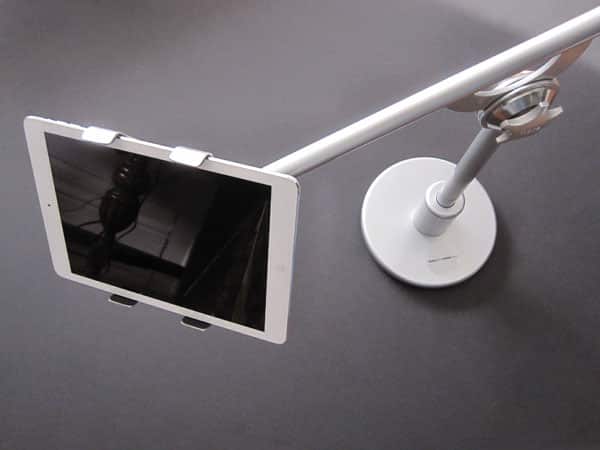
Flote’s Desktop Stand ($220) is a heavy — very heavy — metal stand solution for use with any iPad. Consisting of a base, a long arm attached to a pole, and an adjustable cradle, it’s a well-designed accessory, although its appeal is limited by the size and price. The wide range of possible angles and heights is quite nice, while offering functionality that’s replicated by very many accessories.

Review: Flote Desktop Stand for iPad

Desktop Stand ships in three separate pieces, with some light assembly required to put them all together. First, there’s the heavy, round base, which has a hole running all the way through its center. Into that goes the pole attached to the adjustable arm.

There’s some lubrication in the opening that helps the pole slide into place, with a screw at the bottom securing it. A Philips screwdriver is required for this step, but that’s the only tool needed. Finally, an extremely strong magnetic ball joint connects the tablet holder to the end of the arm. Don’t expect to disconnect those pieces; once the magnet is attached, it’s not coming off.


Review: Flote Desktop Stand for iPad

Review: Flote Desktop Stand for iPad

The stand, 18” at its tallest point, can be adjusted in a few different ways. Where the arm meets the post, there’s a dial to adjust the tension, allowing the counterweighted arm to move up and down or hold it in place. It can also extend out an extra 7”, thanks to a telescoping boom.

Then there’s the ball joint, which allows for a wide array of positions for the iPad holder, including either landscape or portrait orientation. That’s one of Desktop Stand’s strengths: it can be positioned pretty much however you need it to be.


Review: Flote Desktop Stand for iPad

This cradle is made of two pieces of overlapping metal, curled with two padded fingers at either end, and a pair of springs using tension to keep them together. Flote says it has identified some issues with the cushions on its stands, and is sending out slide-on rubber tips to its customers, for free. They had not arrived at the time of our review, although we didn’t experience any issues with the pads that came standard. The cradle can expand to about 7” wide, meaning it can hold almost any iPad case. Full-sized iPads fit with the arms around their long edges, while minis are held the opposite way.


Review: Flote Desktop Stand for iPad

Review: Flote Desktop Stand for iPad

Desktop Stand isn’t for everyone, and because of its drawbacks, earns a limited recommendation.



Latest News
The 14-inch MacBook Pro with M5 Chip 16GB RAM/512GB is $250 Off
1 Min Read
Noise and Static on AirPods Pro 3 Still Unfixed
1 Min Read
New iMac with 24-inch OLED Display May be Brighter With 600 Nits
1 Min Read
The 15-inch M4 MacBook Air 256GB Is $250 Off
1 Min Read
Internal Kernel Debug Kit from Apple Reveals Tests for a MacBook with A15 Chip
1 Min Read
Apple Currently In Talks With Suppliers for Chip Assembly & Packaging of iPhones in India
1 Min Read
Apple Allows Easier Battery Replacement For M5 MacBook Pro with 14-inch Display
1 Min Read
The Apple Watch SE 3 44mm GPS is $50 Off
1 Min Read
20th Anniversary iPhone May Launch in Two Years
1 Min Read
Better Image Generation Capabilities and Apple Music Integration Coming to ChatGPT
1 Min Read
A20 Pro Chip Coming to Next Gen iPad Mini OLED
1 Min Read
Amazon has the AirTag 4 Pack Marked $29 off
1 Min Read

iLounge logo

iLounge is an independent resource for all things iPod, iPhone, iPad, and beyond. iPod, iPhone, iPad, iTunes, Apple TV, and the Apple logo are trademarks of Apple Inc.

This website is not affiliated with Apple Inc.
iLounge © 2001 - 2025. All Rights Reserved.
  • Contact Us
  • Submit News
  • About Us
  • Forums
  • Privacy Policy
  • Terms Of Use
Welcome Back!

Sign in to your account

Lost your password?









