
iLoungeiLounge
  • News
    • Apple
      • AirPods Pro
      • AirPlay
      • Apps
        • Apple Music
      • iCloud
      • iTunes
      • HealthKit
      • HomeKit
      • HomePod
      • iOS 13
      • Apple Pay
      • Apple TV
      • Siri
    • Rumors
    • Humor
    • Technology
      • CES
    • Daily Deals
    • Articles
    • Web Stories
  • iPhone
    • iPhone Accessories
  • iPad
  • iPod
    • iPod Accessories
  • Apple Watch
    • Apple Watch Accessories
  • Mac
    • MacBook Air
    • MacBook Pro
  • Reviews
    • App Reviews
  • How-to
    • Ask iLounge
Font ResizerAa
iLoungeiLounge
Font ResizerAa
Search
  • News
    • Apple
    • Rumors
    • Humor
    • Technology
    • Daily Deals
    • Articles
    • Web Stories
  • iPhone
    • iPhone Accessories
  • iPad
  • iPod
    • iPod Accessories
  • Apple Watch
    • Apple Watch Accessories
  • Mac
    • MacBook Air
    • MacBook Pro
  • Reviews
    • App Reviews
  • How-to
    • Ask iLounge
Follow US

Reviews

Reviews

Review: Fitbit Force Wireless Activity & Sleep Wristband

Last updated: May 16, 2021 7:58 pm UTC
By Nick Guy
Review: Fitbit Force Wireless Activity & Sleep Wristband

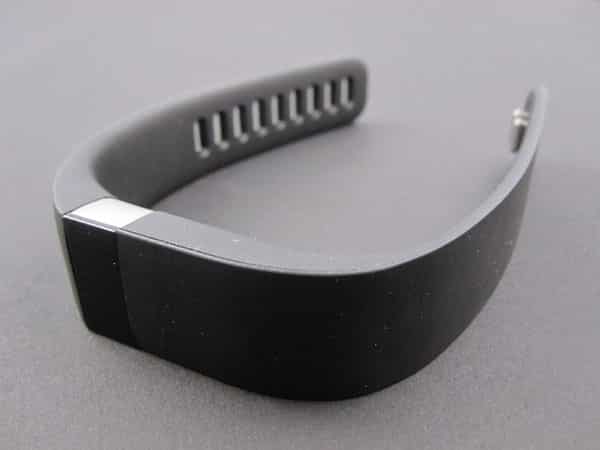
Of the many activity-tracking, wearable accessories we’ve covered over the past few years, Fitbit’s Flex was one of our favorites. Now the company is back with Force ($130), an updated version of the band that adds features while maintaing a very similar look and functionality. At first glance, the only difference between the two is a taller display, and you may notice the button on the left side. Digging deeper, though, there are quite a few improvements that help justify the $30 price increase. Force uses Bluetooth 4.0 to connect to most iPhone, iPad, or iPod touch devices, or a Mac/PC using an included dongle, and comes in black or slate colors. Black is shown in our photos.


Review: Fitbit Force Wireless Activity & Sleep Wristband

Flex came as a package with two silicone bands, and a tap-controlled sensor that fit inside either, depending on the size of your wrist. Now, Fitbit sells separate small and large sizes. This shouldn’t be a big deal for most users, as the activity tracker is not really meant to be shared, but there are fewer sizing options in a box now.

Also new is the USB-based charger. Instead of removing the sensor and clipping it into a holder on the cable, you simply plug the charging cord into the back of Force, where there are three small contacts in a row. Charging shouldn’t be much of an issue, as the battery is advertised as lasting 11 days per charge, more than double the previous band’s five. After a week of testing, our battery indicator showed about half the life left. These design changes offer a better overall experience than Flex.


Review: Fitbit Force Wireless Activity & Sleep Wristband

Review: Fitbit Force Wireless Activity & Sleep Wristband

Force’s most obvious upgrade is the display. It used to be that you would tap on Flex to have it show between one and five dots glowing through the black window, indicating your progress towards a daily activity goal. Now, that window has been replaced by a monochrome OLED display, and the tap gesture’s swapped for a physical button. Once your Force is set up and paired with your iDevice, pressing the button once brings up the time, while continuing to click it cycles through steps taken, miles walked, calories burned, floors climbed, and time spent active.


It’ll also display any alarms that you have set. Finally, holding down the button for three seconds causes the band to vibrate, and brings up a timer. This isn’t a stopwatch, but rather a sleep tracker. Turning it on, and then repeating the process when you wake to turn it off, alerts Force to when you’re sleeping.


Review: Fitbit Force Wireless Activity & Sleep Wristband

Review: Fitbit Force Wireless Activity & Sleep Wristband

Fitbit’s free companion app has also been updated with an iOS 7-like look, and support for the added measurements. When the app is launched, it’ll automatically sync with your Force as long as Bluetooth is turned on. A toggle claims to permit background syncing, but we never actually found that it happened. From the app, you can also enter information such as weight, calories eaten for the day, and water consumed, to help build a holistic picture of your fitness.



Latest News
The Apple Watch Series 11 46mm GPS Is $100 Off
1 Min Read
Clamshell Style iPhone Being Looked Into By Apple
1 Min Read
Foldable iPhones May Have the Largest Battery Ever
1 Min Read
Apple and TSMC’s 10-Year Collaboration May Be Ending
1 Min Read
The 13-inch M5 iPad Pro 256GB Wi-Fi Is $149 Off
1 Min Read
M5 Pro and M5 Max Chips for the MacBook Pro could Roll Out with macOS 26.3
1 Min Read
Mac Ordering Process Revamped
1 Min Read
Check Signed By Steve Wozniak and Steve Jobs Sold For $2.4 Million
1 Min Read
The Anker 140W 4-Port GaN USB-C Charger is $35 Off
1 Min Read
No iPhone Air 2 This Year, according to Latest Report
1 Min Read
New Report Corroborates Split iPhone Release Dates
1 Min Read
Apple Losing More Researchers As They Plan To Release 2 Siri Versions
1 Min Read

iLounge logo

iLounge is an independent resource for all things iPod, iPhone, iPad, and beyond. iPod, iPhone, iPad, iTunes, Apple TV, and the Apple logo are trademarks of Apple Inc.

This website is not affiliated with Apple Inc.
iLounge © 2001 - 2025. All Rights Reserved.
  • Contact Us
  • Submit News
  • About Us
  • Forums
  • Privacy Policy
  • Terms Of Use
Welcome Back!

Sign in to your account

Lost your password?








