
iLoungeiLounge
  • News
    • Apple
      • AirPods Pro
      • AirPlay
      • Apps
        • Apple Music
      • iCloud
      • iTunes
      • HealthKit
      • HomeKit
      • HomePod
      • iOS 13
      • Apple Pay
      • Apple TV
      • Siri
    • Rumors
    • Humor
    • Technology
      • CES
    • Daily Deals
    • Articles
    • Web Stories
  • iPhone
    • iPhone Accessories
  • iPad
  • iPod
    • iPod Accessories
  • Apple Watch
    • Apple Watch Accessories
  • Mac
    • MacBook Air
    • MacBook Pro
  • Reviews
    • App Reviews
  • How-to
    • Ask iLounge
Font ResizerAa
iLoungeiLounge
Font ResizerAa
Search
  • News
    • Apple
    • Rumors
    • Humor
    • Technology
    • Daily Deals
    • Articles
    • Web Stories
  • iPhone
    • iPhone Accessories
  • iPad
  • iPod
    • iPod Accessories
  • Apple Watch
    • Apple Watch Accessories
  • Mac
    • MacBook Air
    • MacBook Pro
  • Reviews
    • App Reviews
  • How-to
    • Ask iLounge
Follow US

Reviews

Reviews

Review: Favi Swivel Screen Portfolio Case with Bluetooth Keyboard for iPad Air

Last updated: May 16, 2021 7:56 pm UTC
By Nick Guy
Review: Favi Swivel Screen Portfolio Case with Bluetooth Keyboard for iPad Air

We should’ve been skeptical when a $40 Bluetooth keyboard case for the iPad Air arrived at the office. After all, most of the competition sells for twice that, or more. But having been surprised by the quality of New Trent’s Airbender Mini, we decided to give Favi’s Screen Portfolio Case with Bluetooth Keyboard for iPad Air ($40) a try. The case comes in black, silver, or gold, and separates into three pieces. It also reminds us why it’s often worth it to pay a bit more when it comes to iDevice accessories.

Review: Favi Swivel Screen Portfolio Case with Bluetooth Keyboard for iPad Air

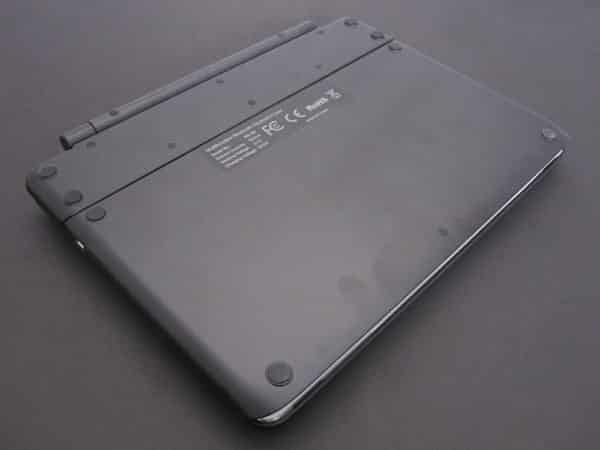
Like almost all keyboard cases, this one is a hard plastic folio, with the keyboard located on the inside of the front cover. Oftentimes, the outside of the lid is made to look nice, even though it ends up being the base when you’re typing. Favi, on the other hand, made its case a little less presentable.

With eight rubber feet and a regulatory sticker, it looks more like the back or bottom of an accessory than the front. This is really a cosmetic issue though, and the least offensive of the problems with the case.


Review: Favi Swivel Screen Portfolio Case with Bluetooth Keyboard for iPad Air

Much like Airbender Mini, Screen Portfolio Case uses a removable arm with a lens cap-style clip to connect the tablet holder to the keyboard, allowing for landscape or portrait orientation positioning. This one’s all plastic though, and the case itself is a thin shell, rather than an Otterbox clone. Although it fits properly, the shell leaves all the buttons and ports exposed, including the two microphones with one abnormally long cutaway, and the iSight camera hole is actually a little bit off-center, although it doesn’t obscure the lens. When separated from the arm, there’s a large opening over the Apple logo. We were pleased to find that the setup does have magnets that lock the screen when the case is closed.


Review: Favi Swivel Screen Portfolio Case with Bluetooth Keyboard for iPad Air

Review: Favi Swivel Screen Portfolio Case with Bluetooth Keyboard for iPad Air

If you want the iPad to rest against the plastic base with the keyboard attached, rather than float in the air, the only placement that works is directly above the top row of keys, placing the screen at a 75 degree angle.

It’s not ideal, and it doesn’t rest perfectly flat, so the tablet still wobbles when you tap it. The keyboard can separate from the arm when you trigger a release, and it’s a bit heavier than competing models. Its rechargeable battery is rated for 80 hours of continuous use. We found the small, plastic keys to actually feel pretty comfortable, and to register taps correctly. Most of the commonly used keys are in the right place, including the apostrophe, which is sometimes an issue, but there’s one big problem.


Review: Favi Swivel Screen Portfolio Case with Bluetooth Keyboard for iPad Air

In the top right corner is a delete key, with a three-quarters length backspace key right below it. Most iPad keyboards only have the former key, and have the lock control mapped there as a secondary function. Unfortunately, Favi has done the opposite.



Latest News
The 14-inch MacBook Pro with M5 Chip 16GB RAM/512GB is $250 Off
1 Min Read
Noise and Static on AirPods Pro 3 Still Unfixed
1 Min Read
New iMac with 24-inch OLED Display May be Brighter With 600 Nits
1 Min Read
The 15-inch M4 MacBook Air 256GB Is $250 Off
1 Min Read
Internal Kernel Debug Kit from Apple Reveals Tests for a MacBook with A15 Chip
1 Min Read
Apple Currently In Talks With Suppliers for Chip Assembly & Packaging of iPhones in India
1 Min Read
Apple Allows Easier Battery Replacement For M5 MacBook Pro with 14-inch Display
1 Min Read
The Apple Watch SE 3 44mm GPS is $50 Off
1 Min Read
20th Anniversary iPhone May Launch in Two Years
1 Min Read
Better Image Generation Capabilities and Apple Music Integration Coming to ChatGPT
1 Min Read
A20 Pro Chip Coming to Next Gen iPad Mini OLED
1 Min Read
Amazon has the AirTag 4 Pack Marked $29 off
1 Min Read

iLounge logo

iLounge is an independent resource for all things iPod, iPhone, iPad, and beyond. iPod, iPhone, iPad, iTunes, Apple TV, and the Apple logo are trademarks of Apple Inc.

This website is not affiliated with Apple Inc.
iLounge © 2001 - 2025. All Rights Reserved.
  • Contact Us
  • Submit News
  • About Us
  • Forums
  • Privacy Policy
  • Terms Of Use
Welcome Back!

Sign in to your account

Lost your password?








