
After Eye-Fi initially launched Wi-Fi-enabled memory cards for digital cameras in 2007, we were generally impressed; the company figured out a way to effectively transfer photos wirelessly from certain SD card-ready cameras to computers. At the time, Eye-Fi was still trying to figure out where it and its products would fit in the Apple universe, having pitched the memory cards as accessories for the Mac version of iPhoto, and its young app as a way to automatically share iPhone snapshots online.
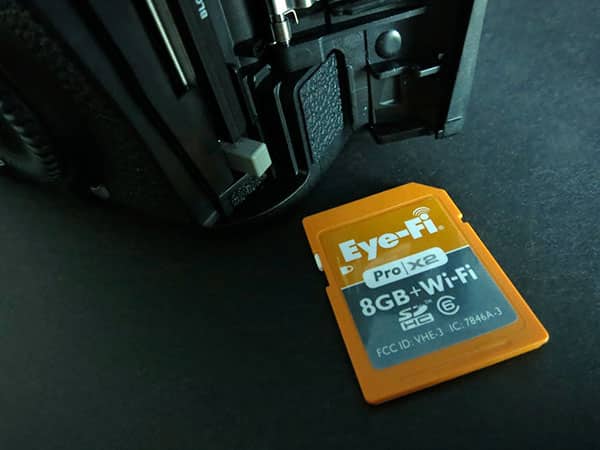
Flash forward to today, and things have dramatically improved thanks to a new series of Eye-Fi X2 cards, including Eye-Fi Pro X2 ($100). Now featuring class 6 read and write speeds, up to 8GB of memory, and a seriously upgraded application that can instantly fire off photos from digital cameras to any iOS device—even when you’re not in range of a home or office Wi-Fi connection—these memory cards completely change the game for serious digital photographers. Pop an Eye-Fi X2 card into a compatible digital camera, go out in the field with your iOS device, and you’ll be ready to start editing and sharing images from the iPod, iPhone, or iPad within minutes. If your iPhone or iPad has a cellular connection, you can literally upload DSLR-quality shots directly from the field to the Internet without using a computer. We’ve now tested this extensively with the Pro X2 model, as shown in this almost entirely Eye-Fi-transferred photo gallery, and it works.
Amazingly well, at that.

A few camera-specific caveats need to be acknowledged up front. You need to have a digital camera that’s compatible with Eye-Fi cards, which have been increasing dramatically in number over the past few years. Some recent cameras, such as Canon’s 5D Mark III, actually have integrated Eye-Fi-specific menus that recognize and provide basic configuration settings for the cards. Other cameras will either block the cards’ Wi-Fi signals or not accommodate the cards for other reasons; the earlier 5D Mark II, for instance, has spotty Eye-Fi compatibility even when users buy CompactFlash/SD Card adapters and consider making other modifications. And even the aforementioned Eye-Fi-compatible 5D Mark III occasionally has SD card-related errors that may require you to pop the battery out and reset the camera. Various firmware updates have in some cases added, improved, or weakened Eye-Fi support, so there’s no performance guarantee, but the trend has been greater support with fewer bugs over time.

Setup is handled pretty smoothly with Eye-Fi computer software—one time only if you want, setting up an account on Eye-Fi’s servers that can be used for a variety of advanced sharing/gallery features—and the free iOS application, which uses some neat tricks to serve as a conduit for photos. Once your iOS device has been paired once with the Eye-Fi X2 card over Wi-Fi, the app automatically will look for the card whenever they’re paired again, and start transferring new photos to your iPad, iPhone, or iPod touch without forcing you to lift a finger.
The only extra step beyond launching the app is taking a brief detour to your iOS Settings menu and tapping on the powered-on card’s Wi-Fi network. In our testing, Pro X2 created this network for direct transfers no matter where we were, so long as the camera was turned on and the network was enabled to remain on in settings.

As a practical matter, the workflow improvements Eye-Fi Pro X2 creates are so considerable that any camera battery life impact the card creates will feel negligible, except on underpowered batteries. What used to be a labored “pull the memory card or plug your camera into the iPad Camera Connection Kit, import photos manually, disconnect the card or camera” process becomes “keep shooting or leave your camera on, wait for the app to finish transferring images to any iOS device—quickly—then turn the camera off.” Eye-Fi includes a simple USB memory card reader with Pro X2, but iOS users probably won’t have any use for it. Full-resolution images synced to your iOS device via the app get transferred automatically into your photo library, then synced back to your computer via iPhoto, Aperture, or other programs. It’s all extremely easy, and far more device-compatible than Apple’s iPad-only Camera Connection Kit.


This isn’t to say that the Eye-Fi Pro X2 we purchased is perfect. The 8GB version’s $100 price point seems so crazy by contrast with simpler, technically faster traditional SD cards that you’ll really need to appreciate the direct-to-iOS wireless feature to be willing to buy in. And the company continues to maintain an initially confusing matrix of different products at various price points, differentiating $40, $80, and $100 cards primarily through software and post-purchase upgradeable features.











