
For the most part, what comes to mind when we think of HomeKit accessories is the seemingly endless array of smart plugs, smart bulbs, light switches, and maybe the occasional door lock or smart thermostat. However, as HomeKit has evolved in recent iOS versions, Apple has added support for a lot more types of devices, and in fact a few months ago Eve (formerly Elgato), announced a new product in a category that’s so new it’s not even on Apple’s HomeKit accessories page: the Eve Aqua Smart Water Controller, a simple Bluetooth-enabled accessory that can be used to control any standard sprinkler system.
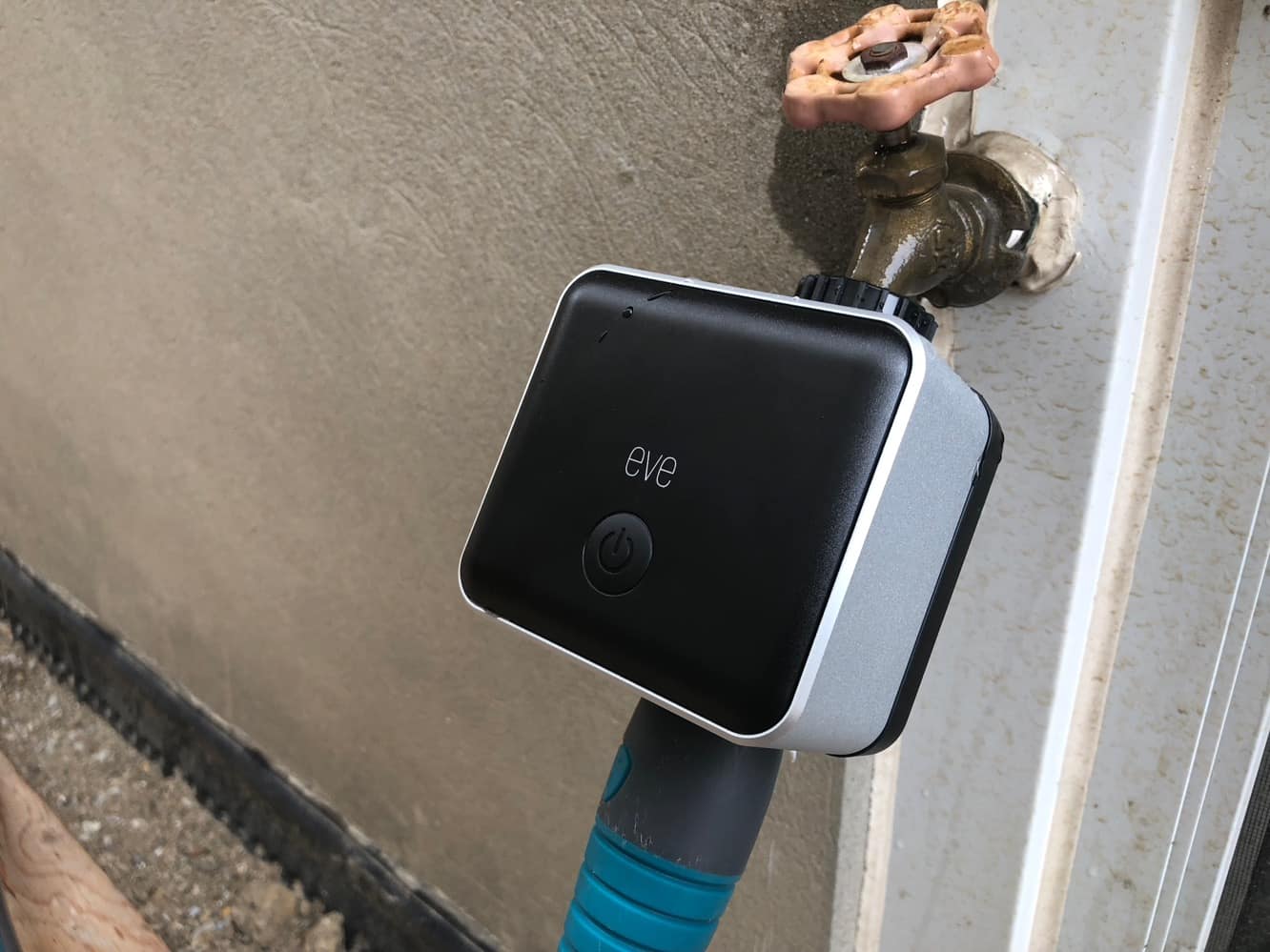
Although full-featured smart sprinkler controllers are more common, Eve Aqua is unique in that it’s a simple attachment rather than something that has to be integrated into a more sophisticated home irrigation system, so it’s an accessory that works for anybody with an outdoor faucet, hose, and standard garden sprinkler. As a result, there’s not much to Eve Aqua — the unit itself is a square block that measures about five inches on its longest side and includes a 3/4-inch threaded attachment on top to connect to a spigot, and another 3/4-inch thread on the bottom for connecting a standard hose. An adapter is also included for those who want to connect to a smaller hose. As with Eve’s entire accessory lineup, Eve Aqua works over Bluetooth Low Energy and is powered by two included AA batteries. Installing Eve Aqua works exactly like you’d expect — insert the batteries, and connect it in between your hose and your outdoor tap. Once connected, you can turn the tap on and leave it on, since Eve Aqua will control the actual flow of water. There’s also a button on the front of the unit that can be used to manually start and stop your sprinkler; this can be disabled via the “Child Lock” setting in the Eve app.

Eve Aqua pairs with HomeKit in the usual manner, and like most newer accessories we’ve seen, takes advantage of Apple’s new QR-code based pairing to simplify the process. You can pair Eve Aqua directly through the iOS Home app, but like many HomeKit accessories, you’ll need to use Eve’s own app in order to update the firmware and take advantage of other features not supported by the HomeKit framework — which are actually quite a few features in this case.

Within the HomeKit framework itself, Eve Aqua appears as a sprinkler device, complete with a unique icon to match that will light up in color and animate when your sprinkler is running.
Eve Aqua can be assigned to a virtual room such as “Back Yard” or simply “Outdoors” and within the HomeKit settings for Eve Aqua you can also choose how long the sprinkler will run when its started outside of a schedule — ranging from five minutes to four hours. Note that there’s no way to simply run the sprinkler indefinitely until it’s manually turned off, but we’re not sure this is a problem, since the whole purpose of a device like this is to save water.

What’s odd, however, is that despite the reference to scheduling, the Home app itself doesn’t provide any way to schedule Eve Aqua — the accessory doesn’t appear as an option within the Automation page, nor can it be added to a Scene, so you’ll need to use Eve’s own iOS app if you want to set up any schedules to run your sprinkler, which as far as we’re concerned is the main benefit of a device like this, so it’s an odd omission on Apple’s part (and it doesn’t appear to be coming in IOS 12 yet, either). Although the Eve app does allow you to add Eve Aqua into a scene, the app actually provides a much simpler way of setting up a schedule directly on the Eve Aqua accessory screen, which allows you to specify several watering schedules more directly, although it’s worth noting that this feature was added in a firmware update after Eve Aqua was released, so you’ll need to make sure you’ve updated your device to take advantage of it. Note that within the Eve app, you can also set up more sophisticated rules that use Eve Aqua as a condition or trigger, allowing you to initiate other HomeKit actions when your sprinkler is turned on or off, or base other actions on whether your sprinkler is running or not.

Setting up schedules is pretty straightforward, requiring that you specify the days of the week you want the schedule to run, and the start time and duration for each watering period on those days. Multiple watering periods can be added for each day, and additional schedules can be configured so that you can have different watering times on different days of the week. In addition to scheduling, the Eve app will also show you when watering last occurred, along with a graph of your watering history from the past few days. The interface will be familiar to anybody who has used Eve’s other accessories such as temperature sensors. The app also allows you to set the default duration (the same setting found in the iOS Home app), and keep track of how much water you’ve used. This latter feature is calculated by specifying a flow rate in the Eve Aqua settings screen, which can normally be found in the manual for whatever sprinkler you’re using.
It’s a fairly simple calculation — take the litres per minute and multiple by the number of minutes your sprinkler runs — but it’s handy to have it at a glance to get an idea of how much water you’re using.

As a HomeKit device, Eve Aqua can also naturally be controlled using Siri, and despite the other limitations, we were impressed by Siri’s flexibility. Simply calling out “Water my lawn” to our HomePod immediately started the sprinkler for the pre-defined time, although the grammar in Siri’s response is a little bit off — Siri told us that it was “watering the Eve Aqua” which is obviously not quite accurate. Of course, you can set whatever name you like for the device, but to us it would seem strange to name it something like “lawn” just so Siri’s responses don’t sound weird. Other Siri commands can also be used, such as “turn on the sprinkler,” optionally adding a location such as “back yard,” and Siri also allows you to specify a watering time, so you can say “Water the lawn for 20 minutes” if you only want to run the sprinkler for that long. Note, however, that as Siri’s response indicates, this changes the actual default duration setting, so it’s not just a one-off command. In other words, if you want to water your lawn for only 20 minutes this time, but normally want to run the sprinkler for an hour, you’ll need to make sure you tell Siri that next time.

While we’re impressed with Eve Aqua overall, in our testing we ran into some relatively minor issues. While these will hopefully be addressed in a firmware update, we’d be remiss if we didn’t note that there are still a few bugs to be ironed out. Most significantly, it seems that Eve Aqua doesn’t always communicate properly when it’s stopped running, One night we started watering our lawn before bedtime, with a standard 30-minute run, and when we woke up and checked out iPhone in the morning, we had a brief moment of panic when it looked like the sprinkler had run all night. In reality, the sprinkler had shut off properly at the appointed time — which was a relief — but HomeKit and the Eve app failed to get the message.











