
iLoungeiLounge
  • News
    • Apple
      • AirPods Pro
      • AirPlay
      • Apps
        • Apple Music
      • iCloud
      • iTunes
      • HealthKit
      • HomeKit
      • HomePod
      • iOS 13
      • Apple Pay
      • Apple TV
      • Siri
    • Rumors
    • Humor
    • Technology
      • CES
    • Daily Deals
    • Articles
    • Web Stories
  • iPhone
    • iPhone Accessories
  • iPad
  • iPod
    • iPod Accessories
  • Apple Watch
    • Apple Watch Accessories
  • Mac
    • MacBook Air
    • MacBook Pro
  • Reviews
    • App Reviews
  • How-to
    • Ask iLounge
Font ResizerAa
iLoungeiLounge
Font ResizerAa
Search
  • News
    • Apple
    • Rumors
    • Humor
    • Technology
    • Daily Deals
    • Articles
    • Web Stories
  • iPhone
    • iPhone Accessories
  • iPad
  • iPod
    • iPod Accessories
  • Apple Watch
    • Apple Watch Accessories
  • Mac
    • MacBook Air
    • MacBook Pro
  • Reviews
    • App Reviews
  • How-to
    • Ask iLounge
Follow US

Reviews

Reviews

Review: Equil Equil Smartpen

Last updated: May 16, 2021 7:56 pm UTC
By Nick Guy
Review: Equil Equil Smartpen

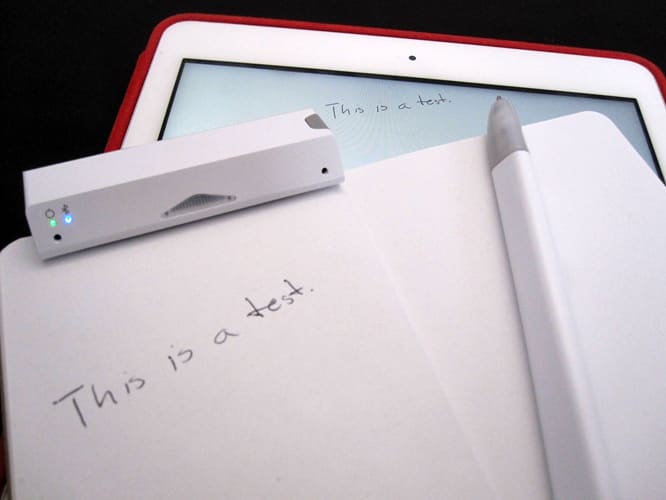
Equil’s Equil Smartpen ($150) is the second smartpen to make it to us this month, after Livescribe’s Livescribe 3. Instead of relying on custom paper to beam notes and sketches back to compatible devices, this pen uses a special sensor that can clip onto any sheet of paper. Using an ultrasonic frequency, the pen and the sensor speak to each other to transfer your writing. The overall feel of the products isn’t as nice as that of Livescribe’s, and it’s more complicated to set up, but you don’t have to worry about buying and using the right accessories to go with the kit.


Review: Equil Equil Smartpen

Our favorite part of this collection has nothing to do with the pen itself, but rather, how it’s stored and charged. Equil came up with a really clever travel case that holds all the pieces together, and allows them to charge at once. The battery lasts up to eight hours per charge. At the core is a 6.25” extruded triangle that’s 1.35” long on each side, and it’s wrapped in a cover that feels a lot like the polyurethane material Apple uses for its Smart Covers. It opens up to expose a holder for the pen along the top, with two small metal contacts for transferring power. There’s a similar but smaller opening at the bottom of the front for the sensor; an extra pen cartridge is hidden underneath. The case also has a Micro-USB charging port, as well as a pen cartridge ejector slot.


On the opposite side you’ll find a pen cap, which pops up when you slide a lever along the back. It’s a really cool way to handle all the pieces cleanly and neatly.


Review: Equil Equil Smartpen

Review: Equil Equil Smartpen

Then pen itself is also triangular, half an inch on any side, and 6” long. It feels somewhat cheap for such an expensive product, perhaps because of how light it is. We find the shape less comfortable than that of a round pen. Mostly white plastic, it’s translucent at either end, and there’s a single button towards the bottom third. The sensor is even smaller — a block measuring 3” across, 1” deep, and almost 0.6” tall. It has a single button along its top right edge, and sensors on its face. A small magnetic flap on the bottom grabs whatever paper you’re using, holding it tightly.


Review: Equil Equil Smartpen

Equil offers two separate, free apps for use with its system: Equil Note HD for writing, and Equil Sketch HD for drawing. Both work with the same hardware, but have different UIs and functionality.

Regardless of which you use, the process is the same. Sync the sensor to your device, clip it to your paper, and launch the app. Once the pen is on, the pieces will speak to each other. Speak is the right word here, as there’s an annoying buzz that emanates from the pen. This is the biggest downside to the whole thing, as the noise drove us a little crazy.


Review: Equil Equil Smartpen

Review: Equil Equil Smartpen

Putting that aside, it’s impressive how well Equil works. Start writing on the paper, and your strokes will appear on the screen. There’s no need to write differently, or worry about where you’re writing on the paper, as Equil does a great job of keeping track of relative position. The only issues come within the two centimeters below the sensor, which is a blind zone.


Review: Equil Equil Smartpen

Both apps are full-featured, rather than proof-of-concept skeletons.


Latest News
The 14-inch MacBook Pro with M5 Chip 16GB RAM/512GB is $250 Off
1 Min Read
Noise and Static on AirPods Pro 3 Still Unfixed
1 Min Read
New iMac with 24-inch OLED Display May be Brighter With 600 Nits
1 Min Read
The 15-inch M4 MacBook Air 256GB Is $250 Off
1 Min Read
Internal Kernel Debug Kit from Apple Reveals Tests for a MacBook with A15 Chip
1 Min Read
Apple Currently In Talks With Suppliers for Chip Assembly & Packaging of iPhones in India
1 Min Read
Apple Allows Easier Battery Replacement For M5 MacBook Pro with 14-inch Display
1 Min Read
The Apple Watch SE 3 44mm GPS is $50 Off
1 Min Read
20th Anniversary iPhone May Launch in Two Years
1 Min Read
Better Image Generation Capabilities and Apple Music Integration Coming to ChatGPT
1 Min Read
A20 Pro Chip Coming to Next Gen iPad Mini OLED
1 Min Read
Amazon has the AirTag 4 Pack Marked $29 off
1 Min Read

iLounge logo

iLounge is an independent resource for all things iPod, iPhone, iPad, and beyond. iPod, iPhone, iPad, iTunes, Apple TV, and the Apple logo are trademarks of Apple Inc.

This website is not affiliated with Apple Inc.
iLounge © 2001 - 2025. All Rights Reserved.
  • Contact Us
  • Submit News
  • About Us
  • Forums
  • Privacy Policy
  • Terms Of Use
Welcome Back!

Sign in to your account

Lost your password?










