
We absolutely love the concept behind Elgato Systems’ Turbo.264 ($100): approximately the same size as a first-generation iPod shuffle, the black and white USB dongle enables Macintosh computer users to rapidly convert videos into H.264 format — the most space-efficient compression format supported by fifth-generation iPods, iTunes, and Apple TV. But, like ADS Technologies’ highly similar $80 device Instant Video To-Go for PC users, Turbo.264 has a software issue that will limit its appeal to Apple TV users, and consequently, we’re waiting for an update before recommending it broadly to all of our readers. Updated August 29, 2007: In addition to issuing our final rating of Turbo.264, we’ve added a new section to the bottom of this review dealing with the much-improved version 1.1 Turbo.264 software. Our original review was published on May 24, 2007 minus a rating, and its text has been preserved in full below.
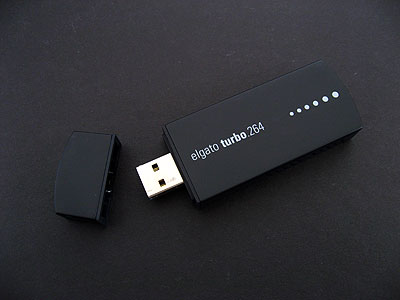
Turbo.264 consists of three parts: the dongle, a USB extension cable, and a CD-ROM with a piece of attractively designed, simple video transcoding software from Elgato. You need to install the software first—we’d recommend updating via Elgato’s web site to bug fixing version 1.0.1, as well—then connect the dongle, and use either the software or a QuickTime-based encoding program on the Mac to create H.264 files. The latter part is important, as Turbo.264 can be used to boost export times from iMovie HD, Final Cut Pro, QuickTime Pro, and Elgato’s own EyeTV software.

As with Instant Video To-Go, the boost is significant—at least, by some measurements. Our Canadian-based editor tested Turbo.264’s iPod (640×480) encoder with a 1.66GHz Core Duo Mac mini, and saw DVD VOB file-to-H.264 video conversions take only a little more than the original videos’ run times (“realtime”), versus roughly 1.7x realtime with VisualHub, the fastest video encoder he previously used, keeping quality settings as constant as possible.

EyeTV-to-H.264 conversion times with the same machine were better than cut in half using Turbo.264, again bringing videos to roughly realtime encoding. For instance, a 22 minute television show that used to take 45 or 50 minutes to encode with the Mac mini was converted by Turbo.264 in 20 minutes. Significantly, Turbo.264 offered another benefit, as well: not only was it faster than the computer, but it offloaded most of the computational work from the Mac mini, so other programs could be used at the same time without dramatically increasing the conversion time.

We also tested another Turbo.264 unit on a higher-spec machine, a 2.33GHz Core 2 Duo MacBook Pro, and gave it some meatier tasks to digest. Using iMovie HD, we created a 1 hour and 56 minute high-definition home movie in HDV format, and gave Turbo.264 two goals: create an Apple TV-ready 800-pixel version, and then a sub-DVD-quality 640-pixel iPod version. We were initially impressed by the result: Turbo.264 created the Apple TV version in 2 hours, 8 minutes, only a little slower than realtime, which was nearly five times as fast as iMovie HD’s built-in Apple TV encoder (10 hours, 4 minutes). The iPod version was even faster—at 1 hour, 26 minutes, it took only .75 realtime—not bad at all for a 640×480 video from a high-def video source.

There was only one problem with the output, specifically the Apple TV output. Something’s wrong with Elgato’s high-resolution encoder settings, because unlike the 800 pixel-wide video we created without Turbo.264, the unit’s higher-resolution video was heavily corrupted with desynchronized lines (deinterlacing issues), as shown in the first of the two pictures below. While slow-moving images and audio synchronization looked fine, any quick motion in the video caused the image to decompose, which it didn’t do in the unaided iMovie HD conversion, the second picture below.
Because the source images are so large, our samples include crops of how the details look up close; suffice to say that we would never want to create videos that looked like these do in motion.

iPod-formatted videos created in both of our test environments thankfully looked fine. A sample image is shown last below. These videos played back properly on the iPod, through iTunes, and on our Apple TV, but as expected offered less still frame detail than the Apple TV-formatted videos we created, which was noticeable during viewing on an Apple TV or in full-screen mode on iTunes. Using the iPod setting rather than the higher-resolution Apple TV setting will mostly affect high-definition downconverted videos; DVD- and standard-definition TV-based transfers will be less noticeably impacted.

In our view, there is no question that these H.264 hardware encoding solutions are appealing: even if they were merely as fast as the best conversion programs out there, which they typically beat on today’s computers by at least some margin, they would hold additional appeal in that they don’t force you to stop using your computer or suffer degraded performance while videos are being converted. The time savings they achieve is significant, in some cases allowing you to convert 2 or even 5 videos in the time it would take an unaided computer to do just one. A reasonably priced encoder is a worthwhile investment.

However—and this is a big however—as we have seen with both Turbo.264 and Instant Video To-Go, software is critically important to creating video files that actually work properly. By providing both its own nice converter and plug-ins that work with various video creation tools, Elgato has gone most of the way towards creating a viable H.264 encoding solution for both iPod and Apple TV users; better, for sure, than ADS Tech has for PC users.











