
iLoungeiLounge
  • News
    • Apple
      • AirPods Pro
      • AirPlay
      • Apps
        • Apple Music
      • iCloud
      • iTunes
      • HealthKit
      • HomeKit
      • HomePod
      • iOS 13
      • Apple Pay
      • Apple TV
      • Siri
    • Rumors
    • Humor
    • Technology
      • CES
    • Daily Deals
    • Articles
    • Web Stories
  • iPhone
    • iPhone Accessories
  • iPad
  • iPod
    • iPod Accessories
  • Apple Watch
    • Apple Watch Accessories
  • Mac
    • MacBook Air
    • MacBook Pro
  • Reviews
    • App Reviews
  • How-to
    • Ask iLounge
Font ResizerAa
iLoungeiLounge
Font ResizerAa
Search
  • News
    • Apple
    • Rumors
    • Humor
    • Technology
    • Daily Deals
    • Articles
    • Web Stories
  • iPhone
    • iPhone Accessories
  • iPad
  • iPod
    • iPod Accessories
  • Apple Watch
    • Apple Watch Accessories
  • Mac
    • MacBook Air
    • MacBook Pro
  • Reviews
    • App Reviews
  • How-to
    • Ask iLounge
Follow US

Reviews

Reviews

Review: Elago Design M2 Stand for iPhone + P2 Stand for iPad

Last updated: May 15, 2021 8:40 am UTC
By Jeremy Horwitz
Review: Elago Design M2 Stand for iPhone + P2 Stand for iPad

There are times when less design is more, and others when less just feels like less. Elago Design’s new M2 Stand for iPhone ($30) and P2 Stand for iPad ($50) are both in the latter category, overly simplistic aluminum holders that bring little to a product genre that has rapidly expanded over the past couple of years.


Review: Elago Design M2 Stand for iPhone + P2 Stand for iPad

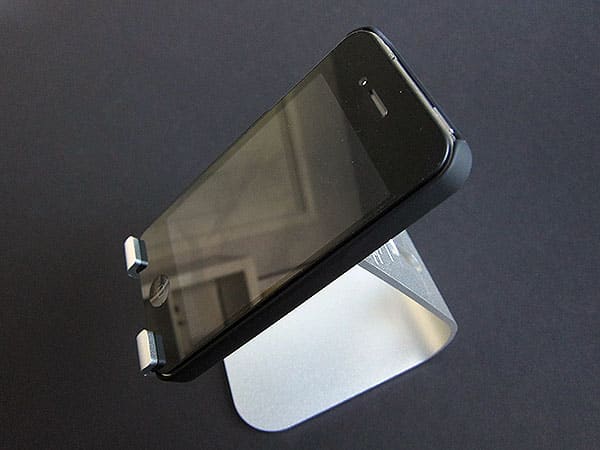
Unlike rival products from companies such as Luxa2, Just Mobile, JaDu Industries and Griffin, the M2 and P2 are just non-positionable aluminum device holders that are designed to passively hold whatever fits into their U-shaped arms. Based on the shapes of recent Apple iMac and Cinema Display legs, both M2 and P2 use a single piece of metal that has been bent to form a foot, a leg, and a two-fingered device cradle, with two holes in the leg for USB and audio cable pass-through purposes.


Elago offers each stand in silver and black variants, their bottoms with rubber feet, and their cradles with a very minimal level of padding to prevent device-on-metal contact—just one sticker in the case of M2, and three stickers for P2.


Review: Elago Design M2 Stand for iPhone + P2 Stand for iPad

Review: Elago Design M2 Stand for iPhone + P2 Stand for iPad

It’s worth a brief note that one of the M2 stands we received arrived with a scratch on the back, while the other had a small imperfection in the machining of the metal, and the P2 was a little underwhelming due to a few small dings around the edges. That said, each unit was within the general range of manufacturing quality we’ve seen from third-party aluminum products recently.


Review: Elago Design M2 Stand for iPhone + P2 Stand for iPad

Review: Elago Design M2 Stand for iPhone + P2 Stand for iPad

Strictly speaking, there’s nothing wrong about these designs save for those nicks and the lack of padding, which should give scratch- and scuff-conscious users of unencased devices reason to pause—virtually every competing stand we’ve seen does a better job of using protective rubber than these. On a semi-positive note, Elago has built M2 and P2 with enough space for iPads and iPhones inside of common cases; if you don’t mind their fixed viewing angles—atypically reclined but very desk-friendly on the M2, while slightly less reclined and comparable to the 55-degree angle of Thought Out’s Stabile on the P2—they both do what they’re supposed to do. M2 has holes for the iPhone’s bottom speakerphone features cut into its fingers; P2 doesn’t, but similarly allows enough room to connect an Apple Dock Connector cable between them.



Latest News
The 14-inch MacBook Pro with M5 Chip 16GB RAM/512GB is $250 Off
1 Min Read
Noise and Static on AirPods Pro 3 Still Unfixed
1 Min Read
New iMac with 24-inch OLED Display May be Brighter With 600 Nits
1 Min Read
The 15-inch M4 MacBook Air 256GB Is $250 Off
1 Min Read
Internal Kernel Debug Kit from Apple Reveals Tests for a MacBook with A15 Chip
1 Min Read
Apple Currently In Talks With Suppliers for Chip Assembly & Packaging of iPhones in India
1 Min Read
Apple Allows Easier Battery Replacement For M5 MacBook Pro with 14-inch Display
1 Min Read
The Apple Watch SE 3 44mm GPS is $50 Off
1 Min Read
20th Anniversary iPhone May Launch in Two Years
1 Min Read
Better Image Generation Capabilities and Apple Music Integration Coming to ChatGPT
1 Min Read
A20 Pro Chip Coming to Next Gen iPad Mini OLED
1 Min Read
Amazon has the AirTag 4 Pack Marked $29 off
1 Min Read

iLounge logo

iLounge is an independent resource for all things iPod, iPhone, iPad, and beyond. iPod, iPhone, iPad, iTunes, Apple TV, and the Apple logo are trademarks of Apple Inc.

This website is not affiliated with Apple Inc.
iLounge © 2001 - 2025. All Rights Reserved.
  • Contact Us
  • Submit News
  • About Us
  • Forums
  • Privacy Policy
  • Terms Of Use
Welcome Back!

Sign in to your account

Lost your password?








