
iLoungeiLounge
  • News
    • Apple
      • AirPods Pro
      • AirPlay
      • Apps
        • Apple Music
      • iCloud
      • iTunes
      • HealthKit
      • HomeKit
      • HomePod
      • iOS 13
      • Apple Pay
      • Apple TV
      • Siri
    • Rumors
    • Humor
    • Technology
      • CES
    • Daily Deals
    • Articles
    • Web Stories
  • iPhone
    • iPhone Accessories
  • iPad
  • iPod
    • iPod Accessories
  • Apple Watch
    • Apple Watch Accessories
  • Mac
    • MacBook Air
    • MacBook Pro
  • Reviews
    • App Reviews
  • How-to
    • Ask iLounge
Font ResizerAa
iLoungeiLounge
Font ResizerAa
Search
  • News
    • Apple
    • Rumors
    • Humor
    • Technology
    • Daily Deals
    • Articles
    • Web Stories
  • iPhone
    • iPhone Accessories
  • iPad
  • iPod
    • iPod Accessories
  • Apple Watch
    • Apple Watch Accessories
  • Mac
    • MacBook Air
    • MacBook Pro
  • Reviews
    • App Reviews
  • How-to
    • Ask iLounge
Follow US

Reviews

Reviews

Review: eKids Disney Creativity Studio – Smart Stylus

Last updated: May 17, 2021 2:34 am UTC
By Nick Guy
Review: eKids Disney Creativity Studio – Smart Stylus

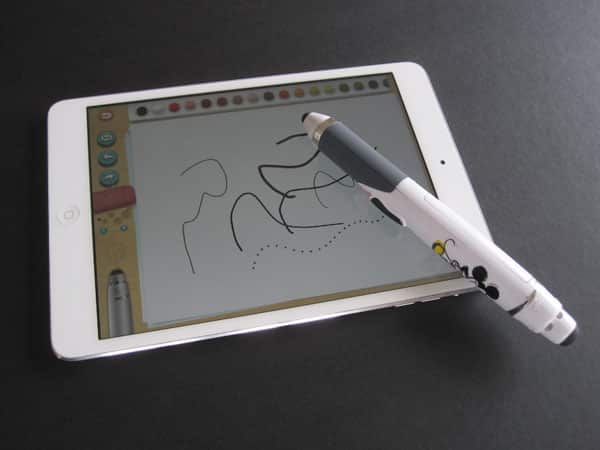
Working in collaboration with iHome and Disney, eKids has released its Disney Creativity Studio – Smart Stylus ($50). The pen is made to work with the Disney Creativity Studio iPad app, which is normally $4, but comes free with the included redemption code. Clearly designed for children, the app and stylus are made for drawing, tracing, and coloring. What makes the accessory “smart” is the wireless connection to the tablet, with which you can change your pen style and more. Also included in the box is a Mickey Mouse-emblazoned carrying case.

Review: eKids Disney Creativity Studio – Smart Stylus

Smart Stylus is just a little over six inches long from end to end, and is chunkier than most styluses we’re used to seeing these days; it makes sense for little hands. The body is mostly white plastic, although the gray grip towards the bottom has a soft-touch finish. There are capacitive tips at either end, and a power button above the grip. The tip at the back end serves double duty: it can be used as an eraser when the stylus is flipped over, and is also a button for cycling through pencil, brush, marker, crayon, and stamper effects.


As for the power button, pressing at the top or bottom adjusts the line thickness.


Review: eKids Disney Creativity Studio – Smart Stylus

A good stylus should be able to communicate with an iPad’s Multi-Touch display with little to no pressure; you should be able to drag the tip across the screen and have a line show up. eKids got this a little less than half right. The eraser end of Smart Stylus requires just the lightest pressure to get it going. In our testing, it took more pressure to have the pen side be recognized, or at least a second or two longer with the same amount of force. Viewed as just a stylus, it’s somewhat disappointing.


Review: eKids Disney Creativity Studio – Smart Stylus

Rather than using Bluetooth or Wi-Fi to connect to your iPad, Smart Stylus’ developers decided to use an audio connection. Once turned on, the pen emits a quiet, high-pitched noise that is picked up by the tablet’s microphone, which interprets it as commands in the app. Frankly, we thought at first there was an issue with our review unit, as the tinny noise sounds something like a broken speaker. Although described as “virtually in-audible,” we were able to hear it clearly, and it very quickly become grating. There is a benefit though: no set up.


The stylus automatically communicates with the app, without the need to pair or sync it.

That sound wasn’t the only thing that led us to believe our review unit was broken, and ultimately request another for confirmation. Two of the stylus’ key features are the ability to flip it over to switch to eraser mode, and shake it for “magic mode,” where the pen output becomes rainbow colored. Instead of using an accelerometer to recognize these movements and changes in orientation, eKids chose ball-bearing orientation switches. They work, there’s no issue with either. The problem is there’s a constant rattling inside the pen, and it’s not a sound we associate with a quality electronic accessory.


Review: eKids Disney Creativity Studio – Smart Stylus

The Disney Creativity Studio app, which works on any iPad, including the iPad mini, features three different modes. There’s a simple blank page, Learn To Draw in which you follow audio and visual prompts to draw different Disney characters, and Activities. These include coloring, tracing, and draw by numbers. The Disney license is a big part of the appeal with this one.



Latest News
The 14-inch MacBook Pro with M5 Chip 16GB RAM/512GB is $250 Off
1 Min Read
Noise and Static on AirPods Pro 3 Still Unfixed
1 Min Read
New iMac with 24-inch OLED Display May be Brighter With 600 Nits
1 Min Read
The 15-inch M4 MacBook Air 256GB Is $250 Off
1 Min Read
Internal Kernel Debug Kit from Apple Reveals Tests for a MacBook with A15 Chip
1 Min Read
Apple Currently In Talks With Suppliers for Chip Assembly & Packaging of iPhones in India
1 Min Read
Apple Allows Easier Battery Replacement For M5 MacBook Pro with 14-inch Display
1 Min Read
The Apple Watch SE 3 44mm GPS is $50 Off
1 Min Read
20th Anniversary iPhone May Launch in Two Years
1 Min Read
Better Image Generation Capabilities and Apple Music Integration Coming to ChatGPT
1 Min Read
A20 Pro Chip Coming to Next Gen iPad Mini OLED
1 Min Read
Amazon has the AirTag 4 Pack Marked $29 off
1 Min Read

iLounge logo

iLounge is an independent resource for all things iPod, iPhone, iPad, and beyond. iPod, iPhone, iPad, iTunes, Apple TV, and the Apple logo are trademarks of Apple Inc.

This website is not affiliated with Apple Inc.
iLounge © 2001 - 2025. All Rights Reserved.
  • Contact Us
  • Submit News
  • About Us
  • Forums
  • Privacy Policy
  • Terms Of Use
Welcome Back!

Sign in to your account

Lost your password?








