
Ever since the iPhone 3G debuted with built-in GPS hardware, Apple has had the opportunity to add GPS to iPod touches and Wi-Fi iPads, but has kept the feature exclusive to subsequent iPhones and 3G-enabled iPads — a distinction that has limited the use of many iOS devices for realtime mapping and positional information. Capitalizing on the feature gap, several companies have released GPS accessories, including MiTAC’s Magellan series, but they’ve all had a couple of limitations: they’ve been too expensive, and they haven’t been designed to work with iPads. Dual Electronics’ XGPS150 Universal GPS Receiver ($100) is different. It uses Bluetooth wireless to connect with virtually any iOS device, runs off its own rechargeable battery, and is more aggressively priced than its rivals. Consequently, it’s a smarter purchase than alternatives we’ve previously tested, though it does have some limitations prospective customers should be aware of.
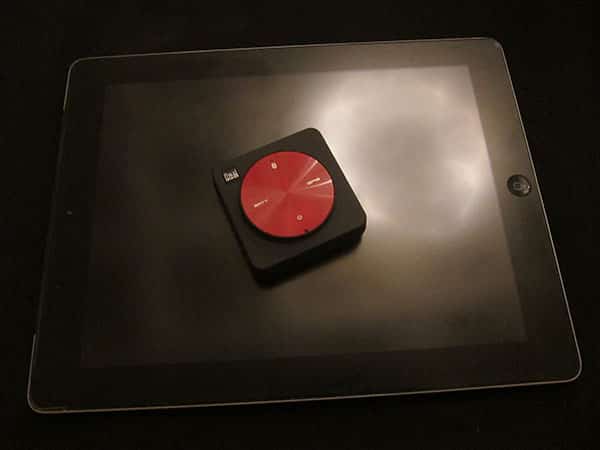
Looking a little like the old U2 iPods, XGPS150 is a rounded square box measuring roughly 2.2” wide and tall, bulging at its center from 0.5” to 0.75” in thickness. Lightweight and made primarily from matte black plastic, the unit’s face is dominated by a red swirled metal circle with four icons or words at its cardinal positions: north is Bluetooth, west is a battery indicator, east is a GPS signal indicator, and south is power. To turn XGPS150 on or off, you hold down the bottom of the circle until the lights go on; none of the other edges of the circle hide buttons. A tiny switch hidden in a mini-USB connector compartment below the power button toggles the XGPS150 between iOS and non-iOS device pairing modes.
There are no other controls to learn; you turn it on, pair it with your device, and repeat the process for additional devices.

Unlike GPS cases and car cradles we’ve previously seen, XGPS150 needs to be carried or mounted separately—but near—your iOS device. Using a hole-shaped bulge and four small pits on the unit’s back, XGPS150 can be mounted on a dashboard using an included anti-slip rubber pad, or worn around with either packed-in Velcro wristband and armband accessories. Though the pad and bands aren’t fancy, they work as expected, and the anti-slip dashboard system has enough flexibility and surface area to keep the unit perfectly situated regardless of whether it’s on a flat or curved surface—or in a car, plane, or boat, the company suggests. An included USB cable and car charger enable the integrated eight-hour battery to be refueled either at home or in a vehicle; in our testing, the remaining battery life of the connected iOS device was more commonly an issue than the XGPS150’s.

As it turns out, XGPS150’s utility will depend a lot on your willingness to purchase and rely upon third-party GPS applications for mapping data—and the applications’ support for third-party GPS accessories. Since the iPod touch and standard iPads depend entirely upon Wi-Fi for their built-in Maps applications, and certain third-party apps (including MotionX GPS) similarly download map data from the Internet on an as-needed basis, you’ll almost certainly need to purchase an app with integrated “offline” maps to pair with XGPS150’s location data. We tested the accessory using an iPod touch 4G with TomTom and Magellan RoadMate North America, both of which installed and worked properly.

Dual also offers a free app for XGPS150, which enables you to check how many satellites it is finding, get longitude, latitude, and altitude coordinates pretty much anywhere you are, plus determine heading and speed when you’re in motion. The app is ready to download automatically after you make your first Bluetooth connection with the accessory, and has an iPhone/iPod touch-optimized interface without full iPad UI support.

During our testing, XGPS150 enabled the iPod touch to work almost identically to the map hardware built into an iPhone.
When you’re within Wi-Fi range, Maps can pull up accurate location information and a full map of your current location—plus cached driving directions—minus the compass button found in iPhones and iPads. The “current location” dot doesn’t pulse to indicate active second-by-second GPS tracking taking place inside the iPod, but it can be checked to determine where you are on the existing Google-loaded map. Switch to apps such as Tom Tom and Magellan RoadMate and XGPS150 can be used to accurately determine everything from location to vector and direction. Maps turned when our car turned, proceeded in a given direction along with us, and stopped when we stopped.

The only issues came up when cellular (or Wi-Fi) network-dependent features were attempted. When you’re using Tom Tom and Magellan RoadMate on an iPhone, it might not occur to you that realtime point of interest searches are drawing upon Google for live assistance, but when they don’t work on an iPod touch or Wi-Fi-only iPad in the car, these and other small omissions become obvious. It helps to have up-to-date POI databases; neither of the apps we tested could locate a restaurant that opened several months ago, but they would have both done fine with a live Internet connection—and were both worked around with a known alternative business nearby. This isn’t a failing of XGPS150 in any way, but if you’re planning on relying upon it to turn your iPod touch into an iPhone, understand the limitations going in.











