
Pros: Allows a Bluetooth phone’s incoming and outgoing calls to interrupt iPod playback: a good idea with fairly good (if highly familiar) industrial design
Cons: Required use of cell phone earphones forces loss of sound quality; does not pause iPod upon receipt of call; poor call quality in and out, accentuated with interference from iPod playback.
If you’re not yet familiar with Bluetooth technology, here’s a brief primer: it’s a short-range wireless communications technology that’s commonly used in wireless mice, keyboards and handheld devices. Recently, its most popular application has been in wireless cell phone headsets, and it has also been used in conjunction with the iPod a couple of times. Most notable is TEN Technology’s naviPlay (iLounge Rating: A-), a $200 accessory which lets users walk up to 25 feet away from their iPods while still using their favorite headphones.
The new iBlue and iBlue mini from d.Muse ($79.99 each) offer a different spin: they promise to turn an iPod or iPod mini, respectively, into a Bluetooth-enabled cell phone’s wireless headset, automatically switching between iPod audio and cell phone conversations as calls are received or placed.
(TEN’s naviPlay recently gained the ability to perform the iBlue’s functions via a software update, and includes a built-in microphone for telephone calls.
Potential shoppers may want to keep this in mind when making their decisions.)
The iBlue comes in a package strikingly similar in construction and style to that of Griffin Technology’s iTrip and iTalk accessories. Inside, you find a small instruction booklet, a special pair of white earphones, a short USB cable used to charge the iBlue’s internal battery, and the iBlue device itself.

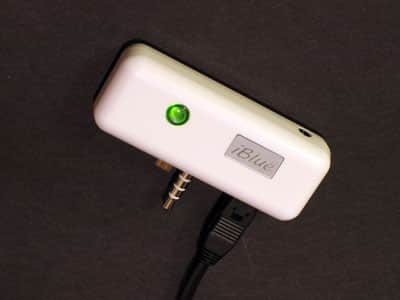
Each iBlue is a sturdy white plastic device that sits atop a full-size 3G, 4G, or photo iPod. (An iPod mini version is also available, although we did not receive one for review.) On its top is a 2.5mm headphone jack, positioned to the right side of the device. On its bottom are the plugs used to connect to the iPod’s extended headphone port, and a female mini port you connect to the USB cable. iBlue’s front face features a small product logo and a single two-color indicator light, utilized as visual feedback for several of iBlue’s functions.
The included iBlue earphones are an interesting cross between the Apple-supplied standard iPod earphones and the earphones included as hands-free kits by many cell phone manufacturers. Their white color and earpiece design are reminiscent of the former’s style, but the inclusion of a removable lapel clip, inline volume control, microphone, and single control button add features only seen on the latter.
These earphones use a 2.5mm connector, which though standard for cell phone earpieces is smaller than a standard music earphone connector. As expected, third-party hands-free kit headsets with microphones do indeed work on iBlue without any loss of functionality, but you can’t use a standard set of iPod earphones. Though we understand the need for an inline microphone for a device such as this, we lament the fact that we must sacrifice significant audio quality in order to use this special set, as the iBlue’s pack-ins look, feel, and sound much like the sub-$10 earphones sold at convenient stores – almost no bass, weak highs, plenty of distortion, and generally flat sound. TEN gets around this with naviPlay by including a microphone in its receiver and letting you use whichever headphones you prefer; this was a much, much smarter idea.

To begin testing iBlue, we connected the device to a spare USB port, which charged the completely empty iBlue to full power in just under three hours, significantly less than the five hours stated in the included manual. During charging, iBlue’s LED lamp illuminates in red; during use, it flashes green until its battery is low, at which point it flashes red.
Pairing iBlue with two test cell phones (a Sony Ericsson T610 and a Nokia 6600) worked without a flaw. To do so, we simply held down the iBlue headset’s single control button for six seconds to put it in “pairing�? mode. We then navigated our cell phone’s menus and were able to discover and pair with the iBlue device easily.
However, after initial setup, the iBlue behaved more unpredictably. On power up, it would sometimes automatically connect with our test cell phones, but sometimes would refuse to connect unless we specifically requested it to via our cell phone.
Once connected properly, the iBlue worked essentially as expected. On an incoming call, the iPod’s music dropped out, and a short monophonic ringtone played through the earpieces. Pushing the control button once answered the call, and the earphones properly became a hands-free headset and microphone.
If the cell phone itself is used to dial an outgoing call, the audio again drops out as the cellular call takes the foreground. When either the incoming or outgoing call is finished, the iPod’s audio returns.
In addition to supporting incoming calls and manually-dialed outgoing calls, the iBlue also supports the hands-free standard voice dialing functionality, should the user’s cell phone support it. When the iPod audio is playing and the phone is idle, one can simply press the inline control button to instruct the iBlue to put the phone into voice dialing mode, speak the name you want to call, and have the call placed – assuming the command was properly recognized by the phone.

Though audio quality on Bluetooth headphones varies from unit to unit, we found the call quality on iBlue – both incoming and outgoing – to be far less than desirable. Incoming audio sounded rough and laden with static. Even worse, if the underlying iPod audio had a strong beat, rhythmic popping noises overlaid our conversation – the iPod didn’t stop playing. Outgoing audio was also reported by listeners to sound fairly poor, compared with when we spoke directly into the phone, with the speaker’s voice being unrealistically deep and unclear.
Though the iBlue has pins that connect to the iPod’s remote control port, leading one to assume that it has iPod control functionality, iBlue is indeed unable to pause the iPod’s audio when a phone call is made. It appears that the remote control plug presence is mostly for connection stability and to prevent the iBlue from rotating. We found this obvious feature omission to be disappointing, especially given how close the iBlue’s hardware comes to technically being able to perform this function.
The iBlue certainly deserves some praise for concept and price point; it’s the cheapest way yet to integrate an iPod with a Bluetooth phone. However, given the sound quality of the included earphones, connectivity issues, call quality issues, and the device’s lack of an ability to control the iPod’s audio playback, we find the iBlue hard to recommend or even like, and we wouldn’t use it ourselves for either iPod or telephone listening.











