
Pros: A simple, attractive 3-in-1 mount, charger, and audio-out/FM transmission solution for the iPod shuffle, with digital tuning and easy controls.
Cons: Short mounting plug and limited FM transmission strength limit its usefulness to specific vehicles; may not mount properly or sound good in your car.
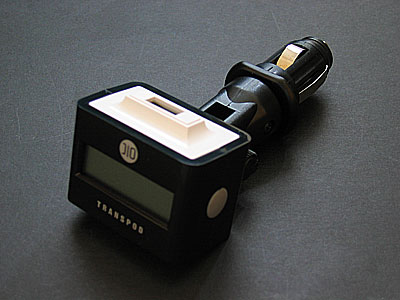
With a couple of small hiccups in the past, we’ve generally liked DLO’s TransPod FM 3-in-1 car mounts, chargers, and FM transmitters (iLounge rating: B+). The concept behind them is smart: use a single device to integrate all of the features people might need to enjoy their iPods in their cars, and sell that device at a price comparable to or lower than the cost of each individual part alone.
DLO’s new TransPod for iPod shuffle ($59.99) is a distillation of its earlier TransPod FM units into a smaller, iPod shuffle-only casing. Instead of the elaborate cradle featured in earlier TransPods, or their two separate plastic ratcheting arms that mount the cradle in your vehicle, or their big kits of alternative mounting tools, TransPod for iPod shuffle is very simple. There’s a black box with a white top that connects to your shuffle’s USB plug. The box has two gray dots, one each on its left and right sides, which are used for tuning the integrated FM transmitter down and up. A blue-backlit digital display on the unit’s front indicates the current station. On the white bottom are two ports – a “line out” output port you can connect with a cable (not included) to a car’s line-in port or a cassette adapter, and an aux-in port so that you can connect other devices – including larger, uncradled iPods – for the TransPod to FM transmit.

TransPod for iPod shuffle is alright as an FM transmitter.
On the positive side, it’s easy to tune, and the large backlit LCD screen looks good. It boots up briefly with the letters DLO, and then is ready to rock. Four presets are also available by pressing both of the gray buttons at the same time; they come set to channels that you can easily change.
We weren’t blown away by its audio quality. In three of the four vehicles we tested, we heard a fairly noticeable base level of noise, even on the clearest and best (empty) FM stations. This was despite the fact that TransPod can tune in the generally available 87.9 frequency; it wasn’t any better on that station. It sounded better overall than XtremeMac’s AirPlay for iPod shuffle (iLounge rating: C-), but not as good as Newer Technology’s inexpensive RoadTrip! 87.9FM (iLounge rating: B+), which is also shuffle-compatible. TransPod tends to do better when it’s mounted near an antenna, but if that’s not an option, expect only a notch above acceptability on the FM transmitter scale.

However, it does a good job with direct cabled audio output through its “line out” port, so if you’re planning to buy the TransPod mostly for its mounting and charging features, you’re more likely to be satisfied.
We’ll note that there is no true “line out” for iPod shuffles, however, as audio pumped through its USB port is just a mirror of that which comes from its headphone port. If you find it hard to connect your cassette tape adapter or car’s line-quality audio cable to the TransPod’s bottom, just connect it to the shuffle’s top instead.
It also does a fine job of charging the attached iPod shuffle; a small lightning bolt on its screen indicates that charging is taking place, and a full battery icon indicates as much. We had no problems getting our shuffles to recharge when the TransPod was properly mounted.

But our biggest issue with the TransPod was, in fact, mounting. We had problems mounting it in three of the four cars we tested, because the unit uses only one short, cradle-matching black power plug to connect to your car’s cigarette lighter/power adapter. A detachable black mounting ring is also included to potentially aid in stability.
While a ratcheting component in the plug lets you adjust the north/south angle of the black box ninety degrees in either direction, its short length and lack of greater flexibility gave us major problems. In one of the cars (a Lexus RX330, depicted), it could only be mounted in a position that prevents the car’s gear shift knob from working properly, and needed to be plugged in only after the car was moving, then unplugged before parking.











