
Pros: A small and convenient remote control for 3G, 4G, mini and photo iPods that looks nicer than TEN’s original naviPod.
Cons: Limited functionality given new remote needs of some iPods, infrared remote requires more direct line-of-sight pointing than competing options, expensive, not practically useful for volume control on Dock Connecting speaker systems.
After an extended period of stagnation, remote control development for the iPod is now in overdrive: no less than four companies are preparing new solutions that allow you to change tracks, volume, and play/pause status on your iPod from a distance. Current offerings such as TEN Technology’s Infrared-based naviPod (iLounge rating: B) and EngineeredAudio’s RF-based RemoteRemote generally do the trick, but are both light on functionality and high in price by comparison with what’s about to come out.
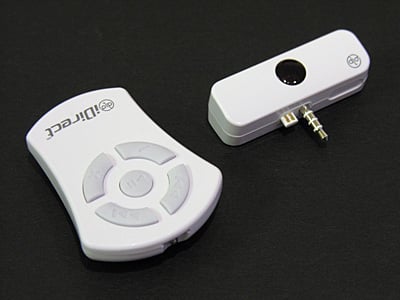
Of the new remote designs, DLO’s new iDirect remote control set is the most traditional. It’s essentially a repackaged naviPod featuring a slightly nicer set of casings.
Like naviPod, iDirect’s receiver is a glossy white plastic, top-mounting iPod attachment with a black central circle that receives Infrared transmissions from a wireless remote control. Unlike naviPod, iDirect’s pass-through headphone port is mounted on its top rather than its rear, and it doesn’t include naviPod’s occasionally useful detachable metal mounting stand. For that reason, you’ll need to mount your iPod upright in something – such as a Dock – if you want to use iDirect.
DLO’s remote control is thankfully less awkward than the old oversized circular unit included with naviPod: again, both units share the same glossy white plastic body material, but iDirect’s uses a ring of light gray buttons for track forward and backwards, volume down and up, with a circular play/pause button in the center.
The infrared light protrudes a bit from the unit’s top, and a battery compartment at the bottom holds a nickle-sized CR2032 lithium cell, just like the naviPod.


Both devices do as promised on 3G, 4G, and mini iPods, switching tracks and changing volume with those four buttons, and playing, pausing and turning off the iPod with the center button. However, neither remote can make the iPod photo switch between photographs – a notable omission from the more recent iDirect that TEN couldn’t have known about when it was developing naviPod many moons ago. Newer remote controls have taken this requirement into account; it was disappointing to note its absence here.
More disappointing was the iDirect infrared remote control’s limited utility – our test unit could only be used in the receiver’s almost direct line-of-sight. RF-based remote controls like RemoteRemote use radio signals rather than light emissions, and therefore don’t depend on the receiver to “see” the remote control signaling track or volume changes with invisible light rays. If pointed on any angle other than generally straight in the direction of the iDirect receiver from more than ten feet away, our test unit’s remote control had problems changing tracks, play/pausing, and adjusting volume.
The naviPod’s remote didn’t have the same problem at the same distance, and since they’re both infrared-based devices, we swapped their receivers just as a test, and tried both remote units at the same distances with the same battery. naviPod’s remote could be pointed wildly and still work; iDirect’s could not.


It bears brief mention that iDirect, like the other iPod standalone remotes, cannot adjust the volume of audio coming off of the iPod’s Dock Connector port, nor send signals to an amplifier connected to that port to boost the amplifier’s volume. For this reason, it’s not a complete substitute for the remotes included by Bose with its SoundDock and Altec with its inMotion iM3 speakers, which let you adjust the docked iPod’s speaker volume with no problem. You can only adjust the volume of the iPod’s headphone port, and may have to connect your speakers in a different way to accommodate the iDirect’s limitation. Keep this in mind if you plan to use the iPod remotely with a speaker system that doesn’t include its own remote control, such as DLO’s iBoom, Altec’s iMmini, JBL’s On Stage and Creatures, and so on.
While we aren’t grading iDirect based on competitors not yet available in the marketplace, we can’t help but feel that its $49.99 asking price is a tough sell today by comparison with the $40 RemoteRemote and $49.95 naviPod – its primary advantage is cosmetic, and its primary caveat is a fairly important one.











