
Yes, DLO might have taken way too long to bring iBoom JukeBox ($200) to market — it was announced back in early 2008 and missed its original ship date by around a year. Yet due to dwindling innovation and competition in the iPod audio space, this four-driver system still manages to offer an overall package of interesting design and features — most importantly a novel display remote — that will endear it to users seeking something unique on a midrange budget. Between its shape, sonics, and controls, iBoom JukeBox handily transcends its iBoom-branded predecessors.
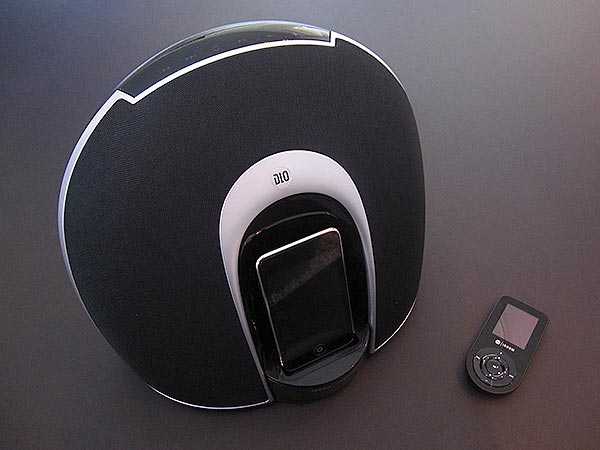
The core of iBoom JukeBox is a large but easily carried plastic and fabric speaker and docking unit that’s compatible with iPods, but not iPhones. Measuring just under 12 inches in width, 8 inches in depth, and 10 inches in height, the black and silver system somewhat recalls JBL’s iPod-exalting Radial speaker design, featuring a central iPod dock, fabric speakers arrayed around it pointing forwards, and an RF remote to let you control your music from afar. Six capacitive touch-sensitive icons are found on the unit’s top, glowing blue when the power’s turned on; power, volume, track, and play/pause buttons are all located here. On the back near the top, DLO includes a sizable handle-like grip hole, while two prominent bass ports are found near the bottom, and a recessed magnetic docking and charging space for the display remote sits in the middle. Notably, the system depends on wall power rather than batteries, and features one “aux out” and one “aux in” port alongside the power port below the remote’s docking area. All of the aesthetic elements strike us as elegant and well-conceived—some of DLO’s best design work to date.

iBoom JukeBox’s reasons for being are two in number: the speakers and the remote, which are tied together in design and purpose.
Start with the four speakers, which are backed by 20 Watts of thankfully clean amplification. At typical volume levels, iBoom JukeBox distinguishes itself from similarly priced portables with low-end warmth and good midrange that are clearly attributable both to its twin 3” drivers and bulbous bass chamber of a body. While there are no bass or treble buttons on the system, songs are presented with both enough and clean enough low-end that bass fans certainly won’t be disappointed for the price, and though the midrange flattens, the bass remains solid as the volume ramps upwards. Treble performance is also handled pretty well thanks to a set of 1” tweeters that give songs enough apparent detail at typical volumes to rival the better $150 speakers we’ve tested for iPods. While we’d have liked to hear more treble at near-field listening volumes, the treble does go up as the system’s amplitude increases, suggesting that the system has been designed to be enjoyed at 7- or 10-foot distances rather than right next to the user. This isn’t surprising given the time and energy expended on the development of its remote control; if you’re planning to use iBoom JukeBox close enough not to need the remote, it’s probably not the right audio system for you.


As many other companies have released very good to great speakers at lower prices than iBoom JukeBox’s, DLO’s special remote is really this system’s biggest distinguishing factor and potential draw. In late 2006 and early 2007, we started to see a number of iPod display remote controls with integrated color screens, notably including Keyspan’s TuneView and DLO’s HomeDock Music Remote, but they tended to be expensive and sluggish in responding. With iBoom JukeBox, DLO has improved considerably upon the HomeDock Music Remote, as the included RF controller offers faster response times, a very readable nine-line screen with letters that are roughly as large as those on the iPod touch and iPhone’s music menus, and the ability to display color album art fairly quickly.
Additionally, the rechargeable battery inside didn’t run out during our testing, and the RF controls worked without issues through walls and several rooms away—within the limits of DLO’s promised 75-80 broadcasting range. Though there is a slight lag in its responsiveness, there’s no huge delay on initial synchronization, and we found the remote’s technical performance acceptable given what it’s pulling off.


While the screen is nowhere near as detailed or well color-balanced as DLO’s packaging and web marketing materials—it actually has a strong blue tint and lower resolution than the official images would suggest—it uses OLED technology, which lets on-screen text appear bright and easy to read. Its controls are interesting, too: it uses three concentric circles, essentially overlapping a four-direction navigation ring directly between the same buttons you’ve seen on the first two iPod shuffles and Apple’s iPod and Mac Apple Remotes. This mightn’t be the most intuitive place to locate these buttons, particularly since there’s a tendency to try to hit the play/pause button at center as an “OK” button, but once you get the hang of it, it’s obvious that this system makes really good use of the remote’s limited space.

iPod menu navigation is limited but practical, with one big exception. You’re given access to Music, Videos, Settings, and Now Playing options, then Playlists, Artists, Albums, Genres, Songs, and Composers. Notably, audiobooks are added to that sub-menu if you have any, and playing back audio is exactly as you’d expect: you can use the integrated track buttons to scrub within or change tracks, the volume buttons to adjust the system’s audio level, and the play/pause button to start or halt playback. The remote shuts off automatically after several seconds of inactivity, but for some reason, it can’t be used to turn off iBoom JukeBox; the system requires a touch on its top panel to deactivate the speakers.


Though that’s a little annoying, the system’s real problem is its approach to video.











