
There’s no easy way to sum up the history of advanced iPod video docks, save to say that they’ve always been more expensive than their functionality seemed to be worth, and most of the companies that have tried to make them have chosen eventually to give up on the category. DLO has been trying longer, and with more models, than anyone else. It has released HomeDock, HomeDock Music Remote, HomeDock Pro, and two versions of HomeDock Deluxe (2006 and 2007), starting at a $100 price, and growing from there. Now — eleven months after the initial announcement — it has finally released a new version called HomeDock HD ($250).
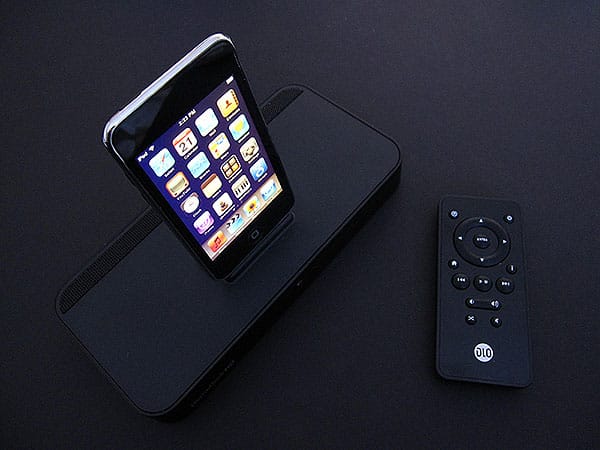
Like the other HomeDocks, HomeDock HD can be understood basically as a charging and video-out dock for your iPod, paired with a wall power adapter and remote control. As with most of the HomeDocks, it displays the contents of your iPod using on-TV menus, letting you navigate those contents from afar with the remote. It’s the nicest-looking HomeDock yet released from an aesthetic standpoint, using simple black parts, providing rear-mounted multiple video and audio outputs, and coming packed with a single composite AV cable for connection to a standard resolution television yet. Virtually everything superfluous from past iterations of the product has been disposed of, which is both a good and a bad thing; unless you’re willing to use the composite AV cable, you’ll need to supply your own cables for higher-quality audio and video connections. Additionally, a USB port is included on the system’s back so that you can connect a self-supplied USB memory stick to perform firmware upgrades.

So why, then, would DLO sell a simple video dock for such a staggeringly high price—more than Apple charges for the 40GB model of Apple TV? The answer: it’s not really a simple video dock.
Using HDMI, S-Video, composite, or optical ports, HomeDock HD now outputs iPod video to both standard-definition and high-definition TV sets, with menus and upscaled video output that support up to 720p or 1080i resolutions. This latter feature is similar to what you see in many current DVD players, and doesn’t magically transform your low-definition iTunes videos into HD-quality programming; it’s supposed to be a way of making better use of your HD display than you might get from a plain jane video cable.

There are other frills, as well. Unlike earlier HomeDocks, the menu system is based almost entirely on large on-screen icons. All of the menu elements, from text to graphics, have taken steps up from past HomeDocks in detail and art quality; they’re not quite at an Apple level of impressiveness, but they’re getting better. Additionally, DLO’s remote control uses radio frequency (RF) technology rather than Infrared, so you can use it from a room away, or with physical impediments between the remote and HomeDock HD. It’s the most responsive and best-feeling remote we can recall testing from DLO, laid out logically and with a nice, substantial weight; moving from icon to icon and menu to menu is very simple.

Unfortunately, that’s where our praise for HomeDock HD has to end, as we weren’t especially impressed by its performance as a music or video player; it is essentially just an old HomeDock with a higher-resolution interface and HD-ready connectors. Perhaps not surprisingly, and despite the upscaling feature, sub-DVD-quality iTunes videos don’t magically start to look better on the HomeDock HD; in fact, they look virtually the same as they do with a standard composite AV cable. Unlike DVDs, which contain extra pixels that some chips can find and upscale nicely into cleaner-looking HDTV imagery, files on iPods are typically formatted at lower resolutions, and when they’re displayed on high-definition TVs, they look blocky and grainy, rather than smooth.
HomeDock HD doesn’t fix this, and practically can’t; the problem is that it claims to.

We also found that the unit has some seriously odd behaviors, some of them attributable to a less than completely thought out transition from a text-based menu interface to one that’s heavily graphical. Logically, HomeDock HD should use some sneaky method to quickly or subtly cache the album art from a connected iPod, but despite a lengthy “initializing” period, it doesn’t; instead, it loads the device’s library text up front, but not the art, so most of the graphics that appear as you browse your library are placeholders.


When you go to start playing an audio track, HomeDock HD interrupts the song to load album art, continuing a countdown timer while it’s paused, and freezing interface interaction. Then, 15 or so seconds later, it resumes the audio with artwork as if nothing had happened.


There are other, similar issues. The album art screen saver, which is conceptually similar to the Apple TV’s, couldn’t be more different in execution: it just keeps repeating the same pieces of art that it has loaded from already played songs, along with a huge collection of placeholder graphics. Here, and in other places in the interface, it’s obvious that DLO isn’t using chips anywhere near as powerful as the Apple TV’s, or software that takes advantage of them as well.


If you have low expectations for HomeDock HD, or specific needs that you don’t want to try tackling with an Apple TV, you may be satisfied. It does output two-channel iPod audio through its integrated optical audio port, and similarly does offer a way for you to output an iPod’s video through an HDMI port; Apple doesn’t sell a cable or a dock with either of these capabilities.











