
iLoungeiLounge
  • News
    • Apple
      • AirPods Pro
      • AirPlay
      • Apps
        • Apple Music
      • iCloud
      • iTunes
      • HealthKit
      • HomeKit
      • HomePod
      • iOS 13
      • Apple Pay
      • Apple TV
      • Siri
    • Rumors
    • Humor
    • Technology
      • CES
    • Daily Deals
    • Articles
    • Web Stories
  • iPhone
    • iPhone Accessories
  • iPad
  • iPod
    • iPod Accessories
  • Apple Watch
    • Apple Watch Accessories
  • Mac
    • MacBook Air
    • MacBook Pro
  • Reviews
    • App Reviews
  • How-to
    • Ask iLounge
Font ResizerAa
iLoungeiLounge
Font ResizerAa
Search
  • News
    • Apple
    • Rumors
    • Humor
    • Technology
    • Daily Deals
    • Articles
    • Web Stories
  • iPhone
    • iPhone Accessories
  • iPad
  • iPod
    • iPod Accessories
  • Apple Watch
    • Apple Watch Accessories
  • Mac
    • MacBook Air
    • MacBook Pro
  • Reviews
    • App Reviews
  • How-to
    • Ask iLounge
Follow US

Reviews

Reviews

Review: Dexim ClickStik Bluetooth Remote + Camera Stand

Last updated: May 17, 2021 9:56 am UTC
By Nick Guy
Review: Dexim ClickStik Bluetooth Remote + Camera Stand

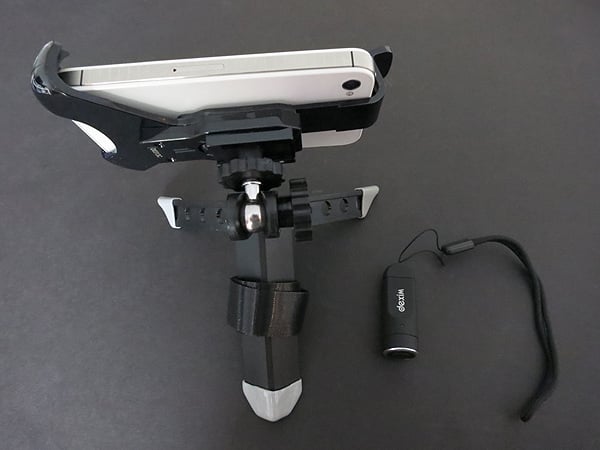
Even though Apple’s addition of a front-mounted FaceTime camera to the iPhone made self-photography much easier, taking good shots with the higher resolution rear iSight camera remains a challenge. Is the issue serious enough to warrant a $50 accessory solution? Dexim’s betting “yes” with the release of ClickStik Bluetooth Remote + Camera Stand ($50), which bundles a wireless shutter release button and three-legged stand. Together, the ClickStik parts allow users to remotely snap pictures on recent iPhones and iPod touches from up to 30 feet away, with partial support for iPads. Also in the box is a Micro-USB cable for charging the Bluetooth wireless remote controller.

Review: Dexim ClickStik Bluetooth Remote + Camera Stand

The remote is about as simple as it can get and does exactly what it’s promised to, although not quite in the manner we were hoping for. Measuring a little less than two inches long, the black soft touch-coated plastic controller has a single button at the top inside a chrome-colored ring, and a Micro-USB port for recharging at the opposite end. It ships with a wrist strap attached, so you can wear it rather than pocketing it.

To toggle the power on and off, you just press the button until a single LED starts flashing. This puts it into pairing mode, and allows it to connect to any supported iPad, iPhone, or iPod.


Review: Dexim ClickStik Bluetooth Remote + Camera Stand

Our initial thought was that the remote duplicated the functionality of the iOS volume up button, and would therefore work with any camera app—notably including the one built in to iOS. Instead, the remote uses its own protocol, and requires Dexim’s free ClickStik app. This application duplicates the still photography functionally of Apple’s Camera app, though the version we tested left out video recording capabilities. It also has Instagram-like filters, stamps, text, and drawing options, in addition to the ability to share via Facebook, Twitter, and email. While not as elegantly designed as Apple’s official option, it gets the job done. 


Review: Dexim ClickStik Bluetooth Remote + Camera Stand

Although the remote can be used with the iPad, Dexim’s 3.75” tall stand is made solely for iPhones and iPod touches.

Thankfully the holder is flexible enough to support multiple generations of devices, whether they’re inside cases or bare. We’ve seen this three-armed style of stand before, and it’s not fantastic, but it works. The two bottom corners are supported with rubber-lined plastic, and an arm grips the iPhone or iPod at the top, moving up and down to accommodate the iPhone/iPod model and case you’re using.


Review: Dexim ClickStik Bluetooth Remote + Camera Stand

The device holder is attached to the body of the stand with a ball joint that can be adjusted based on your desired position via two dials, which help the device stay in your choice of positions. Three plastic legs keep the holder upright. When not in use, the two smaller legs fold into the larger one, and a long Velcro strap wraps around them. The whole thing works fine, although it strikes us as being a bit overcomplicated. For storage purposes, the Velcro strap is way too long, but Dexim suggests that the strap could alternately be used to mount the stand on a pole rather than a desk.



Latest News
The AirPods Pro 3 is $20 Off
1 Min Read
Exynos 2600 Chip 2nm Process Revealed by Samsung
1 Min Read
New Celebrity Ad Campaign Featuring Travis Scott Released by Beats
1 Min Read
Australia Getting Hypertension Notification Feature
1 Min Read
The 14-inch MacBook Pro with M5 Chip 16GB RAM/512GB is $250 Off
1 Min Read
Noise and Static on AirPods Pro 3 Still Unfixed
1 Min Read
New iMac with 24-inch OLED Display May be Brighter With 600 Nits
1 Min Read
The 15-inch M4 MacBook Air 256GB Is $250 Off
1 Min Read
Internal Kernel Debug Kit from Apple Reveals Tests for a MacBook with A15 Chip
1 Min Read
Apple Currently In Talks With Suppliers for Chip Assembly & Packaging of iPhones in India
1 Min Read
Apple Allows Easier Battery Replacement For M5 MacBook Pro with 14-inch Display
1 Min Read
The Apple Watch SE 3 44mm GPS is $50 Off
1 Min Read

iLounge logo

iLounge is an independent resource for all things iPod, iPhone, iPad, and beyond. iPod, iPhone, iPad, iTunes, Apple TV, and the Apple logo are trademarks of Apple Inc.

This website is not affiliated with Apple Inc.
iLounge © 2001 - 2025. All Rights Reserved.
  • Contact Us
  • Submit News
  • About Us
  • Forums
  • Privacy Policy
  • Terms Of Use
Welcome Back!

Sign in to your account

Lost your password?








