
CarBot ($30) from Desk Pets is the least expensive iOS-controlled vehicle we’ve come across, and also the most toy-like: while others including AutoWave’s Ford Mustang Boss 302 Silverlit’s Porsche 911 Carrera are $80-$100 scale replicas of their namesakes, CarBot is a small plastic vehicle roughly twice the size of a Matchbox car that ships in translucent neon colors. The low price has a direct consequence: CarBot doesn’t use Bluetooth, Wi-Fi, or a proprietary radio transmitter for control, instead relying on a line-of-sight Infrared blaster that plugs into the headphone port of your device.
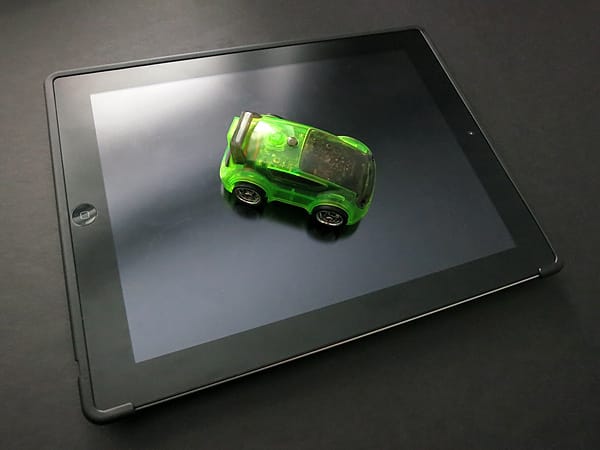
The 3” by 2” car looks like it was inspired by Tron or a similar futuristic aesthetic—the semi-transparent body looks cheap, but lets you see all the circuitry and gears that move the car around. We really liked the novel charging solution: CarBot’s internal battery is recharged through a flip-down USB plug rather than an additional cable or replaceable cells. Although the plug doesn’t unfold in a completely perpendicular fashion, we had no problems connecting it to different computers and wall adapters. The IR blaster adapter is a two-inch-long by sub-one-inch half oval, as toy-like in appearance as the vehicle.
Getting everything set up is a somewhat frustrating process, requiring you to follow instructions printed on the back of simple cardboard packaging. You must make sure the blaster is turned on and pointing down, set your device’s volume above 35%, flip any ringer switch away from the silent position, turn on the car, and make sure that it’s tuned to the same frequency as the app.
This may not sound like a lot, but it’s several extra steps compared to Bluetooth-based cars, and you need to repeat most of the steps each time you want to use CarBot. The sound effects made during this process, and whenever the car is used, are also pretty annoying—robotic and mechanical noises that may become more tolerable as you get used to them, but can otherwise be silenced.

Desk Pets’ self-named iPhone/iPod touch-format app is a free download from the App Store. Once you have the car properly set up, you launch the app to control CarBot in two of its four modes. A less than helpful User Guide within the app offers setup hints; given the simplicity of CarBot’s packaging, it would have been great for the app to include full instructions inside. The app is actually used to control all of Desk Pets’ products, so you must choose which you’re using by scrolling through the options, then tap the image of CarBot to bring up its controls.

The cartoony steering panel works better than we expected it would, though it’s worth noting that CarBot lacks for accelerometer-based controls due to the IR sensor’s need to point at the vehicle; most vehicles we’ve tested include this and/or gyroscope support as control options. Instead, an on-screen lever is used to move the car forwards and backwards, with a steering wheel that turns the car from side to side.
There’s also a “Fire” button used in the Multi Player Battle Mode, a “Boost” that shoots it ahead, and a “Stop.”
Pressing the power button on top of CarBot allows you to toggle through the four play modes, which are indicated by a corresponding number of matching honks and flashing lights—mode 1 is Drift ‘n’ Race, the standard drive setting. We were happy with how zippy the little car is during normal driving, and the controls are pretty responsive although turning could be a bit laggy at times, and there were instances where CarBot would keep going even when it wasn’t being instructed to. Desk Pets’ second mode is the aforementioned Multi Player, which allows two or more CarBots to battle as they fire infrared shots at one another. We found mode 3 to be pretty cool: Obstacle Detection & Navigation Mode lets the car move on its own, avoiding obstacles using its infrared sensors. In our testing it rarely ran into anything, so although it’s not interactive, it’s interesting to watch. Last was Autonomous Personality Mode, which combines the second and third modes.











