
iLoungeiLounge
  • News
    • Apple
      • AirPods Pro
      • AirPlay
      • Apps
        • Apple Music
      • iCloud
      • iTunes
      • HealthKit
      • HomeKit
      • HomePod
      • iOS 13
      • Apple Pay
      • Apple TV
      • Siri
    • Rumors
    • Humor
    • Technology
      • CES
    • Daily Deals
    • Articles
    • Web Stories
  • iPhone
    • iPhone Accessories
  • iPad
  • iPod
    • iPod Accessories
  • Apple Watch
    • Apple Watch Accessories
  • Mac
    • MacBook Air
    • MacBook Pro
  • Reviews
    • App Reviews
  • How-to
    • Ask iLounge
Font ResizerAa
iLoungeiLounge
Font ResizerAa
Search
  • News
    • Apple
    • Rumors
    • Humor
    • Technology
    • Daily Deals
    • Articles
    • Web Stories
  • iPhone
    • iPhone Accessories
  • iPad
  • iPod
    • iPod Accessories
  • Apple Watch
    • Apple Watch Accessories
  • Mac
    • MacBook Air
    • MacBook Pro
  • Reviews
    • App Reviews
  • How-to
    • Ask iLounge
Follow US

Reviews

Reviews

Review: Dane-Elec Media Streamer

Last updated: May 16, 2021 7:57 pm UTC
By Nick Guy
Review: Dane-Elec Media Streamer

It’s tough to examine Dane-Elec’s Media Streamer ($40) without comparing it to MobileLite Wireless from Kingstson, which earned our strong general recommendation earlier this year. Take a look at the feature sets of both, and they’re close to identical. Both devices are wireless media streamers, allowing you to connect a USB flash drive or SD card and broadcast music, video, or other content to iPads, iPhones, and iPods over Wi-Fi. While Dane-Elec’s box isn’t nearly as handsome as Kingston’s, it’s physically much smaller, and less expensive, too. It ships with a micro-USB cable, and is supposed to be able to beam to up to six devices at once.

Review: Dane-Elec Media Streamer

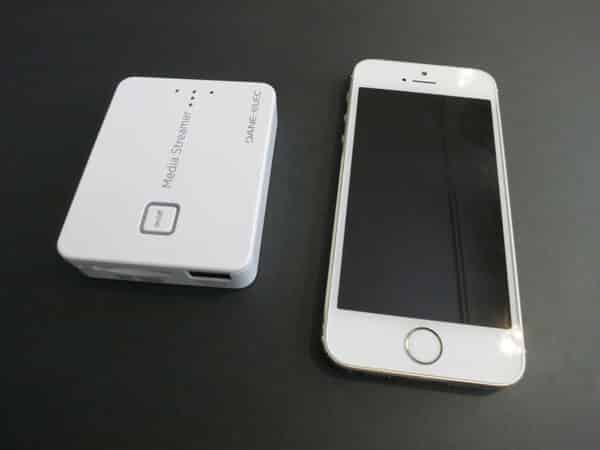
Clad all in white plastic — a step down from the gunmetal and black plastic MobileLite Wireless — Media Streamer measures only 3” by 2.25” by 0.6”. That’s much shorter than an iPhone, just as wide, and about twice as thick. On top, there’s a square on/off button, surrounded by an LED, and five more lights to the right.

A horizontal line of three LEDs shows the remaining battery life of the 2500mAh cell, while one above them indicates that the Internet Bridge is on — more on that in a bit — and the last lets you know if a SD card is plugged in and being read. Labels describing all three, plus a micro-USB port for charging, can be found on the perpendicular edge. Opposite that, there’s a data card slot and a USB port, in addition to a reset button. Finally, on the bottom surface, you’ll find a white sticker with operating information, including factory default passwords, and regulatory specifications.


Review: Dane-Elec Media Streamer

You can plug either a SD card or flash drive into Media Streamer, but it doesn’t support external hard drives, even if they’re receiving external power. Otherwise, though, we had no issue getting the system to recognize the storage devices we plugged in. SD cards notably don’t stick out, but rather sit flush with Media Streamer’s edge; pushing down triggers a spring to pop the card out.

Since SD storage is so inexpensive, users can easily and cheaply add additional space to their devices without having to spring for pricier options.


Communication with your device is handled through a free app. It instructs you to turn Media Streamer on, and then toggle your Wi-Fi connection over to the one Dane-Elec’s accessory puts out. There’s notably no way to get Media Streamer on your network, but there is an Internet Bridge feature that allows your iPad, iPhone, or iPod to continue using the Internet even when it’s connected to the accessory. We had some trouble establishing an initial connection, but once it was up, everything worked properly.


Review: Dane-Elec Media Streamer

The app itself isn’t terribly well designed — on the iPad version, for example, there’s overlapping text — but it’s workable. You’re presented with five categories: Media Streamer, Photo Upload, Upload, Downloads, and Setting, each of which does pretty much what it says. The first allows you to access whatever media is on your card or drive, the next two allow uploading of content from your device, while the fourth shows what’s been copied over.



Latest News
The 14-inch MacBook Pro with M5 Chip 16GB RAM/512GB is $250 Off
1 Min Read
Noise and Static on AirPods Pro 3 Still Unfixed
1 Min Read
New iMac with 24-inch OLED Display May be Brighter With 600 Nits
1 Min Read
The 15-inch M4 MacBook Air 256GB Is $250 Off
1 Min Read
Internal Kernel Debug Kit from Apple Reveals Tests for a MacBook with A15 Chip
1 Min Read
Apple Currently In Talks With Suppliers for Chip Assembly & Packaging of iPhones in India
1 Min Read
Apple Allows Easier Battery Replacement For M5 MacBook Pro with 14-inch Display
1 Min Read
The Apple Watch SE 3 44mm GPS is $50 Off
1 Min Read
20th Anniversary iPhone May Launch in Two Years
1 Min Read
Better Image Generation Capabilities and Apple Music Integration Coming to ChatGPT
1 Min Read
A20 Pro Chip Coming to Next Gen iPad Mini OLED
1 Min Read
Amazon has the AirTag 4 Pack Marked $29 off
1 Min Read

iLounge logo

iLounge is an independent resource for all things iPod, iPhone, iPad, and beyond. iPod, iPhone, iPad, iTunes, Apple TV, and the Apple logo are trademarks of Apple Inc.

This website is not affiliated with Apple Inc.
iLounge © 2001 - 2025. All Rights Reserved.
  • Contact Us
  • Submit News
  • About Us
  • Forums
  • Privacy Policy
  • Terms Of Use
Welcome Back!

Sign in to your account

Lost your password?








