
The debut of iOS 10 in Sept. 2016 brought support for new classes of accessories such as HomeKit cameras, but it’s only now a year later that D-Link’s first HomeKit-enabled camera is finally ready for prime time. Although D-Link unveiled the Omna 180 Cam HD in January at CES and had the product on shelves in March, the camera underwent significant app and firmware updates over the summer, fixing a number of issues and improving HomeKit compatibility. In addition to HomeKit support, D-Link’s Omna 180 Cam HD offers motion detection, 1080p HD video, two-way audio, night vision, local recording, and a 180 degree field of view.
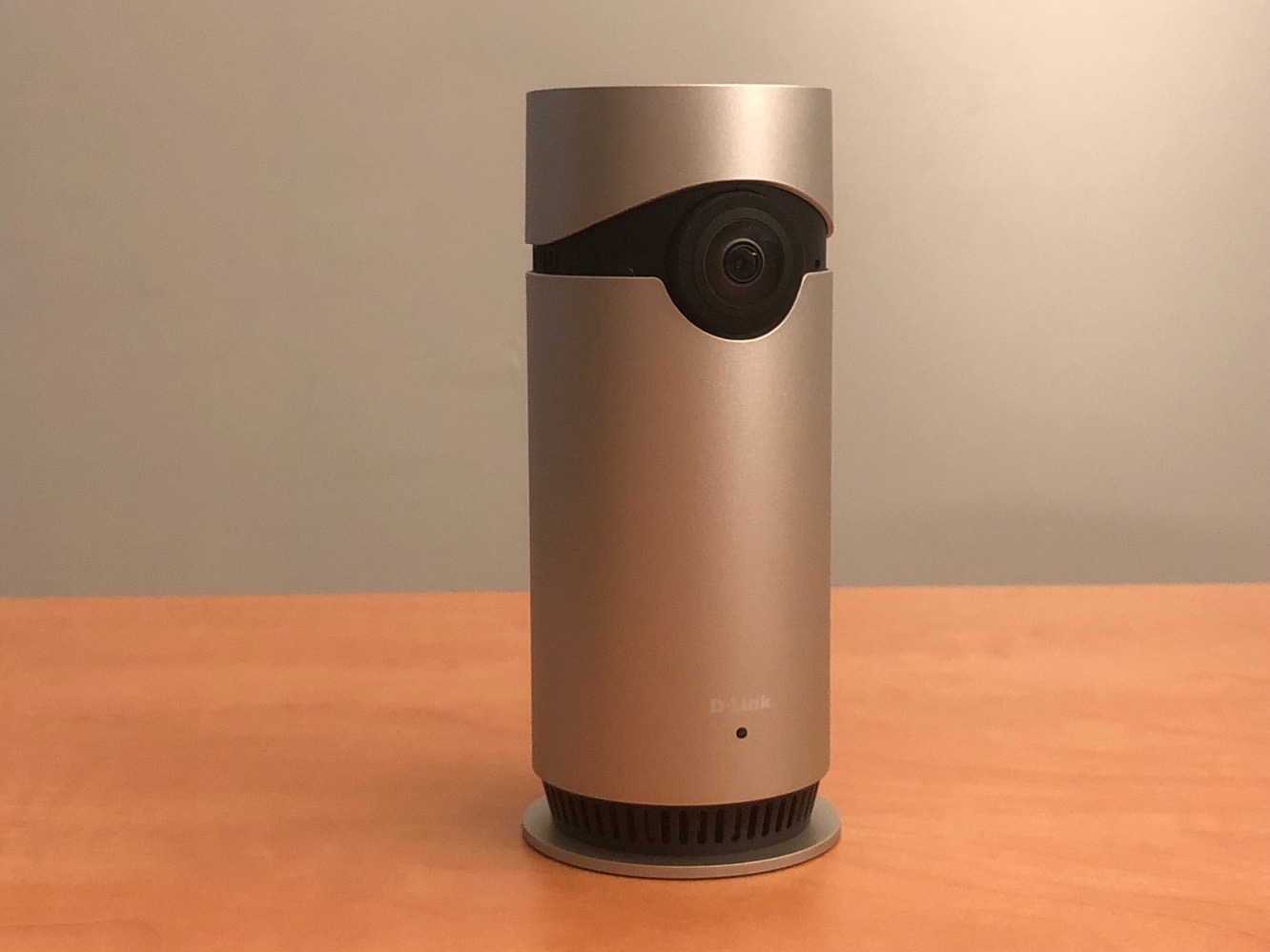
Omna 180 Cam HD is basically an aluminum cylinder with a fish-eye camera lens on the front and a slightly larger base at the bottom for stability. A small multi-colored LED at the bottom front of the camera is used to display recording/viewing status, and the included power adapter connects to a recessed micro USB port on the rear. We were impressed here that D-Link didn’t skimp on the length of the power adapter cable — it’s a good ten feet long, which provides greater flexibility in camera placement. A MicroSD card slot can be found on the bottom of the camera for local recordings, however you’ll have to supply your own card as D-Link does not include one in the package.

Setting up the Omna 180 Cam HD is about as simple as any other HomeKit device.
HomeKit pairing codes are included on a sticker above the power port on the rear of the camera (which peels off easily in the event that you’d rather not leave it there) as well as in the included quick start guide. The recommended set up procedure involves downloading D-Link’s free Omna app and pairing the camera from there, which will take you through the HomeKit pairing process, including joining the camera to your Wi-Fi network. As with many HomeKit accessories, D-Link’s own Omna app is also used to configure more advanced options on the Omna 180 Cam HD, such as adjusting motion detection settings — including setting the areas in which the camera will detect motion — and enabling or disabling the status LED and night vision modes. The Omna app also allows you to easily capture still images from the camera feed and view video recorded to the MicroSD card — both features that simply aren’t supported by Apple’s HomeKit framework.


Omna 180 Cam HD provides a remarkably wide 180 degree field of view, which means that a single camera can monitor most of what’s going on in a given room. Of course, you end up with a very distorted image as a result, but since the goal of this camera is to provide home monitoring, we consider the distortion to be a reasonable tradeoff. The only downside is that the field of view is so wide that placement can become tricky in some rooms. D-Link has also designed this as a tabletop camera rather than for mounting on a wall or other surface, which may also limit the camera’s practicality in some settings. It’s also worth mentioning that D-Link doesn’t provide any cloud-based recording services — the only recording capabilities of Omna 180 Cam HD are directly to a MicroSD card — but this can be a plus or a minus depending on how you plan to use the camera and concerns some may have with privacy and subscription costs.

Of course, there’s nothing really new about the idea of internet-connected video cameras; it’s the support for HomeKit that makes Omna Cam 180 HD particularly special in this case, and D-Link has done a good job of tying this camera into the HomeKit experience.
Once configured, the camera will actually appear as two devices in Apple’s Home app — one standard HomeKit accessory object for the built-in motion sensor, and a second for the camera itself, which will appear in a new “Cameras” section at the bottom of your list of HomeKit accessories, showing a preview image from the camera. As with other HomeKit accessories, you can assign the camera to a room and choose whether the camera should also be shown in your main “Favorites” screen.

Although the camera image in the Home app only presents a static image, it will refresh every ten seconds, with a timer in the top indicating how long ago the displayed image was captured. Tapping on the image opens a live video and audio feed from the camera. A volume slider on the bottom allows you to adjust the audio you’re receiving and a microphone button lets you enable the ability to speak back through the camera from your iPhone. A “Details” button in the top right corner will take you to the standard HomeKit accessory configuration screen for the camera. If you’re using a 3D Touch capable device, you can also see a quick live video preview simply by firmly pressing on the camera panel in the Home app, and can also swipe up to reveal the “Details” button.

HomeKit notifications can also be triggered via the built-in motion sensor, and these are presented as rich notifications that will show you a preview image of what the camera captured and take you directly to the live video feed. The camera is also supported in the Home app on the Apple Watch, including rich notifications, and live video with two-way audio — a particularly handy feature for users of the Series 3 cellular Apple Watch.











