
iLoungeiLounge
  • News
    • Apple
      • AirPods Pro
      • AirPlay
      • Apps
        • Apple Music
      • iCloud
      • iTunes
      • HealthKit
      • HomeKit
      • HomePod
      • iOS 13
      • Apple Pay
      • Apple TV
      • Siri
    • Rumors
    • Humor
    • Technology
      • CES
    • Daily Deals
    • Articles
    • Web Stories
  • iPhone
    • iPhone Accessories
  • iPad
  • iPod
    • iPod Accessories
  • Apple Watch
    • Apple Watch Accessories
  • Mac
    • MacBook Air
    • MacBook Pro
  • Reviews
    • App Reviews
  • How-to
    • Ask iLounge
Font ResizerAa
iLoungeiLounge
Font ResizerAa
Search
  • News
    • Apple
    • Rumors
    • Humor
    • Technology
    • Daily Deals
    • Articles
    • Web Stories
  • iPhone
    • iPhone Accessories
  • iPad
  • iPod
    • iPod Accessories
  • Apple Watch
    • Apple Watch Accessories
  • Mac
    • MacBook Air
    • MacBook Pro
  • Reviews
    • App Reviews
  • How-to
    • Ask iLounge
Follow US

Reviews

Reviews

Review: CruxCase CruxSkunk Keyboard Case for iPad 2, iPad (3rd/4th-Gen)

Last updated: May 16, 2021 8:16 pm UTC
By Nick Guy
Review: CruxCase CruxSkunk Keyboard Case for iPad 2, iPad (3rd/4th-Gen)

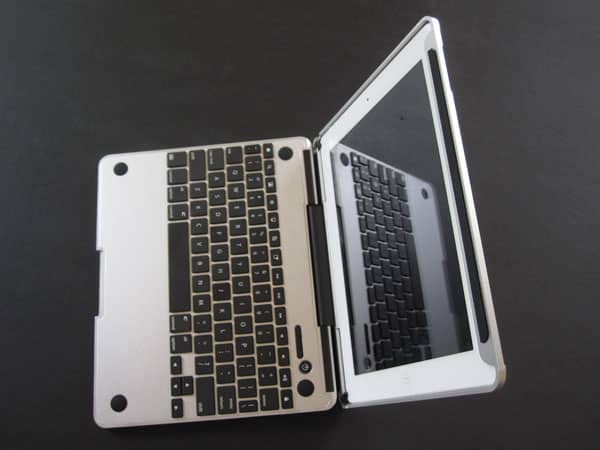
The iPad Bluetooth keyboard case market is mature enough that very good to great options are now commonly available for $100 or less. Most options are made from plastic, but offer a combination of thorough protection and very usable typing surfaces. Designed for use with the iPad 2 and both Retina iPads, CruxCase’s new CruxSkunk ($210*) is an attempt to define the upper end of the market. Instead of using plastic, it’s made mostly from heavy, machined aluminum, and bundled with a Micro-USB charging cable and a leather sleeve. Now available to the general public after a successful Kickstarter campaign, it claims to turn your iPad into a “power laptop.” There’s no denying that CruxSkunk has a premium look and feel with a particularly impressive keyboard. However, the price, weight, and level of protection considerably reduce the overall value equation.


Review: CruxCase CruxSkunk Keyboard Case for iPad 2, iPad (3rd/4th-Gen)

Like most keyboard cases, CruxSkunk is a folio-style design; the keyboard is located inside the front cover, and the iPad fits into a holder on the right. In this instance, the holder turns out to be a simple aluminum frame that only covers the edges of the tablet, while leaving almost all of the back exposed.

Once you slide it into place, two small brackets at the iPad’s left corners swing out to hold the tablet in place, requiring tightening with one of two included wrenches. While we might be able to accept this as a solution if it worked properly, it has problems. After only three or so installations, the screws on our review unit were stripped to the point where they wouldn’t turn at all. We were stuck with one bracket holding the iPad in place, while the other wouldn’t move out of its resting location.


Review: CruxCase CruxSkunk Keyboard Case for iPad 2, iPad (3rd/4th-Gen)

Review: CruxCase CruxSkunk Keyboard Case for iPad 2, iPad (3rd/4th-Gen)

With the iPad in place, the whole thing weights a little over three pounds, which is more than even a 13” MacBook Air. Why someone would want to make an iPad weigh more than a computer is beyond us; one of the main reasons the iPad is so appealing is its low weight. Yet you’re still not getting great iPad protection: the back is left uncovered, possibly to avoid wireless connectivity issues, or to save on material costs, or to reduce what might be even more heft.


Review: CruxCase CruxSkunk Keyboard Case for iPad 2, iPad (3rd/4th-Gen)

Here’s the most exciting part of CruxSkunk: it’s a truly excellent keyboard, and one of the best we’ve seen sold specifically for an iPad model. Measuring roughly 6mm thick with a full QWERTY layout, the keyboard is only as wide as an iPad, yet doesn’t look or feel cramped.

To the contrary, it feels like a real keyboard, and we were instantly up and running on it, making no more mistakes than we would on one of Apple’s own typing surfaces. The black plastic keys have great tactility, and there are iOS function keys on the top row. CruxCase suggests that you recharge the battery once per month during normal use. Generally, it offers everything we would want in a mobile keyboard.


Review: CruxCase CruxSkunk Keyboard Case for iPad 2, iPad (3rd/4th-Gen)

Review: CruxCase CruxSkunk Keyboard Case for iPad 2, iPad (3rd/4th-Gen)

Like previous keyboard cases from CruxCase, CruxSkunk offers three different positions. There’s the standard typing mode, a video viewing angle formed by folding the keyboard as a base underneath the iPad, and a tablet mode where the keyboard is fully tucked behind the iPad. When closed, magnets lock the tablet’s screen; you need to give the hinge a squeeze to make sure that it stays closed, so your iPad doesn’t accidentally turn on.


Review: CruxCase CruxSkunk Keyboard Case for iPad 2, iPad (3rd/4th-Gen)

Review: CruxCase CruxSkunk Keyboard Case for iPad 2, iPad (3rd/4th-Gen)

CruxSkunk is a beautiful-looking accessory, but it’s simply not practical.


Latest News
The 14-inch MacBook Pro with M5 Chip 16GB RAM/512GB is $250 Off
1 Min Read
Noise and Static on AirPods Pro 3 Still Unfixed
1 Min Read
New iMac with 24-inch OLED Display May be Brighter With 600 Nits
1 Min Read
The 15-inch M4 MacBook Air 256GB Is $250 Off
1 Min Read
Internal Kernel Debug Kit from Apple Reveals Tests for a MacBook with A15 Chip
1 Min Read
Apple Currently In Talks With Suppliers for Chip Assembly & Packaging of iPhones in India
1 Min Read
Apple Allows Easier Battery Replacement For M5 MacBook Pro with 14-inch Display
1 Min Read
The Apple Watch SE 3 44mm GPS is $50 Off
1 Min Read
20th Anniversary iPhone May Launch in Two Years
1 Min Read
Better Image Generation Capabilities and Apple Music Integration Coming to ChatGPT
1 Min Read
A20 Pro Chip Coming to Next Gen iPad Mini OLED
1 Min Read
Amazon has the AirTag 4 Pack Marked $29 off
1 Min Read

iLounge logo

iLounge is an independent resource for all things iPod, iPhone, iPad, and beyond. iPod, iPhone, iPad, iTunes, Apple TV, and the Apple logo are trademarks of Apple Inc.

This website is not affiliated with Apple Inc.
iLounge © 2001 - 2025. All Rights Reserved.
  • Contact Us
  • Submit News
  • About Us
  • Forums
  • Privacy Policy
  • Terms Of Use
Welcome Back!

Sign in to your account

Lost your password?










